macOS Monterey 12.3 Beta 3 Makes Accessing Universal Control Settings Easier

In the third beta of macOS Monterey that Apple released to developers today, there is a small Universal Control update that is designed to make it easier to access the various ‌Universal Control‌ settings that you might need when using the feature to control multiple Macs and iPads with a single mouse/trackpad and keyboard.
universal control 1
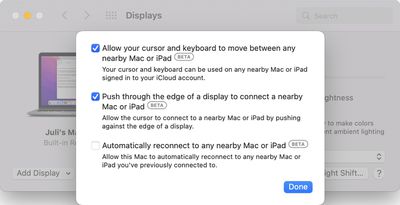
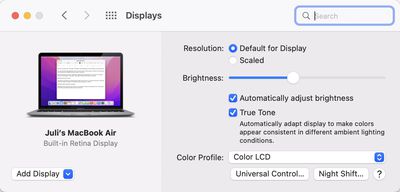
If you open up the Displays section of System Preferences after updating to the new software, there is a new "‌Universal Control‌..." button that was first noticed by 9to5Mac. The ‌Universal Control‌ button goes directly to the three ‌Universal Control‌ settings that are available.

universal control 2
Prior to this beta, the ‌Universal Control‌ options were located under the now-removed "Advanced" tab, and were just a bit harder to get to.

The ‌Universal Control‌ settings have not changed, even though their location has been updated. The first two settings are enabled by default and allow ‌Universal Control‌ to work, while the third is optional and can be toggled on to allow you to automatically reconnect to any nearby Mac or iPad you've previously connected to.

‌Universal Control‌ is live in the macOS Monterey 12.3 and iPadOS 15.4 betas available to developers and public beta testers, and it is working well even in a beta capacity. The feature will be available to everyone when the updates see a public release, which could perhaps come in March following Apple's planned March 8 event.


Related Forum: macOS Monterey

Popular Stories

Apple Logo Zoomed

Tim Cook Teases Plans for Apple's Upcoming 50th Anniversary

Thursday February 5, 2026 12:54 pm PST by
Apple turns 50 this year, and its CEO Tim Cook has promised to celebrate the milestone. The big day falls on April 1, 2026. "I've been unusually reflective lately about Apple because we have been working on what do we do to mark this moment," Cook told employees today, according to Bloomberg's Mark Gurman. "When you really stop and pause and think about the last 50 years, it makes your heart ...
wwdc sans text feature

Apple Rumored to Announce New Product on February 19

Thursday February 5, 2026 12:22 pm PST by
Apple plans to announce the iPhone 17e on Thursday, February 19, according to Macwelt, the German equivalent of Macworld. The report, citing industry sources, is available in English on Macworld. Apple announced the iPhone 16e on Wednesday, February 19 last year, so the iPhone 17e would be unveiled exactly one year later if this rumor is accurate. It is quite uncommon for Apple to unveil...
Finder Siri Feature

Why Apple's iOS 26.4 Siri Upgrade Will Be Bigger Than Originally Promised

Friday February 6, 2026 3:06 pm PST by
In the iOS 26.4 update that's coming this spring, Apple will introduce a new version of Siri that's going to overhaul how we interact with the personal assistant and what it's able to do. The iOS 26.4 version of Siri won't work like ChatGPT or Claude, but it will rely on large language models (LLMs) and has been updated from the ground up. Upgraded Architecture The next-generation...
iOS 26

iOS 26.3 and iOS 26.4 Will Add These New Features to Your iPhone

Tuesday February 3, 2026 7:47 am PST by
While the iOS 26.3 Release Candidate is now available ahead of a public release, the first iOS 26.4 beta is likely still at least a week away. Following beta testing, iOS 26.4 will likely be released to the general public in March or April. Below, we have recapped known or rumored iOS 26.3 and iOS 26.4 features so far. iOS 26.3 iPhone to Android Transfer Tool iOS 26.3 makes it easier...
iphone 17 pro dark blue 1

iPhone 18 Pro Max Rumored to Deliver Next-Level Battery Life

Friday February 6, 2026 5:14 am PST by
The iPhone 18 Pro Max will feature a bigger battery for continued best-in-class battery life, according to a known Weibo leaker. Citing supply chain information, the Weibo user known as "Digital Chat Station" said that the iPhone 18 Pro Max will have a battery capacity of 5,100 to 5,200 mAh. Combined with the efficiency improvements of the A20 Pro chip, made with TSMC's 2nm process, the...

Top Rated Comments

TheYayAreaLiving ?️ Avatar
52 months ago

I’m really looking forward to this feature. It’s a great innovation by Apple, and I’m glad they’re taking their time to get it right.
I agree. It’s worth the long wait. Highly anticipated. It’s definitely magical. I seriously can’t wait.
Score: 3 Votes (Like | Disagree)
1147402 Avatar
52 months ago

Handoff is a bit of a different animal, isn't it. Universal Control involves mouse and cursor control across different Apple devices, whereas Handoff involves passing clipboard data (among other things?) to other Apple devices.
Handsoff is part of/required by UC. You can't turn it off while turning UC on.

UC is the ultimate solution that Apple has imagined, combining Handsoff and AirDrop with the soft-KVM, it makes multiple devices feel like one. So far the experience is so great that I couldn't live without when I have multiple Macs around. I sometime forgot that I'm using multiple Macs now and would try to drag an application window from one to another. Hopefully they can make applications work across devices someday.
Score: 3 Votes (Like | Disagree)
Kelly the Dude Avatar
52 months ago
As I recalled right before the update, the “Advanced” button was in the same spot the “Universal Control” button is now.
Score: 3 Votes (Like | Disagree)
jchap Avatar
52 months ago

Well, those three checkboxes are all that matters, and they are turned on by default iirc. Moving its location hardly matters, and unlike disastrous handoff, this one at least can’t get triggered randomly easily so I’m fine.
Handoff is a bit of a different animal, isn't it. Universal Control involves mouse and cursor control across different Apple devices, whereas Handoff involves passing clipboard data (among other things?) to other Apple devices.
Score: 2 Votes (Like | Disagree)
symphony Avatar
52 months ago
I set the third option back to off, because you can't change the side of your other device automatically.

And when I took my iPad to another room and tried to use the cursor gesture to show apps in slide over, I didn't realize my cursor went to my Mac, which made me lose the cursor due to how massive my iMac screen is. I was so confused about what happened to my iPad cursor.
Score: 2 Votes (Like | Disagree)
GuruZac Avatar
52 months ago
Can’t wait for this. I use my iPad Pro and MacBook Air side by side a lot and having the features of Universal Control will be super handy.

Does any one know if the feature works from Magic Keyboard on the iPad back to the Mac? Or does the mouse support only work from the Mac to the iPad?
Score: 1 Votes (Like | Disagree)