
Popular Drag-and-Drop Mac App 'Yoink' Gains Configurable Clipboard History Widget and Browser

Popular Mac drag-and-drop app Yoink received a substantial update on Monday that brings back a much-improved Yoink clipboard history widget with several highly configurable features.
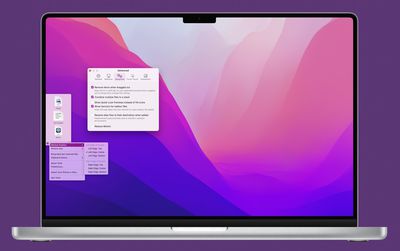
yoink mac
For those unfamiliar with the app, Yoink aims to simplify the action of dragging and dropping files and app-content on the macOS desktop by providing a temporary place for files to be dragged to. Yoink's shelf fades in when you start a drag - either with files from Finder or app-content, like an image from a website - offering you a temporary place for your dragged files.

With files temporarily docked in the Yoink shelf and the cursor free, users can more easily navigate to the intended destination of files, which is handy when moving and copying files between different windows, Spaces, fullscreen apps, or devices via Handoff.

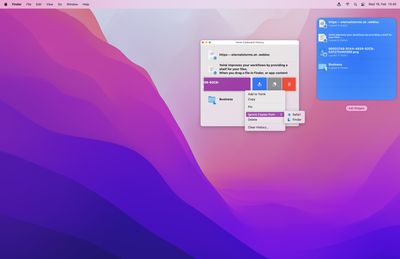
Today's v3.6.5 update brings back the defunct Objective-C based Yoink widget, only now written in Swift, offering previously unavailable functions. The widget comes in medium and large sizes, and provides quick access to Yoink's clipboard history, allowing users to select up to six previous copies of items in the medium widget and up to 12 in the larger one. Clicking an item in the widget copies it to the clipboard, ready for pasting elsewhere.

Yoink supports the use of up to three widgets simultaneously that can be configured to show the most recent copies, older copies, and oldest copies. So for example it's possible to have one large and one medium widget to show the last 18 copied items, or three large widgets to show the last 36 copied items.
2 Clipboard History
Individual widgets can also be configured to show specific data types (images, text, links, or files), and each widget has a Pin feature that allows items to be pinned to the top so that it doesn't go away when other items populate the clipboard.

In addition, Yoink v3.6.5 comes with a clipboard history browser, where users can organize copied items with actions like pin, unpin, delete, send to Yoink, copy, and clear history.

In other changes, rather than a TIFF file, a PNG file is now created when pasting image data into Yoink. Yoink also transparently provides PNG and JPEG data when dragging out images of the types HEIC, HEIF or TIFF to broaden compatibility with other apps.

Yoink runs natively on Apple Silicon and Intel Macs, although note that this version of Yoink increases the minimum system requirements from macOS 10.10 Yosemite to macOS 10.12 Sierra. Yoink v3.6.5 is available on the Mac App Store as a $8.99 one-time purchase and updates are free to existing customers. Yoink is also available for iPad and iPhone.


Tag: Yoink

Popular Stories

Apple Logo Zoomed

Tim Cook Teases Plans for Apple's Upcoming 50th Anniversary

Thursday February 5, 2026 12:54 pm PST by
Apple turns 50 this year, and its CEO Tim Cook has promised to celebrate the milestone. The big day falls on April 1, 2026. "I've been unusually reflective lately about Apple because we have been working on what do we do to mark this moment," Cook told employees today, according to Bloomberg's Mark Gurman. "When you really stop and pause and think about the last 50 years, it makes your heart ...
wwdc sans text feature

Apple Rumored to Announce New Product on February 19

Thursday February 5, 2026 12:22 pm PST by
Apple plans to announce the iPhone 17e on Thursday, February 19, according to Macwelt, the German equivalent of Macworld. The report, citing industry sources, is available in English on Macworld. Apple announced the iPhone 16e on Wednesday, February 19 last year, so the iPhone 17e would be unveiled exactly one year later if this rumor is accurate. It is quite uncommon for Apple to unveil...
Finder Siri Feature

Why Apple's iOS 26.4 Siri Upgrade Will Be Bigger Than Originally Promised

Friday February 6, 2026 3:06 pm PST by
In the iOS 26.4 update that's coming this spring, Apple will introduce a new version of Siri that's going to overhaul how we interact with the personal assistant and what it's able to do. The iOS 26.4 version of Siri won't work like ChatGPT or Claude, but it will rely on large language models (LLMs) and has been updated from the ground up. Upgraded Architecture The next-generation...
iOS 26

iOS 26.3 and iOS 26.4 Will Add These New Features to Your iPhone

Tuesday February 3, 2026 7:47 am PST by
While the iOS 26.3 Release Candidate is now available ahead of a public release, the first iOS 26.4 beta is likely still at least a week away. Following beta testing, iOS 26.4 will likely be released to the general public in March or April. Below, we have recapped known or rumored iOS 26.3 and iOS 26.4 features so far. iOS 26.3 iPhone to Android Transfer Tool iOS 26.3 makes it easier...
iphone 17 pro dark blue 1

iPhone 18 Pro Max Rumored to Deliver Next-Level Battery Life

Friday February 6, 2026 5:14 am PST by
The iPhone 18 Pro Max will feature a bigger battery for continued best-in-class battery life, according to a known Weibo leaker. Citing supply chain information, the Weibo user known as "Digital Chat Station" said that the iPhone 18 Pro Max will have a battery capacity of 5,100 to 5,200 mAh. Combined with the efficiency improvements of the A20 Pro chip, made with TSMC's 2nm process, the...

Top Rated Comments

m.gansrigler Avatar
52 months ago

Wow, sounds cool. It's what I really miss on Mac after migrating from windows (Win + V). Does this app impact performance\response time?
Hi, I'm the developer of Yoink.
I can safely say that it doesn't, it's very light-weight (and continuously improve upon it).
There's a free, 30-day demo at https://eternalstorms.at/yoink/mac if you'd like to try before you buy!
Score: 20 Votes (Like | Disagree)
No5tromo Avatar
52 months ago
Magnet for windows management and Yoink for drag and drop, both paid apps, cause it's very hard to have essential desktop OS features built in like, I don't know, Windows maybe
Score: 5 Votes (Like | Disagree)
wanha Avatar
52 months ago

This should really be built-in functionality. I really like the look of it, it's super slick, but will I need it enough to justify a £9 spend? At least it's not a monthly subscription!
It should only be a built-in functionality IF Apple is committed to maintaining and developing it.

Apple has chosen certain things it will build, maintain, and develop and has left the rest up to app developers like Yoink.

The moment Apple builds something into the OS, most independent competitors will be forced out of the market. And if Apple doesn't continue developing the app/functionality, then what?

The way it is seems more than ok to me.
Score: 5 Votes (Like | Disagree)
star-affinity Avatar
52 months ago

Magnet for windows management and Yoink for drag and drop, both paid apps, cause it's very hard to have essential desktop OS features built in like, I don't know, Windows maybe
I think the majority of stuff is done better in macOS. But I do agree windows management is better in Windows by default.

Why does the apps of the window go into full screen in macOS when I hold down the mouse button on the green dot in the upper left corner of a window and choose ”Tile Window to Left of Screen”?

Fortunately there is the free and open source Rectangle: https://rectangleapp.com/
Score: 3 Votes (Like | Disagree)
M1 Max Avatar
52 months ago

Magnet for windows management and Yoink for drag and drop, both paid apps, cause it's very hard to have essential desktop OS features built in like, I don't know, Windows maybe
Is Windows not a paid app?
Score: 3 Votes (Like | Disagree)
OS X Dude Avatar
52 months ago
This should really be built-in functionality. I really like the look of it, it's super slick, but will I need it enough to justify a £9 spend? At least it's not a monthly subscription!
Score: 3 Votes (Like | Disagree)














