
iOS 15.4 and watchOS 8.5 Allow You to Restore an Apple Watch Using an iPhone - MacRumors
Skip to Content

iOS 15.4 and watchOS 8.5 Allow You to Restore an Apple Watch Using an iPhone

Apple today published a new support document indicating that iOS 15.4 and watchOS 8.5 allow an Apple Watch to be restored with a nearby iPhone.
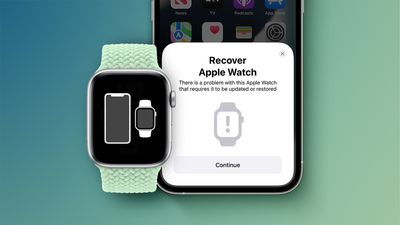
image 40
The support document states that if an Apple Watch running watchOS 8.5 or later displays an animation showing an Apple Watch and iPhone being brought close together, customers can follow the steps below to initiate the restore process:

1. Make sure that an iPhone is nearby. The iPhone needs to have iOS 15.4 or later, it needs to be connected to Wi-Fi with Bluetooth turned on, and it needs to be unlocked.
2. Put your Apple Watch on its charger.
3. Double-click the side button (the button below the circular Digital Crown) on your Apple Watch.
4. Follow the steps that appear on the iPhone.

If the steps fail to work, Apple advises customers to check their Wi-Fi connection. Specifically, Apple says to try using a 2.4GHz network instead of 5GHz, and to avoid 802.1X or captive Wi-Fi networks, such as those in hotel rooms.

In an internal memo to Apple Stores and Apple Authorized Service Providers, obtained by MacRumors, Apple said this feature allows customers and technicians to restore watchOS on some Apple Watch models without the device having to be mailed to an Apple Repair Center. The memo did not specify which Apple Watch models support the feature.

Apple's support document said customers might see a red exclamation point on their Apple Watch instead. If this happens, Apple says to double-press the side button and then follow the steps outlined above. If the Apple Watch continues to display a red exclamation point, customers are advised to contact Apple Support to set up a mail-in repair.

iOS 15.4 and watchOS 8.5 were released today alongside iPadOS 15.4, macOS 12.3, tvOS 15.4, and HomePod software version 15.4.


Related Roundup: Apple Watch 11
Buyer's Guide: Apple Watch (Neutral)
Related Forum: iOS 15

Popular Stories

iOS 26

iOS 26.4 Adds Two New Features to CarPlay

Tuesday March 24, 2026 1:55 pm PDT by
iOS 26.4 was released today, and it includes a couple of new features for CarPlay: an Ambient Music widget and support for voice-based chatbot apps. To update your iPhone 11 or newer to iOS 26.4, open the Settings app and tap on General → Software Update. CarPlay will automatically offer the new features so long as the iPhone connected to your vehicle is running iOS 26.4 or later....
Apple Business hero

Apple Unveils 'Apple Business' All-in-One Platform

Tuesday March 24, 2026 8:53 am PDT by
Apple today announced Apple Business, a new all-in-one platform that unifies device management, productivity tools, and customer outreach features. The service is designed to be a consolidated replacement for several of Apple's existing business-focused offerings, including Apple Business Essentials, Apple Business Manager, and Apple Business Connect. It provides organizations with a single...
AirPods Pro Firmware Feature

Apple Releases New Firmware for AirPods Pro 3, AirPods Pro 2 and AirPods 4

Tuesday March 24, 2026 12:31 pm PDT by
Apple today released new firmware for the AirPods Pro 2, AirPods Pro 3, and the AirPods 4. The firmware has a version number of 8B39, up from 8B34 on the AirPods Pro 3, 8B28 on the AirPods Pro 2, and 8B21 on the AirPods 4. There is no word on what's included in the firmware, but Apple has a support document with limited notes. Most updates are limited to bug fixes and performance...

Top Rated Comments

53 months ago

It's a nice new option to have. Always been a pain to start fresh with the Apple Watch when switching to a new one. Takes forever.
We could always restore from a backup when getting a new watch. This is about restoring the OS!

On that note, could this be the beginning of the rumored port-less iPhone? Depending on how well it works for the watch, perhaps we'll soon be able to restore iOS on our iPhones wirelessly from an iPad or Mac...
Score: 12 Votes (Like | Disagree)
Kylo83 Avatar
53 months ago
Does that mean if we put a beta on it and wanna roll back we now can?
Score: 8 Votes (Like | Disagree)
Macintosh TV Avatar
53 months ago
It's a nice new option to have. Always been a pain to start fresh with the Apple Watch when switching to a new one. Takes forever.
Score: 8 Votes (Like | Disagree)
anshuvorty Avatar
53 months ago
The watch....slowly becoming independent from the iPhone...
Score: 6 Votes (Like | Disagree)
53 months ago

This may be a stupid question, but how is this any different from the existing method of restoring a Watch?

It’s been more than a couple years since I’ve had any OS-level problems with my Watch, so I honestly don’t recall the setup process.
I believe this is taking about Restoring the actual OS of the watch. Previously they would be mailed in and Apple would restore them somehow, perhaps with dedicated hardware or using that small service port. I had a nasty bug with my Apple Watch S4 that had a bit of beta software bugs left over from running the beta. All I could do was Erase and re-set up the watch but this didn't actually erase/restore the OS, just erased the contents and reloaded it. Thus I was stuck with this bug preventing me from updating my software for a few months.

Now with the ability to restore the watch OS, I could start fresh with a new copy of the OS.
Score: 5 Votes (Like | Disagree)
TheYayAreaLiving 🎗️ Avatar
53 months ago
Makes it so much easier now. Hopefully the restore process is not going to take forever. This could be a first step for a port less iPhone in the near future.
Score: 4 Votes (Like | Disagree)















