
PSA: Universal Control and Sidecar Can Be Used At the Same Time in macOS 12.3

Before macOS 12.3 and iPadOS 15.4 were released to the public, many beta testers who tried Universal Control were unable to get it working if they were already using an iPad in Sidecar mode, but it turns out that in the final release you can actually enable both ‌Universal Control‌ and ‌Sidecar‌ simultaneously on different devices, provided your setup allows for this.

sys-prefs
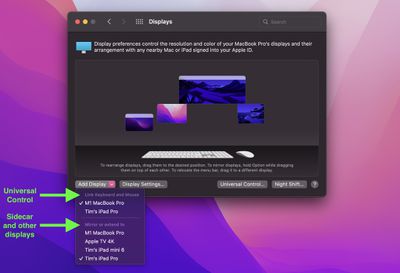
In the final version of macOS 12.3, the "Add Display" options in the Displays preference pane distinguishes between devices available to connect via ‌Universal Control‌ and devices available to be used as extended displays, including iPads via ‌Sidecar‌.

This means that you can now, for example, connect your Mac to one ‌‌iPad‌‌ via ‌‌Sidecar‌‌ for some extra macOS screen space, and on the other side of your Mac you could control a second ‌‌iPad‌‌ or Mac using your main Mac's keyboard and trackpad.

Differences Between Universal Control and Sidecar

For those unfamiliar with the two modes and the differences between them, here's a quick recap. With ‌‌Universal Control‌‌, if you have a Mac and an ‌‌iPad‌‌ next to each other, or even multiple Macs and iPads, you can use the keyboard and cursor on one device across all of them. So, for example, if you have a MacBook Pro and an ‌‌iPad‌‌ on your desk, the ‌MacBook Pro‌'s trackpad can be used over on the ‌‌‌iPad‌‌‌ just by swiping across, and the Mac's keyboard will become the ‌‌iPad‌‌'s input device. The same is also true of the ‌‌‌iPad‌‌‌ if you have a keyboard attached to it.

‌‌Sidecar‌‌ works differently. Announced in 2019 as part of macOS Catalina, ‌‌Sidecar‌‌ is designed to let you use an ‌‌iPad‌‌ as a secondary display for your Mac. Up to one ‌‌iPad‌‌ can be used to either mirror the content on your Mac's display or turn it into a secondary display for extra screen real estate in macOS.


To be clear, ‌‌Universal Control‌‌ lets you use your Mac's keyboard and trackpad to navigate your ‌‌iPad‌‌, but it functions over two different operating systems – macOS and iPadOS. Unlike ‌Sidecar‌, it does not extend your Mac's display to the ‌‌iPad‌‌, it simply allows the keyboard and mouse/trackpad of one device to be used to control one or more other devices. If you want your Mac's content displayed on a nearby ‌‌iPad‌‌, you'll need to use ‌‌Sidecar‌‌, but you cannot control the same device with ‌‌Universal Control‌‌.

With all that said, however, provided you have enough iPads and Macs, it turns out that you can in fact use ‌‌Sidecar‌‌ and ‌‌Universal Control‌‌ at the same time and enjoy the best of both worlds. Note that ‌Universal Control‌ is still technically in beta, so some setups may throw up lingering bugs.

For more information on how to set up an ‌iPad‌ in ‌Sidecar‌ while also controlling additional Macs and/or iPads using ‌Universal Control‌, be sure to check out our dedicated how-to article.

Popular Stories

Apple Logo Zoomed

Tim Cook Teases Plans for Apple's Upcoming 50th Anniversary

Thursday February 5, 2026 12:54 pm PST by
Apple turns 50 this year, and its CEO Tim Cook has promised to celebrate the milestone. The big day falls on April 1, 2026. "I've been unusually reflective lately about Apple because we have been working on what do we do to mark this moment," Cook told employees today, according to Bloomberg's Mark Gurman. "When you really stop and pause and think about the last 50 years, it makes your heart ...
wwdc sans text feature

Apple Rumored to Announce New Product on February 19

Thursday February 5, 2026 12:22 pm PST by
Apple plans to announce the iPhone 17e on Thursday, February 19, according to Macwelt, the German equivalent of Macworld. The report, citing industry sources, is available in English on Macworld. Apple announced the iPhone 16e on Wednesday, February 19 last year, so the iPhone 17e would be unveiled exactly one year later if this rumor is accurate. It is quite uncommon for Apple to unveil...
Finder Siri Feature

Why Apple's iOS 26.4 Siri Upgrade Will Be Bigger Than Originally Promised

Friday February 6, 2026 3:06 pm PST by
In the iOS 26.4 update that's coming this spring, Apple will introduce a new version of Siri that's going to overhaul how we interact with the personal assistant and what it's able to do. The iOS 26.4 version of Siri won't work like ChatGPT or Claude, but it will rely on large language models (LLMs) and has been updated from the ground up. Upgraded Architecture The next-generation...
iOS 26

iOS 26.3 and iOS 26.4 Will Add These New Features to Your iPhone

Tuesday February 3, 2026 7:47 am PST by
While the iOS 26.3 Release Candidate is now available ahead of a public release, the first iOS 26.4 beta is likely still at least a week away. Following beta testing, iOS 26.4 will likely be released to the general public in March or April. Below, we have recapped known or rumored iOS 26.3 and iOS 26.4 features so far. iOS 26.3 iPhone to Android Transfer Tool iOS 26.3 makes it easier...
iphone 17 pro dark blue 1

iPhone 18 Pro Max Rumored to Deliver Next-Level Battery Life

Friday February 6, 2026 5:14 am PST by
The iPhone 18 Pro Max will feature a bigger battery for continued best-in-class battery life, according to a known Weibo leaker. Citing supply chain information, the Weibo user known as "Digital Chat Station" said that the iPhone 18 Pro Max will have a battery capacity of 5,100 to 5,200 mAh. Combined with the efficiency improvements of the A20 Pro chip, made with TSMC's 2nm process, the...

Top Rated Comments

rmcq Avatar
51 months ago
Universal control is not just keyboard/mouse control. It also lets you drag/drop pretty much anything between devices (assuming OS support). I was even able to drag a Safari tab from my iPad to Safari on my Mac. Another very useful thing was to be able to drag a file from the Mac and drop it into a Spark email as an attachment.

Really well done by Apple to allow the config you’ve demonstrated too. Thanks.
Score: 11 Votes (Like | Disagree)
timmyh Avatar
51 months ago
For anyone interested, the above display arrangement maps onto this setup. The iPad on the right is using Sidecar to extend the display of the 14-inch MacBook Pro on the left of the large monitor, while the 13-inch MBP on the far left is linked via Universal Control.


Attachment Image
Score: 10 Votes (Like | Disagree)
iBluetooth Avatar
51 months ago
Universal Control is PURE GENIUS! I am programming with keyboard on an iMac and MacBook, side by side, and can have testing setup on one computer and programming on the other, without switching keyboards or touchpad!
Score: 6 Votes (Like | Disagree)
Doebldodl Avatar
51 months ago
You can even have one iPad attached via sidecar and universal control simultaneously. In my current setting, I can move the cursor down into the mac sidecar display, and if I move further down, I get the iPad dock (and can then switch to the iPad home screen).


Attachment Image
Score: 4 Votes (Like | Disagree)
GSWForever8 Avatar
51 months ago
Universal control is pure genius. It’s one of my favorite features that apple have ever made!
Score: 3 Votes (Like | Disagree)
Mchuv Avatar
51 months ago

('https://www.geekwebguides.com/2022/03/15/universal-control-sidecar-work-same-time-macos/')

Before macOS 12.3 ('https://www.geekwebguides.com/2022/03/14/apple-releases-macos-monterey-12-3/') and iPadOS 15.4 ('https://www.geekwebguides.com/2022/03/14/apple-releases-ios-15-4/') were released to the public, many beta testers who tried Universal Control were unable to get it working if they were already using an iPad in Sidecar mode, but it turns out that in the final release you can actually enable both Universal Control and Sidecar simultaneously on different devices, provided your setup allows for this.


In the final version of macOS 12.3, the "Add Display" options in the Displays preference pane distinguishes between devices available to connect via Universal Control and devices available to be used as extended displays, including iPads via Sidecar.

This means that you can now, for example, connect your Mac to one ‌iPad‌ via ‌Sidecar‌ for some extra macOS screen space, and on the other side of your Mac you could control a second ‌iPad‌ or Mac using your main Mac's keyboard and trackpad.

Differences Between Universal Control and Sidecar

For those unfamiliar with the two modes and the differences between them, here's a quick recap. With ‌Universal Control‌, if you have a Mac and an ‌iPad‌ next to each other, or even multiple Macs and iPads, you can use the keyboard and cursor on one device across all of them. So, for example, if you have a MacBook Pro and an ‌iPad‌ on your desk, the MacBook Pro's trackpad can be used over on the ‌‌iPad‌‌ just by swiping across, and the Mac's keyboard will become the ‌iPad‌'s input device. The same is also true of the ‌‌iPad‌‌ if you have a keyboard attached to it.

‌Sidecar‌ works differently. Announced in 2019 as part of macOS Catalina, ‌Sidecar‌ is designed to let you use an ‌iPad‌ as a secondary display for your Mac. Up to one ‌iPad‌ can be used to either mirror the content on your Mac's display or turn it into a secondary display for extra screen real estate in macOS.


To be clear, ‌Universal Control‌ lets you use your Mac's keyboard and trackpad to navigate your ‌iPad‌, but it functions over two different operating systems – macOS and iPadOS. Unlike Sidecar, it does not extend your Mac's display to the ‌iPad‌, it simply allows the keyboard and mouse/trackpad of one device to be used to control one or more other devices. If you want your Mac's content displayed on a nearby ‌iPad‌, you'll need to use ‌Sidecar‌, but you cannot control the same device with ‌Universal Control‌.

With all that said, however, provided you have enough iPads and Macs, it turns out that you can in fact use ‌Sidecar‌ and ‌Universal Control‌ at the same time and enjoy the best of both worlds. Note that Universal Control is still technically in beta, so some setups may throw up lingering bugs.

* How to Use Universal Control and Sidecar Simultaneously in macOS 12.3 ('https://www.geekwebguides.com/how-to/use-universal-control-sidecar-same-time-macos/')

For more information on how to set up an iPad in Sidecar while also controlling additional Macs and/or iPads using Universal Control, be sure to check out our dedicated how-to article ('https://www.geekwebguides.com/how-to/use-universal-control-sidecar-same-time-macos/').

Article Link: PSA: Universal Control and Sidecar Can Be Used At the Same Time in macOS 12.3 ('https://www.geekwebguides.com/2022/03/15/universal-control-sidecar-work-same-time-macos/')
I use a programm called Barier that do the same as universal control, my MacBook Pro is the main device and my Linux PCs akd Workstation all are controlled by the keyboard and touchbar of my Mac.
Score: 2 Votes (Like | Disagree)
















