
iMovie for iOS Updated With 'Magic Movie' and 'Storyboards' Options, Final Cut Pro Optimized for Mac Studio - MacRumors
Skip to Content

iMovie for iOS Updated With 'Magic Movie' and 'Storyboards' Options, Final Cut Pro Optimized for Mac Studio

Apple today announced it has updated iMovie app for the iPhone and iPad with two new types of video projects called "Magic Movie" and "Storyboards."
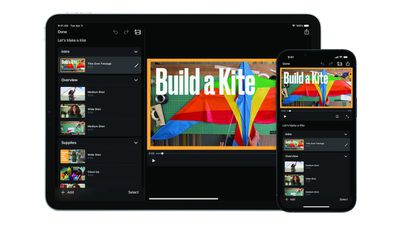
iMovie Magic Movie Feature
Apple says the "Magic Movie" function instantly creates a custom video from the clips and photos a user selects, with transitions, effects, and music automatically added. "Storyboards" helps users learn to edit and improve their video storytelling skills with pre-made templates for popular types of videos shared on social media platforms, such as DIY videos, cooking tutorials, product reviews, science experiments, and more.

iMovie for macOS was also updated today with support for importing "Magic Movie" and "Storyboard" projects created with the iOS app. The free updates are currently rolling out on the App Store across the iPhone, iPad, and Mac.

Apple also updated Final Cut Pro, Compressor, and Motion on macOS with optimized performance on the Mac Studio and more. The new version of Final Cut Pro also supports importing "Magic Movie" and "Storyboard" projects created with iMovie.

iMovie for iOS version 3.0 release notes:

• Get started, learn, and be inspired by two brand-new types of video projects: Magic Movie and Storyboards
• Create a Magic Movie to instantly make and share custom videos with titles, transitions, and music in just a few taps
• Select an album of photos and videos, and Magic Movie will create a polished video using your media
• Start with a Storyboard project to improve your storytelling skills using a template that guides you through the video-making process
• Choose from 20 Storyboards for common video projects like Cooking, DIY, Q&A, Product Review, and Book Report
• Customize and organize your storyboard video by adding, reordering, and grouping shots within the flexible shot list
• Learn different types of video framing and storytelling techniques with the shot tips provided in each type of storyboard
• Record video or take photos right into each Storyboard placeholder clip, or add media from your Photos library
• Enhance your Magic Movie or Storyboard video with 20 dynamic styles that include title layouts, fonts, filters, color palettes, and music
• Go further by editing clips with tools like trim, split, and clip speed
• Apply title treatments, record voiceover narration, or adjust the depth-of-field effect in Cinematic mode video clips* to further customize your videos
• Import Magic Movie and Storyboard projects into a timeline in iMovie for Mac or Final Cut Pro** to take your project further
• Save Magic Movie and Storyboard videos to your Photos library, send to friends and family via Messages or Mail, or share with your followers on social media
* Requires iPhone 13, iPad mini (6th generation), iPad Pro 11-inch or iPad Pro 12.9-inch (3rd generation or later)
** Requires iMovie for Mac version 10.3.2 or Final Cut Pro version 10.6.2

iMovie 3.0 requires a device running iOS 15.2 or later or iPadOS 15.2 or later.

Tag: iMovie

Popular Stories

iOS 26

iOS 26.4 Adds Two New Features to CarPlay

Tuesday March 24, 2026 1:55 pm PDT by
iOS 26.4 was released today, and it includes a couple of new features for CarPlay: an Ambient Music widget and support for voice-based chatbot apps. To update your iPhone 11 or newer to iOS 26.4, open the Settings app and tap on General → Software Update. CarPlay will automatically offer the new features so long as the iPhone connected to your vehicle is running iOS 26.4 or later....
Apple Business hero

Apple Unveils 'Apple Business' All-in-One Platform

Tuesday March 24, 2026 8:53 am PDT by
Apple today announced Apple Business, a new all-in-one platform that unifies device management, productivity tools, and customer outreach features. The service is designed to be a consolidated replacement for several of Apple's existing business-focused offerings, including Apple Business Essentials, Apple Business Manager, and Apple Business Connect. It provides organizations with a single...
AirPods Pro Firmware Feature

Apple Releases New Firmware for AirPods Pro 3, AirPods Pro 2 and AirPods 4

Tuesday March 24, 2026 12:31 pm PDT by
Apple today released new firmware for the AirPods Pro 2, AirPods Pro 3, and the AirPods 4. The firmware has a version number of 8B39, up from 8B34 on the AirPods Pro 3, 8B28 on the AirPods Pro 2, and 8B21 on the AirPods 4. There is no word on what's included in the firmware, but Apple has a support document with limited notes. Most updates are limited to bug fixes and performance...

Top Rated Comments

52 months ago

It still does not support portrait video, though right?
Good! People that film in portrait don’t need encouraging.
Score: 23 Votes (Like | Disagree)
FCX Avatar
52 months ago
Would have been nice to see the Pro Apps get their own writeup, instead of buried in the iOS iMovie article. Jeez, people.
Score: 17 Votes (Like | Disagree)
Mr. Awesome Avatar
52 months ago
iMovie on iOS desperately needs a complete redesign - it’s so incredibly incapable compared for the macOS version it’s insane.
Score: 10 Votes (Like | Disagree)
52 months ago

How in 2022 is the main video editing app made by Apple not even able to adjust the brightness, contrast, saturation etc?
The main video editing app made by Apple is Final Cut Pro. They have a free video editing app called iMovie, but it’s not their main focus.
Score: 9 Votes (Like | Disagree)
TheYayAreaLiving 🎗️ Avatar
52 months ago
This is awesome. I'm happy Apple is focused on updating all the stock apps. However, I do agree with the above comment. It needs a complete redesign. Starting with Podcast?
Score: 7 Votes (Like | Disagree)
52 months ago
With the release of the new Final Cut Pro, expect a lot of YouTube videos entitled, "Why I Re-bought the Mac Studio Ultra After I Returned It."
Score: 5 Votes (Like | Disagree)
















