Useful Mac Apps Worth Checking Out - April 2022

Mac apps often don't receive as much attention as apps designed for iPhones and iPads, so we have a regular video series that is designed to highlight some of the useful Mac apps that we've come across over the past few months. Our April picks feature apps for quickly accessing websites, adjusting external display settings from the menu bar, using a Windows-like "alt-tab" tool, and more.

  • WebCatalog (Free) - WebCatalog is a handy app that's designed to turn websites into desktop apps so you can access all of your favorite website content in one handy place. It offers up self-contained, distraction-free windows and is an alternative to using browser tabs. WebCatalog is free to use, but it offers a limited number of apps. To unlock unlimited apps, you need to pay $40.
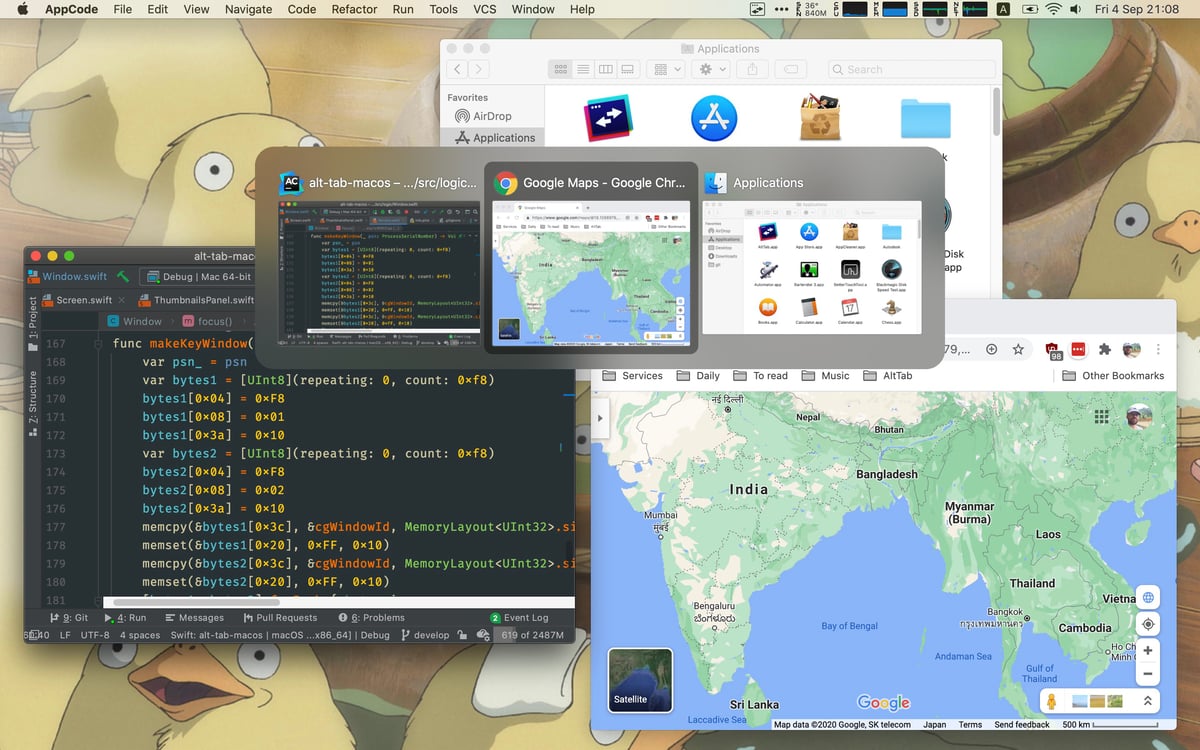
  • AltTab (Free) - AltTab is a simple app that is based on the Windows "alt-tab" windows switcher. With the tool, you can customize your controls to mimic how alt tab works on Windows, quickly swapping between your open app windows and manipulating them with simple keyboard commands.
  • MonitorControl (Free) - As the name suggests, MonitorControl is a straightforward menu bar app that lets you adjust the parameters of an external display. You can tweak brightness, contrast, volume, and more.
  • Raycast (Free) - Raycast is kind of an all-in-one extendable launcher or Spotlight replacement app that offers a bunch of features for writing scripts, activating shortcuts, searching for files, controlling your system, writing quick notes, opening links, launching apps, tracking clipboard history, and much more.
  • CleanShot X ($29) - CleanShot X is a screen capture tool that's ideal for taking screenshots and videos. It's simple to capture whatever you want on your screen, annotate it, and send it off, plus there's a cloud component that saves everything in one spot. It can do screen recordings and capture screenshots even if the content doesn't fit all on one screen. There's a $29 one-time payment option that unlocks a year of updates, or users can pay $8 per month for continual updates.

Know of a great Mac app that we haven't highlighted yet? Let us know in the comments below and we might feature it in a future video. For more of our Mac app picks, check out our Mac apps archive.

Popular Stories

Apple Logo Zoomed

Tim Cook Teases Plans for Apple's Upcoming 50th Anniversary

Thursday February 5, 2026 12:54 pm PST by
Apple turns 50 this year, and its CEO Tim Cook has promised to celebrate the milestone. The big day falls on April 1, 2026. "I've been unusually reflective lately about Apple because we have been working on what do we do to mark this moment," Cook told employees today, according to Bloomberg's Mark Gurman. "When you really stop and pause and think about the last 50 years, it makes your heart ...
wwdc sans text feature

Apple Rumored to Announce New Product on February 19

Thursday February 5, 2026 12:22 pm PST by
Apple plans to announce the iPhone 17e on Thursday, February 19, according to Macwelt, the German equivalent of Macworld. The report, citing industry sources, is available in English on Macworld. Apple announced the iPhone 16e on Wednesday, February 19 last year, so the iPhone 17e would be unveiled exactly one year later if this rumor is accurate. It is quite uncommon for Apple to unveil...
Finder Siri Feature

Why Apple's iOS 26.4 Siri Upgrade Will Be Bigger Than Originally Promised

Friday February 6, 2026 3:06 pm PST by
In the iOS 26.4 update that's coming this spring, Apple will introduce a new version of Siri that's going to overhaul how we interact with the personal assistant and what it's able to do. The iOS 26.4 version of Siri won't work like ChatGPT or Claude, but it will rely on large language models (LLMs) and has been updated from the ground up. Upgraded Architecture The next-generation...
iOS 26

iOS 26.3 and iOS 26.4 Will Add These New Features to Your iPhone

Tuesday February 3, 2026 7:47 am PST by
While the iOS 26.3 Release Candidate is now available ahead of a public release, the first iOS 26.4 beta is likely still at least a week away. Following beta testing, iOS 26.4 will likely be released to the general public in March or April. Below, we have recapped known or rumored iOS 26.3 and iOS 26.4 features so far. iOS 26.3 iPhone to Android Transfer Tool iOS 26.3 makes it easier...
iphone 17 pro dark blue 1

iPhone 18 Pro Max Rumored to Deliver Next-Level Battery Life

Friday February 6, 2026 5:14 am PST by
The iPhone 18 Pro Max will feature a bigger battery for continued best-in-class battery life, according to a known Weibo leaker. Citing supply chain information, the Weibo user known as "Digital Chat Station" said that the iPhone 18 Pro Max will have a battery capacity of 5,100 to 5,200 mAh. Combined with the efficiency improvements of the A20 Pro chip, made with TSMC's 2nm process, the...

Top Rated Comments

sentiblue Avatar
49 months ago
Command TAB does exactly what AltTab does in Windows. Why do we need an app?
Score: 29 Votes (Like | Disagree)
julesme Avatar
49 months ago

Command TAB does exactly what AltTab does in Windows. Why do we need an app?
Alt + Tab in MS Windows lets you cycle through separate windows for each app (i.e., cycle through documents, browser windows, etc.) as well as cycle through open system folders.

I'm not advocating for installing this third party app, but there's a clear difference between Alt + Tab and Command + Tab.
Score: 14 Votes (Like | Disagree)
JMStearnsX2 Avatar
49 months ago


I honestly like mission control better
Score: 9 Votes (Like | Disagree)
FightTheFuture Avatar
49 months ago

I honestly like mission control better
Me too - Mission Control is three finger swipe up or Control + Up, by default in case anyone was wondering.
Score: 8 Votes (Like | Disagree)
AZhappyjack Avatar
49 months ago

Command TAB does exactly what AltTab does in Windows. Why do we need an app?
Word. And why in the name of all that is sacred would anyone want to use macOS to emulate Windows?
Score: 7 Votes (Like | Disagree)
iHorseHead Avatar
49 months ago

Word. And why in the name of all that is sacred would anyone want to use macOS to emulate Windows?
Mac doesn't show live preview. Windows does.
Score: 6 Votes (Like | Disagree)