Security Fixes Won't Require Full iOS Update in iOS 16, Will Be Installed Automatically
Apple in iOS 16 is introducing a new Rapid Security Response feature that's designed to make it easier and quicker for the company to deploy security improvements.
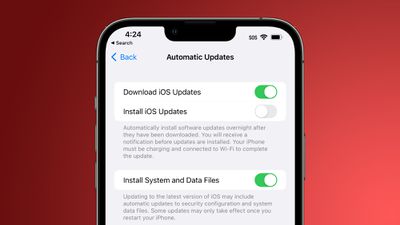
Security updates will be able to be automatically applied between standard software updates, so implementing security fixes will not require a full new version of iOS.
It's also going to let Apple automatically install security updates on many devices without people even having to think about it. There is a new "Install System and Data Files" option in Settings > General > Software Update that lets users toggle on automatic security updates independent of iOS updates.
For those who prefer not to have security updates, such as jailbreakers, the toggle does make it possible to avoid all security updates when it is disabled. It's worth noting that the "Install System and Data Files" option is enabled by default when installing iOS 16, so you'll need to manually turn it off if you are not interested in using the feature.
Popular Stories
iOS 26.4 was released today, and it includes a couple of new features for CarPlay: an Ambient Music widget and support for voice-based chatbot apps.
To update your iPhone 11 or newer to iOS 26.4, open the Settings app and tap on General → Software Update. CarPlay will automatically offer the new features so long as the iPhone connected to your vehicle is running iOS 26.4 or later....
Apple today announced Apple Business, a new all-in-one platform that unifies device management, productivity tools, and customer outreach features.
The service is designed to be a consolidated replacement for several of Apple's existing business-focused offerings, including Apple Business Essentials, Apple Business Manager, and Apple Business Connect. It provides organizations with a single...
Apple today released new firmware for the AirPods Pro 2, AirPods Pro 3, and the AirPods 4. The firmware has a version number of 8B39, up from 8B34 on the AirPods Pro 3, 8B28 on the AirPods Pro 2, and 8B21 on the AirPods 4.
There is no word on what's included in the firmware, but Apple has a support document with limited notes. Most updates are limited to bug fixes and performance...
























