
Apple Improves Focus Modes With Filters, Linked Lock Screens, and Set Up Enhancements

Apple unveiled a host of improvements to Focus modes at WWDC this week, including set up suggestions, linked custom Lock Screens and watch faces, Focus filters, and more.
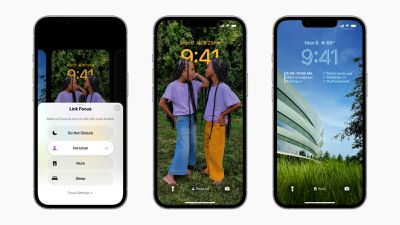
ios 16 focus lock screen
Focus modes were introduced with iOS 15 last year and have been expanded and refined in iOS 16, iPadOS 16, watchOS 9, and macOS Ventura. Accompanying the redesigned customizable Lock Screen in iOS 16, each Focus mode now has a linked Lock Screen. In addition to all of the pre-existing ways to activate a Focus mode, such as in Control Center or via automations, iPhone users can swipe between Lock Screens to enable a corresponding Focus. Users can also directly tie an Apple Watch face to a specific Focus.

One of the biggest additions to Focuses in iOS 16 is Focus filters. Focus filters allow users to set boundaries within apps like Calendar, Mail, Messages, and Safari to only display relevant content, such as a particular Tab Group in Safari, set of calendars in the Calendar app, or email accounts in Mail. With a new Focus filter API, developers can build this functionality into their apps and change content based on a user's current Focus.
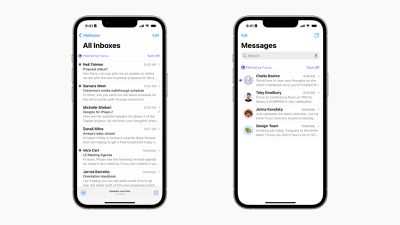
ios 16 focus filters
The process of setting up Focus modes has also been improved with a personalized setup experience for each option. Now, iOS suggests a relevant set of Home Screens and Lock Screens for each Focus mode with relevant apps, wallpapers, and widgets. There are also more configurable options inside Focus modes, with a new ability to silence notifications from apps and people, effectively adding the ability to exclude notifications rather than only include as is the case in iOS 15.

iOS 16, iPadOS 16, watchOS 9, and macOS Ventura are currently undergoing beta testing to give Apple time to perfect the updates and address any bugs, as well as allow developers to prepare their apps. Beta versions of the updates are currently available to developers with compatible devices now and a public beta will become available in July.


Related Forum: iOS 16

Popular Stories

Apple Logo Zoomed

Tim Cook Teases Plans for Apple's Upcoming 50th Anniversary

Thursday February 5, 2026 12:54 pm PST by
Apple turns 50 this year, and its CEO Tim Cook has promised to celebrate the milestone. The big day falls on April 1, 2026. "I've been unusually reflective lately about Apple because we have been working on what do we do to mark this moment," Cook told employees today, according to Bloomberg's Mark Gurman. "When you really stop and pause and think about the last 50 years, it makes your heart ...
wwdc sans text feature

Apple Rumored to Announce New Product on February 19

Thursday February 5, 2026 12:22 pm PST by
Apple plans to announce the iPhone 17e on Thursday, February 19, according to Macwelt, the German equivalent of Macworld. The report, citing industry sources, is available in English on Macworld. Apple announced the iPhone 16e on Wednesday, February 19 last year, so the iPhone 17e would be unveiled exactly one year later if this rumor is accurate. It is quite uncommon for Apple to unveil...
Finder Siri Feature

Why Apple's iOS 26.4 Siri Upgrade Will Be Bigger Than Originally Promised

Friday February 6, 2026 3:06 pm PST by
In the iOS 26.4 update that's coming this spring, Apple will introduce a new version of Siri that's going to overhaul how we interact with the personal assistant and what it's able to do. The iOS 26.4 version of Siri won't work like ChatGPT or Claude, but it will rely on large language models (LLMs) and has been updated from the ground up. Upgraded Architecture The next-generation...
iOS 26

iOS 26.3 and iOS 26.4 Will Add These New Features to Your iPhone

Tuesday February 3, 2026 7:47 am PST by
While the iOS 26.3 Release Candidate is now available ahead of a public release, the first iOS 26.4 beta is likely still at least a week away. Following beta testing, iOS 26.4 will likely be released to the general public in March or April. Below, we have recapped known or rumored iOS 26.3 and iOS 26.4 features so far. iOS 26.3 iPhone to Android Transfer Tool iOS 26.3 makes it easier...
iphone 17 pro dark blue 1

iPhone 18 Pro Max Rumored to Deliver Next-Level Battery Life

Friday February 6, 2026 5:14 am PST by
The iPhone 18 Pro Max will feature a bigger battery for continued best-in-class battery life, according to a known Weibo leaker. Citing supply chain information, the Weibo user known as "Digital Chat Station" said that the iPhone 18 Pro Max will have a battery capacity of 5,100 to 5,200 mAh. Combined with the efficiency improvements of the A20 Pro chip, made with TSMC's 2nm process, the...

Top Rated Comments

Saturnine Avatar
48 months ago
Apple listened to feedback. There now seems to be an option to 'silence notifications from...' in addition to 'allow notifications from...'

This is much more convenient. Now I can create a 'Personal' focus mode which allows notifications from all apps except Teams, Outlook and others which I only use for work.
Score: 14 Votes (Like | Disagree)
ignatius345 Avatar
48 months ago
What I would really like is a "blacklist" so that I can easily mute all my work apps after hours and on weekends. Slack lets you do it natively, but Gmail doesn't. Would just be cleaner to set it at the OS level.

[edit: I now see from @Saturnine's comment above that they're doing this now. Great addition!]
Score: 4 Votes (Like | Disagree)
contacos Avatar
48 months ago
Can you finally share your actual Focus status? I guess not, that would make too much sense.

There is a difference between „Sleeping“ and thus, not responding at all and „Working“ which may simple cause a delay in replies
Score: 3 Votes (Like | Disagree)
x-evil-x Avatar
48 months ago
Is there a focus mode like the old do not disturb?
I want to just have the notification be silent and not light up the phone but still be on the Lock Screen when I tap it.
it’s one feature they got rid of when they released focus mode i think last year.
Score: 2 Votes (Like | Disagree)
Abazigal Avatar
48 months ago
If you need to use this convoluted filter functionality on a phone, you're either doing life wrong or are the most (self) important person on Earth.
I use it on my iPad to turn off notifications and present a custom homescreen when I am using it to teach in class. This way, my screen isn’t interrupted my incoming email / telegram notifications, students aren’t distracted by my media consumption page, and I have the apps I typically use in class at my fingertips.

So far haven’t found a way to make it work on my iPhone though, but I am thinking along the like of custom homescreens for differing use cases.

Still tinkering. [emoji846]
Score: 2 Votes (Like | Disagree)
MLVC Avatar
48 months ago
Does anybody have that wallpaper of Apple Park? I know it's a photo but maybe it's out there somewhere ?
Score: 1 Votes (Like | Disagree)















