iOS 16 Lets You Isolate, Copy, and Share Subjects in Photos
Using advanced machine learning, iOS 16 will let users extract a subject from a photo, then drag and drop that subject as a photo across the system to use in Messages, Notes, Mail, and more.
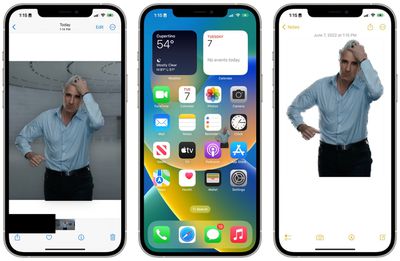
The feature works not only in Photos but even in screenshots and Quick Look. In the Photos app, just hold down on a photo for a few seconds until you see a white glow appear around the subject. You can then drag the subject out of the Photos app and into Messages, Mail, Notes, and more.
In Quick Look and elsewhere in the system, simply hold down on a photo and tap "Copy Subject" from the list of actions. The subject of the image is then isolated and stored in your clipboard to be used elsewhere in the system.
The feature also works with paused frames for videos in the Photos app. Since the feature requires advanced machine learning and image analysis, it is only available on phones with the A12 Bionic and newer.
Popular Stories
iOS 26.4 was released today, and it includes a couple of new features for CarPlay: an Ambient Music widget and support for voice-based chatbot apps.
To update your iPhone 11 or newer to iOS 26.4, open the Settings app and tap on General → Software Update. CarPlay will automatically offer the new features so long as the iPhone connected to your vehicle is running iOS 26.4 or later....
Apple today announced Apple Business, a new all-in-one platform that unifies device management, productivity tools, and customer outreach features.
The service is designed to be a consolidated replacement for several of Apple's existing business-focused offerings, including Apple Business Essentials, Apple Business Manager, and Apple Business Connect. It provides organizations with a single...
Apple today released new firmware for the AirPods Pro 2, AirPods Pro 3, and the AirPods 4. The firmware has a version number of 8B39, up from 8B34 on the AirPods Pro 3, 8B28 on the AirPods Pro 2, and 8B21 on the AirPods 4.
There is no word on what's included in the firmware, but Apple has a support document with limited notes. Most updates are limited to bug fixes and performance...






















