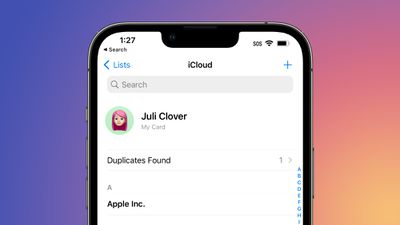
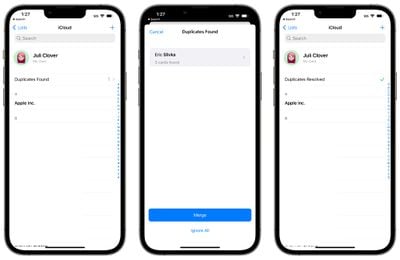
If your Contacts app is riddled with duplicates that you haven't been able to fix, iOS 16 has a solution. The update includes a dedicated feature for merging duplicate contacts, solving problems with multiple contacts once and for all.
In the iOS 16 Contacts app, if you have more than one contact card for the same person, the app will automatically detect the duplicate and let you know that duplicates were found.
The "Duplicates Found" interface is at the top of the app, and if you tap it, the Contacts app is able to merge all of the duplicate contact cards into one.
Prior to now, there was no built-in way to quickly manage duplicate contacts in the iOS Contacts app, so the new iOS 16 feature should be a relief for those dealing with Contacts issues. This feature did previously exist on the Mac, but it was not available on iOS devices.
iOS 26.4 was released today, and it includes a couple of new features for CarPlay: an Ambient Music widget and support for voice-based chatbot apps.
To update your iPhone 11 or newer to iOS 26.4, open the Settings app and tap on General → Software Update. CarPlay will automatically offer the new features so long as the iPhone connected to your vehicle is running iOS 26.4 or later....
Apple today announced Apple Business, a new all-in-one platform that unifies device management, productivity tools, and customer outreach features.
The service is designed to be a consolidated replacement for several of Apple's existing business-focused offerings, including Apple Business Essentials, Apple Business Manager, and Apple Business Connect. It provides organizations with a single...
Tuesday March 24, 2026 12:31 pm PDT by Juli Clover
Apple today released new firmware for the AirPods Pro 2, AirPods Pro 3, and the AirPods 4. The firmware has a version number of 8B39, up from 8B34 on the AirPods Pro 3, 8B28 on the AirPods Pro 2, and 8B21 on the AirPods 4.
There is no word on what's included in the firmware, but Apple has a support document with limited notes. Most updates are limited to bug fixes and performance...
This is awesome. I have a bunch of duplicates because of previous intentions with LinkedIn, Facebook, multiple Outlook databases, 2 different personal email contact lists, etc.
Anyone could explain why iPhone 7plus (A10 chip) won’t be upgraded to iOS16 while iPad 5gen (A9) will to iPadOS 16? They have limit even more devices in macOS Ventura…
I suspect it’s because of the headline feature (new Lock Screen) probably needing the neural processor from the A11 and newer chips (to get that blurred background right). Since the iPads didn’t get this feature, they got away with it. That, and there are probably lots of A9/A10 iPads being used in schools.