
More iOS 16 Tidbits: New FaceTime Video Call UI, Redesigned Video Player, and More - MacRumors
Skip to Content

More iOS 16 Tidbits: New FaceTime Video Call UI, Redesigned Video Player, and More

Apple this week announced iOS 16, a major release filled with significant customization features for the Lock Screen, new features for Focus mode, the ability to edit and retract iMessages, and so much more.

ios 16 lock screen
While Apple showcased some of iOS 16's major features during its jam-packed WWDC keynote, there are dozens, if not hundreds, of smaller features and changes left for users to discover. Below, we've compiled a list of six changes and new features you may not have known about.

Transparent FaceTime Video Call UI
ios 16 transparent video call ui
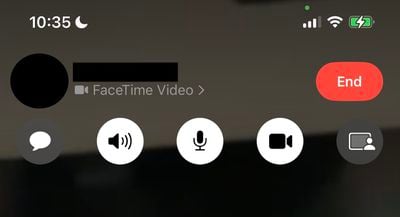
During a FaceTime video call, Apple has updated the UI in iOS 16 to be fully transparent, with buttons for camera, microphone, message, speaker, and SharePlay now larger and easier to tap.

iMessage Mention Suggestions Now Include Contact Images

ios 16 imessage mentions
When mentioning a contact on iMessage, mention suggestions now include a contact image in the Quick Tap bar. This can be particularly helpful in group chats where multiple people may share a first name.

Entirely Redesigned Video Player UI
ios 16 updated vidoe player ui
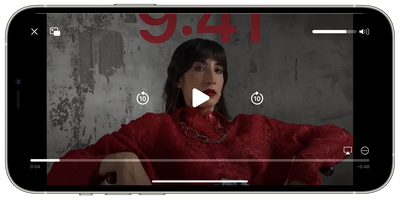
Apple has redesigned the stock video player UI in iOS 16, making it cleaner by getting rid of unnecessary clutter while highlighting basic controls such as volume, play/pause, and Picture in Picture.

Redesigned Voice Messaging Experience in iMessage
ios 16 new audio recording imessage
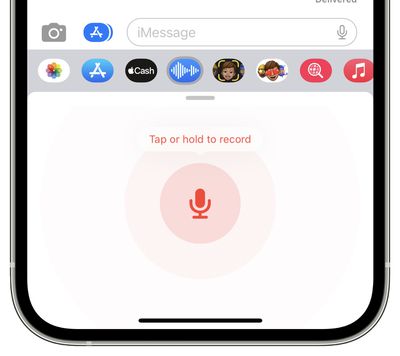
Apple has redesigned the voice messaging experience on iMessage with iOS 16, making it its own separate iMessage app that lives in the app bar.

The app lets users tap, hold, and record messages more quickly. Apple has replaced the previous hold and swipe-up gesture to record voice messages with a new Dictation button. On a related note, users can now skim through voice messages on iOS 16.

Privacy Access History
ios 16 privacy access history
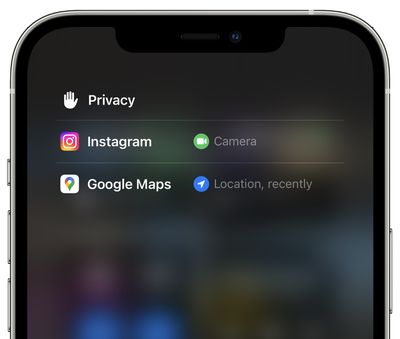
On iOS 16 Apple is adding a neat trick that lets users check which apps have recently accessed their camera, microphone, location, and other sensitive sensors on their iPhone. The new view can be accessed by tapping on the top of Control Center shortly after an app has used access.


Related Forum: iOS 16

Popular Stories

iOS 26

iOS 26.4 Adds Two New Features to CarPlay

Tuesday March 24, 2026 1:55 pm PDT by
iOS 26.4 was released today, and it includes a couple of new features for CarPlay: an Ambient Music widget and support for voice-based chatbot apps. To update your iPhone 11 or newer to iOS 26.4, open the Settings app and tap on General → Software Update. CarPlay will automatically offer the new features so long as the iPhone connected to your vehicle is running iOS 26.4 or later....
Apple Business hero

Apple Unveils 'Apple Business' All-in-One Platform

Tuesday March 24, 2026 8:53 am PDT by
Apple today announced Apple Business, a new all-in-one platform that unifies device management, productivity tools, and customer outreach features. The service is designed to be a consolidated replacement for several of Apple's existing business-focused offerings, including Apple Business Essentials, Apple Business Manager, and Apple Business Connect. It provides organizations with a single...
AirPods Pro Firmware Feature

Apple Releases New Firmware for AirPods Pro 3, AirPods Pro 2 and AirPods 4

Tuesday March 24, 2026 12:31 pm PDT by
Apple today released new firmware for the AirPods Pro 2, AirPods Pro 3, and the AirPods 4. The firmware has a version number of 8B39, up from 8B34 on the AirPods Pro 3, 8B28 on the AirPods Pro 2, and 8B21 on the AirPods 4. There is no word on what's included in the firmware, but Apple has a support document with limited notes. Most updates are limited to bug fixes and performance...

Top Rated Comments

a104375 Avatar
50 months ago
I hate that the new video controls dim the screen and are needlessly in the middle. What was wrong with having them off to the side out of the main content area?
Score: 6 Votes (Like | Disagree)
Reeneman Avatar
50 months ago
These are some very welcome small features :)
Score: 5 Votes (Like | Disagree)
Kylo83 Avatar
50 months ago

These are some very welcome small features :)
None will really change anything, we need the batt % number back at the top and the home bar gone that would make a big change
Score: 3 Votes (Like | Disagree)
50 months ago

I hate that the new video controls dim the screen and are needlessly in the middle. What was wrong with having them off to the side out of the main content area?
I thought I was the only one! The new video controls would be fine if they didn’t have to dim the entire video to change volume or scrub video track..
Score: 1 Votes (Like | Disagree)
chibihabibi Avatar
50 months ago
The transparent elements for FaceTime and the video player look very amateurish to me. I’ve always loved the translucent elements, why do they need to change things just for the sake of it?
Score: 1 Votes (Like | Disagree)
50 months ago
Privacy access history is great. Also transparent FaceTime UI during video calls is nice.
Score: 1 Votes (Like | Disagree)















