
Here Are All the Widgets You Can Add to Your iPhone's Lock Screen in iOS 16

In iOS 16, Apple has overhauled the iPhone Lock Screen to make it a lot more customizable, and one of the most welcome changes is the ability to add information-rich widgets to the Lock Screen for the first time.
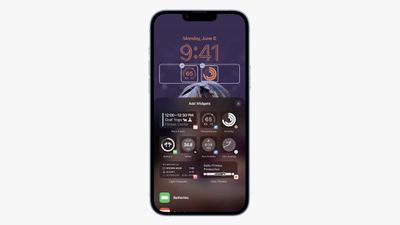
lock screen widgets ios 16
Lock Screen Widgets have been the sole preserve of Android phones for a few years now, so it's good to see that they will finally come to iPhones later this year when iOS 16 is released in the fall.

As it stands, widgets provide updates from your apps that you can conveniently check at a glance, without having to unlock your ‌iPhone‌ to access the Home Screen, but they're minimally interactive insofar as tapping on a widget will likely only open its associated app.

Below is a list of all the available stock ‌Widgets‌ that Apple has included in the first iOS 16 beta, divided into those which can be added above or below the digital clock.

Widgets You Can Add Above the Time
lock screen top widget
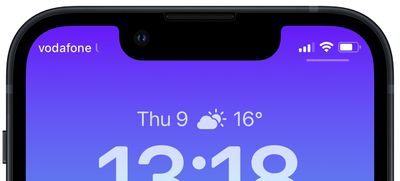
You can insert a widget alongside the date above the digital clock on the Lock Screen. The list below includes the stock app widget options available to you. Many of these widgets display a single data point, using alphanumeric text and symbols.

  • Calendar - day of the week, date, month / next event
  • Clock - city time zone / next alarm
  • Fitness - activity stats (move calories, exercise minutes, stand hours)
  • Reminders - due today
  • Stocks - single stock with up/down symbol
  • Weather - moon events, sun events, conditions, location, rain, air quality, UV index, wind

Widgets You Can Add Below the Time
lock screen widgets bottom
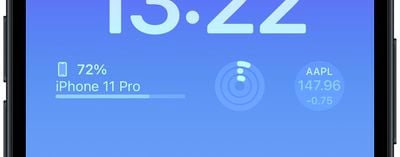
Directly below the digital clock there is a larger oblong space where you can place widgets horizontally next to each other. You can insert up to four square symbol-based widgets, or up to two rectangular widgets with more information, or alternatively a combination of two square widgets and one rectangular widget.

Batteries
lock screen widgets
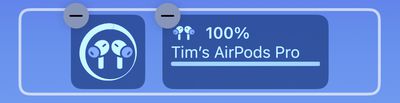
The Batteries widget comes in both square and rectangular versions showing the ‌iPhone‌'s battery status. Connect AirPods and their battery is shown instead.

Oddly, if you use two battery widgets they will display the battery level for the same device, rather than showing AirPods in one and ‌iPhone‌ in the other. Hopefully this is a kink that will be worked out in the beta testing phase.

Calendar
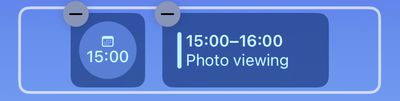
2lock screen widgets
The Calendar widget comes in three formats. You can track the current date as a square widget (although why you'd want to is unclear since the date is always displayed above the time). You can also track the next upcoming event's time or use a larger widget to show both the event name and its time.

Clock
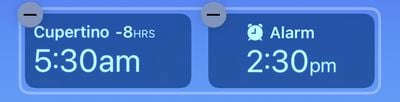
3lock screen widgets
Three clock widgets let you view a clock for a city to check the time at that location, and these come in one rectangular and two square varieties. There's also a world clock to view the time in up to three cities around the world, and two versions that display the next alarm.

Fitness
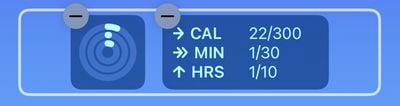
4lock screen widgets
One Fitness widget displays the Activity rings graphic, while a larger readout shows your Activity ring stats (move, exercise, stand).

Home
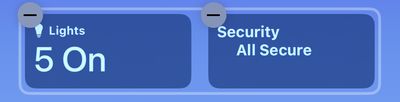
5lock screen widgets
For the Home app, two widgets display any indoor climate sensors, one displays any lights and switches, and another informs you of any security issues. You can also monitor a specific security accessory, or view a home summary (security, climate, and lights).

News
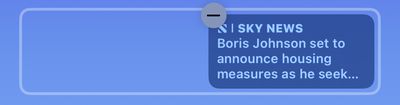
6lock screen widgets
A single larger widget provides today's top news story.

Reminders
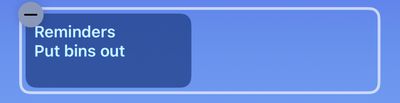
7lock screen widgets
A single larger widget offers quick access to one of your reminders lists, and displays the next due reminder.

Stocks
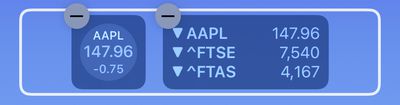
8lock screen widgets
One smaller and one larger widget let you view price quotes and track performance a symbol throughout the day. There's also a larger widget that displays three stocks.

Weather
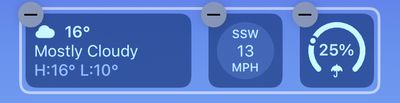
9lock screen widgets
Eight optional weather widgets to see moon events, sun events, conditions, location, rain, air quality, UV index, and wind. Only the current weather conditions and moon events come in the larger widget format.

More Widgets to Come

This widgets list shouldn't be treated as comprehensive, as Apple may add more or tweak existing ones before the public release of iOS 16 in the fall. Also, developers will be able to create widgets for third-party apps using Apple's new WidgetKit API, so expect plenty more Lock Screen widgets to come.


Related Forum: iOS 16

Popular Stories

Apple Logo Zoomed

Tim Cook Teases Plans for Apple's Upcoming 50th Anniversary

Thursday February 5, 2026 12:54 pm PST by
Apple turns 50 this year, and its CEO Tim Cook has promised to celebrate the milestone. The big day falls on April 1, 2026. "I've been unusually reflective lately about Apple because we have been working on what do we do to mark this moment," Cook told employees today, according to Bloomberg's Mark Gurman. "When you really stop and pause and think about the last 50 years, it makes your heart ...
Finder Siri Feature

Why Apple's iOS 26.4 Siri Upgrade Will Be Bigger Than Originally Promised

Friday February 6, 2026 3:06 pm PST by
In the iOS 26.4 update that's coming this spring, Apple will introduce a new version of Siri that's going to overhaul how we interact with the personal assistant and what it's able to do. The iOS 26.4 version of Siri won't work like ChatGPT or Claude, but it will rely on large language models (LLMs) and has been updated from the ground up. Upgraded Architecture The next-generation...
wwdc sans text feature

Apple Rumored to Announce New Product on February 19

Thursday February 5, 2026 12:22 pm PST by
Apple plans to announce the iPhone 17e on Thursday, February 19, according to Macwelt, the German equivalent of Macworld. The report, citing industry sources, is available in English on Macworld. Apple announced the iPhone 16e on Wednesday, February 19 last year, so the iPhone 17e would be unveiled exactly one year later if this rumor is accurate. It is quite uncommon for Apple to unveil...
iOS 26

iOS 26.3 and iOS 26.4 Will Add These New Features to Your iPhone

Tuesday February 3, 2026 7:47 am PST by
While the iOS 26.3 Release Candidate is now available ahead of a public release, the first iOS 26.4 beta is likely still at least a week away. Following beta testing, iOS 26.4 will likely be released to the general public in March or April. Below, we have recapped known or rumored iOS 26.3 and iOS 26.4 features so far. iOS 26.3 iPhone to Android Transfer Tool iOS 26.3 makes it easier...
iphone 17 pro dark blue 1

iPhone 18 Pro Max Rumored to Deliver Next-Level Battery Life

Friday February 6, 2026 5:14 am PST by
The iPhone 18 Pro Max will feature a bigger battery for continued best-in-class battery life, according to a known Weibo leaker. Citing supply chain information, the Weibo user known as "Digital Chat Station" said that the iPhone 18 Pro Max will have a battery capacity of 5,100 to 5,200 mAh. Combined with the efficiency improvements of the A20 Pro chip, made with TSMC's 2nm process, the...

Top Rated Comments

Justin Cymbal Avatar
48 months ago
Apple can and needs to do a better job with the design of the battery widgets for both this new lock screen and the existing home screen

This widget (screenshot attached) should not take up (literally) one third of my available screen real estate

Myself, and many other Apple users would really like to see the battery percentages for AirPods, the Apple Watch and their iPhone on at all times and take up as little screen real estate as possible

I can’t speak for others, but the default battery widget with just a circle and no percentage, is useless, as well as displaying the name of the AirPods as pictured in the above article

A simple picture of an Apple Watch and a picture of AirPods next to their percentage is all that I need - in AS LITTLE screen real estate as possible

Attachment Image
Score: 29 Votes (Like | Disagree)
rhett7660 Avatar
48 months ago

Already enough..we dont want infinite widgets to create too much confusion
Why limit? Why not let the end user pick what they want...
Score: 15 Votes (Like | Disagree)
Leon Ze Professional Avatar
48 months ago
Adding widgets to the lock screen was a master stroke by Apple. Well played Apple and an awesome move!
Score: 11 Votes (Like | Disagree)
xraydoc Avatar
48 months ago

Already enough..we dont want infinite widgets to create too much confusion
Really? I can think of a many more.
- Battery level for my car (EV)
- Battery level for my hearing aids (currently reported by their app)
- Timer widget / Countdown timer
- # unread mail / text messages
...many others
Score: 10 Votes (Like | Disagree)
Populus Avatar
48 months ago
This widgets are screaming “always-on display”. Actually the whole lock screen redesign points to a future always-on display. Such a pity that this feature will be exclusive to the 14 Pro models… And no iPhone mini will have it.
Score: 10 Votes (Like | Disagree)
MLL63QNA Avatar
48 months ago

If you tap a widget will it take you to the respective app?
Yes, i.e if you click on a weather widget icon on the lockscreen it will open up weather app.
Score: 9 Votes (Like | Disagree)















