
iCloud Shared Photo Library Support Added in Latest iOS 16 and macOS Ventura Betas

With the third betas of iOS 16, iPadOS 16, and macOS Ventura that went out to developers this morning, Apple has added support for iCloud Shared Photo Library, a new feature that was not in the initial betas.
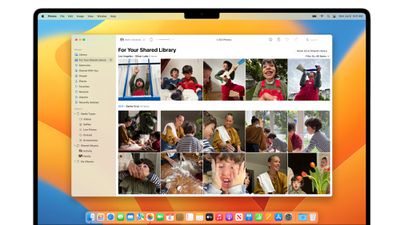
icloud shared photo library
‌iCloud‌ Shared Photo Library is designed to make it easier for you to share photos with your family members, and after installing iOS 16, iPadOS 16, or macOS Ventura, it can be set up in the Settings app. Under Photos, scroll down to "Shared Library" and tap it.

From there, tap on "Start Setup" to add participants you want to share with. You can invite up to five other people, and all participants can add, edit, or delete content from the shared library. You can add any five people, including people who you do not have a Family Sharing setup with.
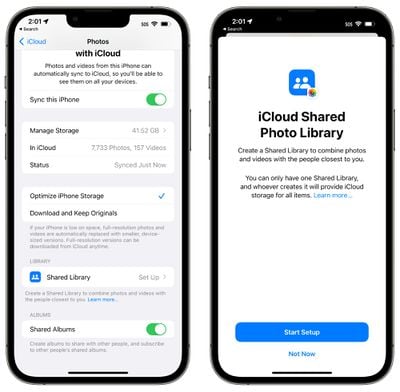
shared photo library splash screen
After selecting people to share with, you can opt to move your photos to the Shared Library. You can move all your photos and videos, photos that include select people or that are from a select date, or you can choose photos manually.

Once your photos are added, you can preview the library before it's shared, and then officially invite participants using the Messages app or a shared link. All participants will have access to all photos that are uploaded to the shared library.
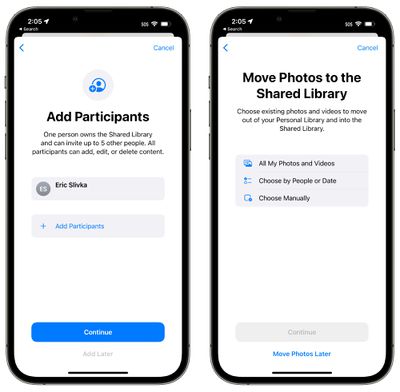
shared library add participants
To prevent accidentally shared photos, there are smart setup rules that can be implemented. You can opt to share all past photos or just photos from a specific start date. You can also choose to share photos that have only specific people, such as your family members.
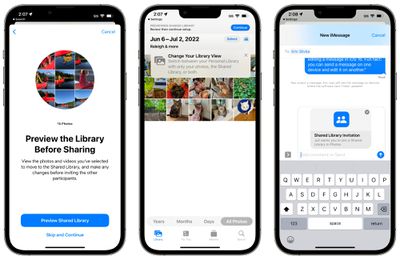
shared photo library 1
‌Photos‌ can be added to the Shared Library automatically, but there are also options to share based on Bluetooth proximity. Sharing suggestions will continue to pop up in For You as well.

With a new toggle in the Camera app you can upload all photos you take to the Shared Library automatically, so if you're out on vacation with your family, everyone can see vacation photos as soon as they're snapped.

Shared photos will show up in Memories, Featured ‌‌Photos‌‌, and the ‌‌Photos‌‌ widget, similar to standard ‌‌iCloud‌‌ Library images.

Related Forums: iOS 16, macOS Ventura

Popular Stories

Apple Logo Zoomed

Tim Cook Teases Plans for Apple's Upcoming 50th Anniversary

Thursday February 5, 2026 12:54 pm PST by
Apple turns 50 this year, and its CEO Tim Cook has promised to celebrate the milestone. The big day falls on April 1, 2026. "I've been unusually reflective lately about Apple because we have been working on what do we do to mark this moment," Cook told employees today, according to Bloomberg's Mark Gurman. "When you really stop and pause and think about the last 50 years, it makes your heart ...
wwdc sans text feature

Apple Rumored to Announce New Product on February 19

Thursday February 5, 2026 12:22 pm PST by
Apple plans to announce the iPhone 17e on Thursday, February 19, according to Macwelt, the German equivalent of Macworld. The report, citing industry sources, is available in English on Macworld. Apple announced the iPhone 16e on Wednesday, February 19 last year, so the iPhone 17e would be unveiled exactly one year later if this rumor is accurate. It is quite uncommon for Apple to unveil...
Finder Siri Feature

Why Apple's iOS 26.4 Siri Upgrade Will Be Bigger Than Originally Promised

Friday February 6, 2026 3:06 pm PST by
In the iOS 26.4 update that's coming this spring, Apple will introduce a new version of Siri that's going to overhaul how we interact with the personal assistant and what it's able to do. The iOS 26.4 version of Siri won't work like ChatGPT or Claude, but it will rely on large language models (LLMs) and has been updated from the ground up. Upgraded Architecture The next-generation...
iOS 26

iOS 26.3 and iOS 26.4 Will Add These New Features to Your iPhone

Tuesday February 3, 2026 7:47 am PST by
While the iOS 26.3 Release Candidate is now available ahead of a public release, the first iOS 26.4 beta is likely still at least a week away. Following beta testing, iOS 26.4 will likely be released to the general public in March or April. Below, we have recapped known or rumored iOS 26.3 and iOS 26.4 features so far. iOS 26.3 iPhone to Android Transfer Tool iOS 26.3 makes it easier...
iphone 17 pro dark blue 1

iPhone 18 Pro Max Rumored to Deliver Next-Level Battery Life

Friday February 6, 2026 5:14 am PST by
The iPhone 18 Pro Max will feature a bigger battery for continued best-in-class battery life, according to a known Weibo leaker. Citing supply chain information, the Weibo user known as "Digital Chat Station" said that the iPhone 18 Pro Max will have a battery capacity of 5,100 to 5,200 mAh. Combined with the efficiency improvements of the A20 Pro chip, made with TSMC's 2nm process, the...

Top Rated Comments

LtRoyalShrimp Avatar
47 months ago
Families today are often more than 5 people if generations are included and some of us, unfortunately, have to deal with divorced families. At first glance, the limit of one library seems bad but it seems like we can only start one shared library, yet be a part of more than one if someone else invites us?


I don't see the benefit over shared albums?
Shared Albums have awful limits like: No photo information and reduced quality.


When shared, photos are reduced to 2048 pixels on the long edge, except panoramic photos, which can be up to 5400 pixels wide. You can share GIFs that are 100MB or smaller.

Videos can be up to fifteen minutes in length and are delivered at up to 720p resolution.
https://support.apple.com/en-us/HT202786

From what I understand Shared Library has 100% the same information for everyone at the highest quality with all metadata.
Score: 11 Votes (Like | Disagree)
applerocks Avatar
47 months ago
This is good but the natural next step is needing multiple. One for the parents. One for kids. One for friend groups.

Shared albums are clunky and inconsistent. This is hopefully a better solution they can scale over the next 2-3 years.
Score: 10 Votes (Like | Disagree)
ssspinball Avatar
47 months ago
This is WAY WAY WAY more advanced than current Shared Albums, which are entirely and completely manual. you literally have to move photos that way by selecting photos one-at-a-time.

You can set the family share to automatically send ALL photos you take to the family album, or just those with family members identified in the pic, or just those at certain locations and have it done completely automatically. There is no step 2 after taking the photo! I also really like the toggle right inside the camera app so you can PRE-EMPTIVELY decide if the photos you are about to take go to your personal album or the family album.

If it works as expected, this will be a major improvement for families.
Score: 6 Votes (Like | Disagree)
Grimace Avatar
47 months ago
The words "Move Photos" are throwing me off a little. If we are truly moving them to this album, and everyone has Read/Write/Delete access, couldn't your annoying sister delete your photo?

Or, should it read "Copy Photos" to the Shared Album?
Score: 6 Votes (Like | Disagree)
Debauch Avatar
47 months ago
How is this different for the current Shared Albums?

Lol limiting to six people though. I guess larger families can’t have this?!?
Score: 5 Votes (Like | Disagree)
squirrelist Avatar
47 months ago

How is this different for the current Shared Albums?

Lol limiting to six people though. I guess larger families can’t have this?!?

I don't see the benefit over shared albums?
Current Shared Albums are much clunkier. You have to remember to copy items in, they are reduced quality, they can’t be edited, and they can’t be selected in the photo picker. This new album allows you to easily move photos between, not a copy, and they act as if they are pics in your own real photo library, and you can easily see which items are only in your personal library but not yet shared to the shared one.
Score: 4 Votes (Like | Disagree)
















