
Apple Seeds First Public Beta of macOS 13 Ventura

Apple today seeded the first beta of macOS Ventura to its public beta testing group, allowing non-developers to test the new macOS Ventura operating system ahead of its release.
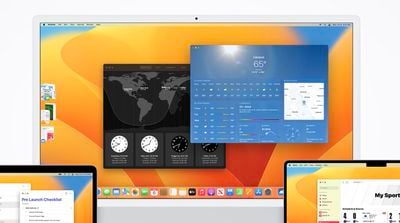
clock weather macos ventura
Public beta testers can download the macOS 13 Ventura update from the Software Update section of the System Preferences app after installing the proper profile from Apple's beta software website.

macOS Ventura introduces Stage Manager, a new multi-tasking option for focusing on a task while having other apps waiting in the wings. ‌Stage Manager‌ puts your main app front and center, tucking your other apps to the side for quick access.

Continuity Camera allows you to use your iPhone as a webcam for your Mac, offering much better camera quality than the built-in Mac camera. Apple is building special stands to hold the ‌iPhone‌ with a Mac, and there are neat features like Desk View, which uses the Ultra Wide lens.

Handoff now works with FaceTime so you can answer calls on the Mac and then transfer them over to another device, and Messages is gaining undo, edit, and mark as unread features. SharePlay now works in Messages in addition to ‌FaceTime‌, and the Mail app has been overhauled. Search is more relevant, emails can be scheduled, and there's even an option to undo an email for up to 10 seconds after it's sent.

Apple brought the Weather and Clock apps to the Mac, redesigned System Preferences and renamed it System Settings, and added support for Shared Tab Groups. Passwords are being replaced with more secure Passkeys in iOS 16 and macOS Ventura, and there are updates to Spotlight, Visual Lookup, Live Text, and more.

There are a ton of other features in macOS Ventura, and we have a full rundown available in our dedicated macOS Ventura roundup.


Popular Stories

wwdc sans text feature

Apple Rumored to Announce New Product on February 19

Thursday February 5, 2026 12:22 pm PST by
Apple plans to announce the iPhone 17e on Thursday, February 19, according to Macwelt, the German equivalent of Macworld. The report, citing industry sources, is available in English on Macworld. Apple announced the iPhone 16e on Wednesday, February 19 last year, so the iPhone 17e would be unveiled exactly one year later if this rumor is accurate. It is quite uncommon for Apple to unveil...
Apple Logo Zoomed

Tim Cook Teases Plans for Apple's Upcoming 50th Anniversary

Thursday February 5, 2026 12:54 pm PST by
Apple turns 50 this year, and its CEO Tim Cook has promised to celebrate the milestone. The big day falls on April 1, 2026. "I've been unusually reflective lately about Apple because we have been working on what do we do to mark this moment," Cook told employees today, according to Bloomberg's Mark Gurman. "When you really stop and pause and think about the last 50 years, it makes your heart ...
Finder Siri Feature

Why Apple's iOS 26.4 Siri Upgrade Will Be Bigger Than Originally Promised

Friday February 6, 2026 3:06 pm PST by
In the iOS 26.4 update that's coming this spring, Apple will introduce a new version of Siri that's going to overhaul how we interact with the personal assistant and what it's able to do. The iOS 26.4 version of Siri won't work like ChatGPT or Claude, but it will rely on large language models (LLMs) and has been updated from the ground up. Upgraded Architecture The next-generation...
maxresdefault

Apple Shows Off a Key Reason to Upgrade to the iPhone 17

Saturday February 7, 2026 9:26 am PST by
Apple today shared an ad that shows how the upgraded Center Stage front camera on the latest iPhones improves the process of taking a group selfie. "Watch how the new front facing camera on iPhone 17 Pro takes group selfies that automatically expand and rotate as more people come into frame," says Apple. While the ad is focused on the iPhone 17 Pro and iPhone 17 Pro Max, the regular iPhone...
iOS 26

iOS 26.3 and iOS 26.4 Will Add These New Features to Your iPhone

Tuesday February 3, 2026 7:47 am PST by
While the iOS 26.3 Release Candidate is now available ahead of a public release, the first iOS 26.4 beta is likely still at least a week away. Following beta testing, iOS 26.4 will likely be released to the general public in March or April. Below, we have recapped known or rumored iOS 26.3 and iOS 26.4 features so far. iOS 26.3 iPhone to Android Transfer Tool iOS 26.3 makes it easier...

Top Rated Comments

chrisdazzo Avatar
47 months ago
Oh boooy I think it's time to install this on a daily driver!

guys, I'm kidding, don't do it (and come back here to complain how it's all a mess and you broke ur mack)
Score: 12 Votes (Like | Disagree)
zorinlynx Avatar
47 months ago
By the way, for folks who want to try out the beta mostly risk free (things can still go wrong with firmware but that's rare), APFS makes it really easy to create a second volume and install the beta there. You can even have Migration Assistant copy your home folder and settings over from the primary Monterey installation.

The two systems are separate with distinct home folders and you can choose which one to boot into on startup. This is something I wish iOS could do. Been playing with Ventura now for the past couple weeks and I can easily boot back into my main install if something is broken. It's been surprisingly good though!

Apple even sanctions it with a support article:

https://support.apple.com/en-us/HT208891
Score: 11 Votes (Like | Disagree)
BanjoDudeAhoy Avatar
47 months ago

Install macOS Ventura Beta on my main computer ✅
Install iOS 16 Beta on my main phone ✅
Here's the soundtrack for your endeavors ?

Score: 6 Votes (Like | Disagree)
Colstan Avatar
47 months ago

By the way, for folks who want to try out the beta risk free
I appreciate you sharing your advice, but it's not entirely risk free. The firmware will be updated to a beta version regardless of where you install Ventura. I'm sure Apple will try to minimize errors, but it's still there. For instance, if the firmware update goes awry with a T2 Intel Mac, then you'll need a second Mac capable of capable of DFU mode ('https://mrmacintosh.com/how-to-restore-bridgeos-on-a-t2-mac-how-to-put-a-mac-into-dfu-mode/') to revert to the old version. So, public beta or not, there are risks involved.
Score: 5 Votes (Like | Disagree)
landrew4 Avatar
47 months ago
I absolutely despise their change to System Preferences to make it look more like iOS. As someone who supports all the Macs in my company (not to mention friends and family), this is going to cause huge confusion and problems. Not only is it a big change and makes settings much harder to find, but to limit an OS that generally has lots of screen real estate available to a long scrolling list (necessary on limited screen like iPhone) is just stupid. I was really hoping they would dump this silly idea before it made it to Beta. Hopefully enough people will complain and Apple will come to its senses.
Score: 5 Votes (Like | Disagree)
zorinlynx Avatar
47 months ago

yup. I've never used a beta that was SO bad I had to revert, but carefully read all of the info at beta.apple.com and go (or don't) from there :)
Keep in mind that the process is different than it used to be.

Before you could restore everything including the operating system itself from a Time Machine backup. You could even boot from it.

Now (Since at least Big Sur) you have to wipe the disk, reinstall the previous version of MacOS manually, then restore from the backup using Migration Assistant. It's a longer process that involves downloading the OS if you don't have a copy already handy.

Trying to make people aware as it's a bit more involved now.
Score: 4 Votes (Like | Disagree)















