
iPhone 14 Pro Status Bar Rumored to Include Classic Battery Indicator - MacRumors
Skip to Content

iPhone 14 Pro Status Bar Rumored to Include Classic Battery Indicator

Apple plans to bring the classic iOS battery indicator back to the status bar directly on the upcoming iPhone 14 Pro and iPhone 14 Pro Max, taking full advantage of the added screen space at the top of the display thanks to a new pill-shaped notch replacement.
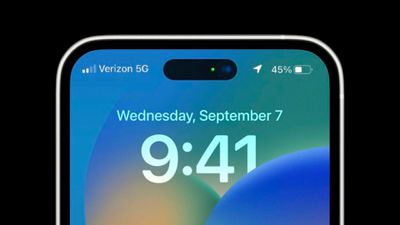
iphone 14 pro battery status bar 2
According to information shared with MacRumors and images posted on the MacRumors forums, Apple will bring back the classic iOS battery indicator to the status bar of the upcoming iPhone 14 Pro, which will include the battery percentage and battery icon separate from each other.

While Apple brought the battery percentage back to the status bar in an iOS 16 beta, the battery percentage is placed inside the battery icon and is not separated from it due to limited space at the top of the display.
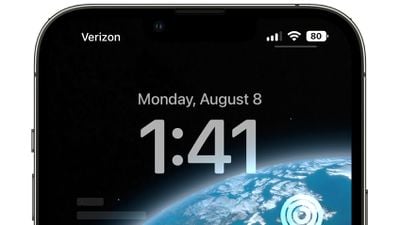
ios 16 beta 5 battery percent

iOS 16 battery percentage currently on iPhones with a notch

Alongside the classic battery indicator, Apple will rearrange other elements of the iOS status bar on the Lock Screen and notification center for the upcoming iPhones, including moving the cellular signal indicator to the left, according to the latest information.

It's unknown whether the classic battery indicator will be present in the status bar when the device is unlocked and in use, given the need to display the time on the left, reducing the overall amount of available width.

The latest tidbit is one of several new aspects of the iPhone 14 Pro iOS 16 experience we're learning about just days before Apple's "Far out" event. Earlier today, MacRumors reported new details on the always-on display experience for the iPhone 14 Pro and iPhone 14 Pro Max, including the behavior of the always-on display and different design elements.


Related Forum: iPhone

Popular Stories

iOS 26

iOS 26.4 Adds Two New Features to CarPlay

Tuesday March 24, 2026 1:55 pm PDT by
iOS 26.4 was released today, and it includes a couple of new features for CarPlay: an Ambient Music widget and support for voice-based chatbot apps. To update your iPhone 11 or newer to iOS 26.4, open the Settings app and tap on General → Software Update. CarPlay will automatically offer the new features so long as the iPhone connected to your vehicle is running iOS 26.4 or later....
Apple Business hero

Apple Unveils 'Apple Business' All-in-One Platform

Tuesday March 24, 2026 8:53 am PDT by
Apple today announced Apple Business, a new all-in-one platform that unifies device management, productivity tools, and customer outreach features. The service is designed to be a consolidated replacement for several of Apple's existing business-focused offerings, including Apple Business Essentials, Apple Business Manager, and Apple Business Connect. It provides organizations with a single...
AirPods Pro Firmware Feature

Apple Releases New Firmware for AirPods Pro 3, AirPods Pro 2 and AirPods 4

Tuesday March 24, 2026 12:31 pm PDT by
Apple today released new firmware for the AirPods Pro 2, AirPods Pro 3, and the AirPods 4. The firmware has a version number of 8B39, up from 8B34 on the AirPods Pro 3, 8B28 on the AirPods Pro 2, and 8B21 on the AirPods 4. There is no word on what's included in the firmware, but Apple has a support document with limited notes. Most updates are limited to bug fixes and performance...

Top Rated Comments

TVreporter Avatar
47 months ago
“It’s our best battery indicator ever and we think you’re going to love it!”
Score: 30 Votes (Like | Disagree)
DMG35 Avatar
47 months ago
I really wish we could get some type of status light up there. A blinking light for missed calls, emails, texts would be awesome.
Score: 25 Votes (Like | Disagree)
47 months ago
So much COURAGE ! Wow !!
headphone jack to return in 2026? You heard it here first.
Score: 15 Votes (Like | Disagree)
Mojo1019 Avatar
47 months ago
A battery what? What is this witchcraft?
Score: 10 Votes (Like | Disagree)
TheYayAreaLiving 🎗️ Avatar
47 months ago
We don’t have much time left. Excited to see all the changes.
Score: 9 Votes (Like | Disagree)
47 months ago

This was always a first world problem since you could always drag down the Control Center shade to see battery life at a glance anyway. We are really in a period of aesthetics and refinements right now with the iPhone. The areas they can probably spend more time really is Siri and Maps.
Bitching on MacRumors is a first world activity in the first place, so why not do it about first world issues? There's a big difference between 20%, 10% and 1%, not having to perform additional guestures is a big improvement for those who find themselves in low battery situations often and want to see how much juice is left at a glance. (The iOS 16 indicator solves this issue already, though)
Score: 7 Votes (Like | Disagree)















