
Apple Watch Series 8 Takes Five Nights to Establish Baseline Wrist Temperature - MacRumors
Skip to Content

Apple Watch Series 8 Takes Five Nights to Establish Baseline Wrist Temperature

Apple today published a new support document with additional details about the new wrist temperature sensing feature available on Apple Watch Series 8 and Apple Watch Ultra models, and it turns out the feature requires users to wear their watch for five nights before it can detect a baseline temperature.
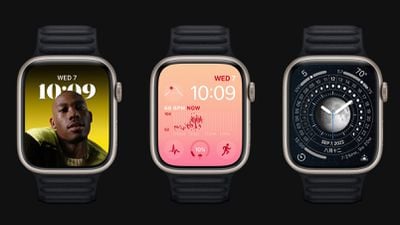
apple watch series 8 trio
Apple Watch Series 8 and Apple Watch Ultra have two temperature sensors — one on the back crystal, near your skin, and another just under the display. While the wearer sleeps, Apple Watch samples wrist temperature every five seconds. This design improves accuracy by reducing bias from the outside environment, according to Apple.

Your body temperature naturally fluctuates and can vary each night due to your diet and exercise, alcohol consumption, sleep environment, or physiological factors such as menstrual cycles and illness. After about 5 nights, your Apple Watch will determine your baseline wrist temperature and look for nightly changes to it.

Apple says that Sleep must be set up with "Track Sleep with Apple Watch" enabled, and Sleep Focus must be enabled for at least four hours a night for about five nights. After that, users can check Body Measurements -> Wrist Temperature in the Health app for recorded measurements.

Apple cautions that the feature isn't a medical-grade device and shouldn't be used for any medical purpose, nor is it a thermometer, and it cannot provide measurements on demand. A loose-fitting Apple Watch can also impact wrist temperature data.

Apple is marketing the feature in promotional materials for the new Apple Watch models as a way to improve period predictions and retrospective ovulation estimates, but the support document suggests that tracking nightly temperature changes while sleeping can give anyone insight into their "overall well-being."

For those who have no use for the feature, Wrist Temperature can be turned off in the Watch app on iPhone, under Privacy -> Turn off Wrist Temperature.


Related Forum: Apple Watch

Popular Stories

iOS 26

iOS 26.4 Adds Two New Features to CarPlay

Tuesday March 24, 2026 1:55 pm PDT by
iOS 26.4 was released today, and it includes a couple of new features for CarPlay: an Ambient Music widget and support for voice-based chatbot apps. To update your iPhone 11 or newer to iOS 26.4, open the Settings app and tap on General → Software Update. CarPlay will automatically offer the new features so long as the iPhone connected to your vehicle is running iOS 26.4 or later....
Apple Business hero

Apple Unveils 'Apple Business' All-in-One Platform

Tuesday March 24, 2026 8:53 am PDT by
Apple today announced Apple Business, a new all-in-one platform that unifies device management, productivity tools, and customer outreach features. The service is designed to be a consolidated replacement for several of Apple's existing business-focused offerings, including Apple Business Essentials, Apple Business Manager, and Apple Business Connect. It provides organizations with a single...
AirPods Pro Firmware Feature

Apple Releases New Firmware for AirPods Pro 3, AirPods Pro 2 and AirPods 4

Tuesday March 24, 2026 12:31 pm PDT by
Apple today released new firmware for the AirPods Pro 2, AirPods Pro 3, and the AirPods 4. The firmware has a version number of 8B39, up from 8B34 on the AirPods Pro 3, 8B28 on the AirPods Pro 2, and 8B21 on the AirPods 4. There is no word on what's included in the firmware, but Apple has a support document with limited notes. Most updates are limited to bug fixes and performance...

Top Rated Comments

Le0M Avatar
46 months ago
Honest question:
If I wear the watch all day, and put it into charge before going to sleep, how can I possibly be wearing it at night?
Score: 10 Votes (Like | Disagree)
46 months ago

Honest question:
If I wear the watch all day, and put it into charge before going to sleep, how can I possibly be wearing it at night?
Because there's quick charging on the newer ones which means that 15-30 minutes of charging in the evening will get you through the night and 15-30 minutes of charging in the morning (while showering for example) will get you through a day (because it will still be pretty charged from that evening 15-30 minute charge).

Added bonus of that is that's very good for your battery health.
Score: 9 Votes (Like | Disagree)
46 months ago
I just wish it could last 5 nights on a single charge… 🤔
Score: 9 Votes (Like | Disagree)
whoknows2597 Avatar
46 months ago

Came here to ask this as well. I dont sleep with mine on because obviously it has to get charged at some point and a watch doesnt do me much good on a charger during the day?!
What I do, take off my watch an hour or so before my bedtime then do my evening routine. After that time, it should be 80% to 100% charged then I wear my watch when sleeping. In the morning, I place it on the charger and leave it there before I head out to work.
Score: 7 Votes (Like | Disagree)
46 months ago
So it won’t alert me if I have a fever?
Score: 7 Votes (Like | Disagree)
performa_6400 Avatar
46 months ago
For those that wear your watch overnight, when do you charge it?
Score: 5 Votes (Like | Disagree)














