
Everything New With iOS 16.1 Beta 2: Lock Screen Charging Indicator, Copy Paste Alert Fix, Battery Status Updates and More - MacRumors
Skip to Content

Everything New With iOS 16.1 Beta 2: Lock Screen Charging Indicator, Copy Paste Alert Fix, Battery Status Updates and More

Apple today released the second beta of iOS 16.1, introducing some notable changes to charging indicators on the iPhone and also fixing a few bugs. We've rounded up all of the changes in the second beta below.
iOS 16

Battery Status Bar Visual Charge Indicator

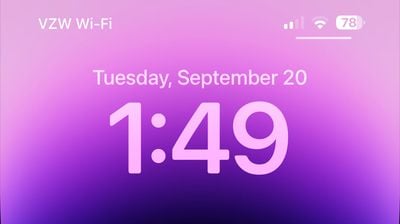
Apple in iOS 16 added battery percentage to the battery icon in the status bar on Face ID iPhones, and in iOS 16.1 beta 2, improved the feature to show a visual indication of the charge level.
ios 16 1 beta 2 battery
The battery icon shifts throughout the day as the battery depletes or is charged, making it easier to see charge level at a glance. Prior to the beta, the battery indicator in the status bar showed percent, but the battery level was static and always full, making it sometimes confusing to determine the iPhone's charge with a quick look.

Battery Font

Apple has updated the font that's used for the battery icon, slightly increasing the size.

Lock Screen Charging Indicator

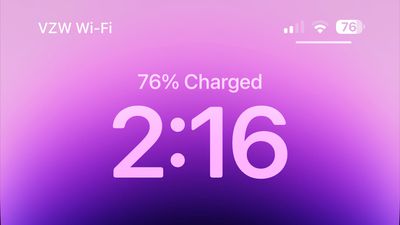
When charging an iPhone, the battery percentage is now displayed above the time both when the iPhone first starts charging and each time that it is woken from sleep during the charging process.
ios 16 beta 2 charge level
This allows for a clear indication of the charge level when tapping on the iPhone's display without unlocking the device. The always-on display does not show charge level and waking the screen on an iPhone 14 Pro model is required to get the battery level to show up.

Copy and Paste Fix

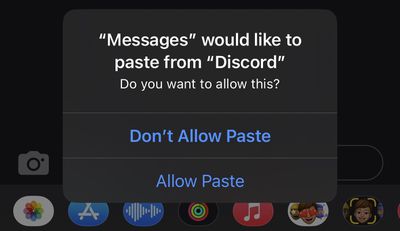
The incessant copy and paste prompts that iOS 16 users are seeing have been addressed in iOS 16.1, and you no longer need to explicitly approve each and every copy and paste attempt. While this is fixed in iOS 16.1, we are expecting Apple to address it prior to the iOS 16.1 launch with an iOS 16 bug fix update that is planned for next week.
iOS 16 Copy Paste Permission Prompt

No Camera Shake Fix

Reports suggest that the bug causing the iPhone 14 Pro rear camera to shake and vibrate has not been addressed in iOS 16.1 beta 2. Apple has said that the issue will be fixed in an iOS 16 update coming next week, and we are expecting an iOS 16.0.2 release.

Other New Features

Know of a new feature in iOS 16.1 that we left out? Let us know in the comments below.

Related Forum: iOS 16

Popular Stories

iOS 26

iOS 26.4 Adds Two New Features to CarPlay

Tuesday March 24, 2026 1:55 pm PDT by
iOS 26.4 was released today, and it includes a couple of new features for CarPlay: an Ambient Music widget and support for voice-based chatbot apps. To update your iPhone 11 or newer to iOS 26.4, open the Settings app and tap on General → Software Update. CarPlay will automatically offer the new features so long as the iPhone connected to your vehicle is running iOS 26.4 or later....
Apple Business hero

Apple Unveils 'Apple Business' All-in-One Platform

Tuesday March 24, 2026 8:53 am PDT by
Apple today announced Apple Business, a new all-in-one platform that unifies device management, productivity tools, and customer outreach features. The service is designed to be a consolidated replacement for several of Apple's existing business-focused offerings, including Apple Business Essentials, Apple Business Manager, and Apple Business Connect. It provides organizations with a single...
AirPods Pro Firmware Feature

Apple Releases New Firmware for AirPods Pro 3, AirPods Pro 2 and AirPods 4

Tuesday March 24, 2026 12:31 pm PDT by
Apple today released new firmware for the AirPods Pro 2, AirPods Pro 3, and the AirPods 4. The firmware has a version number of 8B39, up from 8B34 on the AirPods Pro 3, 8B28 on the AirPods Pro 2, and 8B21 on the AirPods 4. There is no word on what's included in the firmware, but Apple has a support document with limited notes. Most updates are limited to bug fixes and performance...

Top Rated Comments

hoorayforhollywood Avatar
46 months ago
I'm no hater - I'm a fanboy - but I LOVE how much effort it seems to take to get the battery indicator functioning in pretty much the same way it did with the original iPhone.
Score: 36 Votes (Like | Disagree)
coolbreeze2 Avatar
46 months ago

Is the GPA issue resolved?
I know my son who is attending Baylor has not had any GPA improvement since updating his iPhone to 16.0.
Score: 20 Votes (Like | Disagree)
46 months ago
I am becoming less and less of a fan of IOS. One of my favorite things about IOS was that I knew exactly what to expect. More or less the experience was going to be the same no matter what device I went to. Jump to current IOS and there are so many bugs and variables that I am just never sure what will fully work. The questions that I have to ask too often "what bug fix am I going to have to Google today?" "Will this feature actually work the way I expect it to?" I am tired of over hyped features, I just want a stable OS.
Score: 16 Votes (Like | Disagree)
Canyda Avatar
46 months ago

Is the GPA issue resolved?
Yes. Apple went to night school and its Grade Point Average has improved. :D
Score: 12 Votes (Like | Disagree)
46 months ago
The GPA post above was a typo. The question was whether the GPS issue has been fixed.
Score: 8 Votes (Like | Disagree)
GMShadow Avatar
46 months ago

I am becoming less and less of a fan of IOS. One of my favorite things about IOS was that I knew exactly what to expect. More or less the experience was going to be the same no matter what device I went to. Jump to current IOS and there are so many bugs and variables that I am just never sure what will fully work. The questions that I have to ask too often "what bug fix am I going to have to Google today?" "Will this feature actually work the way I expect it to?" I am tired of over hyped features, I just want a stable OS.
Spoken like someone who hasn't been using it long. Even these issues aren't remotely approaching the pile of excrement that iOS 8 was.
Score: 7 Votes (Like | Disagree)















