
iPhone 14 Pro Users Can Switch Between Two Live Activities in Dynamic Island - MacRumors
Skip to Content

iPhone 14 Pro Users Can Switch Between Two Live Activities in Dynamic Island

Apple earlier this month announced that iOS 16.1 will enable a new Live Activities feature which allows iPhone users to stay on top of things that are happening in real time, such as a sports game or a food delivery order, right from the Lock Screen. On the iPhone 14 Pro and Pro Max, Live Activities also integrate with the Dynamic Island.
live activities intro dark 2x
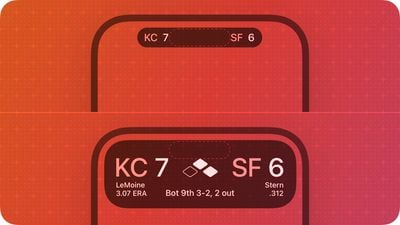
On Monday, we learned that when following a sports event the ‌Dynamic Island‌ shows a live-updating scoreboard with the number of goals scored by each club on either side of the True Depth camera pill, which Apple refers to as a Live Activity's "compact" presentation. When long pressed, the ‌Dynamic Island‌ expands to show the time elapsed and play-by-play action.

Since then, Apple has shared its Human Interface Guidelines (HIG) for app developers intending to support Live Activities, and one notable detail is that on iPhone 14 Pro models, users will be able to switch between two Live Activities using the ‌Dynamic Island‌ if they are following multiple tasks or events at the same time, thanks to a separate "minimal" presentation:

When multiple Live Activities are active, the system uses the circular minimal presentation to display two of them in the Dynamic Island. The system chooses one Live Activity to appear attached to the Dynamic Island while the other appears detached. As with a compact Live Activity, people can tap a minimal Live Activity to open the app and get more details about the event or task.

Apple's guidelines go on to add that when people touch and hold a Live Activity in the minimal presentation described above, the system displays the content in an expanded presentation, just as it does for the compact version.

dynamic island split 1

Example image showing "minimal" presentation of multiple Live Activities

The implementation Apple describes above should come as welcome news to those who envision, say, following two Premier League matches that are being played at the same time, where either one result or both could end up being decisive for the teams' league standings.

In other noteworthy tidbits in the HIG, Apple cautions developers not to offer Live Activities that exceed eight hours, and asks them to consider removing Live Activities from the Lock Screen after they end:

In the Dynamic Island, the system immediately removes a Live Activity when it ends. By default, the system shows a Live Activity on the Lock Screen for up to four hours after it ends to give people time to view its final content update. If the outcome of your Live Activity is only relevant for a shorter time, tell the system to dismiss it at a specific time within the four-hour window or immediately after it ends. For example, a rideshare app might choose to display a summary of the ride in the Live Activity on the Lock Screen for 15 minutes after the ride ends so people can view the final fare.

Finally, Apple notes that Live Activities adapt their colors to "look great" in both the Light and Dark system modes, as well as on the dimmed screen of an always-on display.

Apple says iOS 16.1, currently in beta, will be released later this year. In addition to adding support for Live Activities in third-party apps, the update will include a new Clean Energy Charging option for U.S. users, add support for Matter accessories in the Home app, make Apple Fitness+ workouts available without an Apple Watch, and more.


Related Forum: iPhone

Popular Stories

iOS 26

iOS 26.4 Adds Two New Features to CarPlay

Tuesday March 24, 2026 1:55 pm PDT by
iOS 26.4 was released today, and it includes a couple of new features for CarPlay: an Ambient Music widget and support for voice-based chatbot apps. To update your iPhone 11 or newer to iOS 26.4, open the Settings app and tap on General → Software Update. CarPlay will automatically offer the new features so long as the iPhone connected to your vehicle is running iOS 26.4 or later....
Apple Business hero

Apple Unveils 'Apple Business' All-in-One Platform

Tuesday March 24, 2026 8:53 am PDT by
Apple today announced Apple Business, a new all-in-one platform that unifies device management, productivity tools, and customer outreach features. The service is designed to be a consolidated replacement for several of Apple's existing business-focused offerings, including Apple Business Essentials, Apple Business Manager, and Apple Business Connect. It provides organizations with a single...
AirPods Pro Firmware Feature

Apple Releases New Firmware for AirPods Pro 3, AirPods Pro 2 and AirPods 4

Tuesday March 24, 2026 12:31 pm PDT by
Apple today released new firmware for the AirPods Pro 2, AirPods Pro 3, and the AirPods 4. The firmware has a version number of 8B39, up from 8B34 on the AirPods Pro 3, 8B28 on the AirPods Pro 2, and 8B21 on the AirPods 4. There is no word on what's included in the firmware, but Apple has a support document with limited notes. Most updates are limited to bug fixes and performance...

Top Rated Comments

DMG35 Avatar
46 months ago
Dynamic Island is legit awesome.
Score: 12 Votes (Like | Disagree)
46 months ago
Eight hours maximum? That JUST about works for a day’s test match cricket ;)
Score: 10 Votes (Like | Disagree)
IIGS User Avatar
46 months ago
Dynamic island wasn't just created to deal with the notch haters or to hide "the pill". I think Apple has long term plans for it.
Score: 9 Votes (Like | Disagree)
johnmarki Avatar
46 months ago
This is a great use of the space, and I'm happy to see the notch gone. I dont care if dynamic island goes the way of the touch-bar, because that will likely mean we have full, unobstructed screens with no notch/hole/pill/island. I live in the moment, and when this feature goes away, something else will come along. Some of you may love it or hate it, I personally love it; and this device, and its features, are pretty much perfect for me as of this exact moment in time. Trying to cling onto these things and guess a future for their current implementation is pretty murky. It works now, its being used more than the notch ever was, and the devs putting in work on the magic pill / dynamic island now are bringing creative solutions to this design. I think this is a win-win for all (notch haters (me), notch lovers, non-interested)
Score: 6 Votes (Like | Disagree)
46 months ago

Dynamic Island will wind up in the same trash heap of design history as the Touch Bar. It's a temporary solution to a temporary problem, the notch. Once Apple figures out how to get all the Face ID stuff under the display Apple will transition Dynamic Island to the Oops Peninsula.
Huh? From a UX perspective it works with or without the notch.
Score: 6 Votes (Like | Disagree)
MacWorld78 Avatar
46 months ago
Dynamic Island just nice concept but not really ideal because obviously it is hard to reach from a thumb if holding one hand only. :oops:

Bless those who have long thumbs. :cool:
Score: 5 Votes (Like | Disagree)














