
Here's How to Share Your Location via Satellite With Find My - MacRumors
Skip to Content

Here's How to Share Your Location via Satellite With Find My

Apple today launched its Emergency SOS via satellite service in the US and Canada, and while the feature is geared to help users in a genuine emergency, Apple's satellites also make it possible for anyone to share their location whenever they are off the grid.
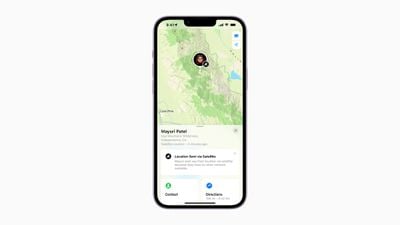
find my satellite
The new functionality means you can now share your location with friends and family, even if your iPhone 14 has no cellular connection or access to Wi-Fi, allowing you to reassure people of your whereabouts while traveling in the wilderness.

The following steps show you how to take advantage of the feature, which can be accessed via Find My on iPhone 14 models running iOS 16.1 or later. Be sure to update your device if you haven't already via Settings -> General -> Software Update. Also note that you must lack cellular coverage and not be connected to Wi-Fi for the feature to show up.

  1. Open the Find My app on your iPhone 14.
  2. Tap on the Me tab.
  3. Swipe up to see "My Location via Satellite," then tap Send My Location.

That's all there is to it. As long as you are outdoors, anyone who you share your location with will now be able to see where you are, regardless of your cellular coverage.

In addition to Emergency SOS and Find My, the satellite connection on the iPhone 14 lineup also works with other features available on iPhone and Apple Watch, including Crash Detection and Fall Detection.

Note that Apple's satellite services are included for free for two years starting at the time of activation of a new iPhone 14, iPhone 14 Plus, iPhone 14 Pro, and iPhone 14 Pro Max. Emergency SOS via satellite and Find My via satellite are available today in the US and Canada, and will be available in France, Germany, Ireland, and the UK in December.


Popular Stories

iOS 26

iOS 26.4 Adds Two New Features to CarPlay

Tuesday March 24, 2026 1:55 pm PDT by
iOS 26.4 was released today, and it includes a couple of new features for CarPlay: an Ambient Music widget and support for voice-based chatbot apps. To update your iPhone 11 or newer to iOS 26.4, open the Settings app and tap on General → Software Update. CarPlay will automatically offer the new features so long as the iPhone connected to your vehicle is running iOS 26.4 or later....
Apple Business hero

Apple Unveils 'Apple Business' All-in-One Platform

Tuesday March 24, 2026 8:53 am PDT by
Apple today announced Apple Business, a new all-in-one platform that unifies device management, productivity tools, and customer outreach features. The service is designed to be a consolidated replacement for several of Apple's existing business-focused offerings, including Apple Business Essentials, Apple Business Manager, and Apple Business Connect. It provides organizations with a single...
AirPods Pro Firmware Feature

Apple Releases New Firmware for AirPods Pro 3, AirPods Pro 2 and AirPods 4

Tuesday March 24, 2026 12:31 pm PDT by
Apple today released new firmware for the AirPods Pro 2, AirPods Pro 3, and the AirPods 4. The firmware has a version number of 8B39, up from 8B34 on the AirPods Pro 3, 8B28 on the AirPods Pro 2, and 8B21 on the AirPods 4. There is no word on what's included in the firmware, but Apple has a support document with limited notes. Most updates are limited to bug fixes and performance...

Top Rated Comments

TheYayAreaLiving 🎗️ Avatar
44 months ago
When going hiking I hope to not get lost anymore.
Score: 7 Votes (Like | Disagree)
Adoniram Avatar
44 months ago

I'm running 16.1 on my iPhone 14 Pro. I don't see "My Location via Satellite" as described.
From the article:
“Also note that you must lack cellular coverage and not be connected to Wi-Fi for the feature to show up.”

If you’re posting here, there’s a good chance you have cellular or Wi-Fi.
Score: 5 Votes (Like | Disagree)
Joe Mac User Avatar
44 months ago
I'm running 16.1 on my iPhone 14 Pro. I don't see "My Location via Satellite" as described.
Score: 5 Votes (Like | Disagree)
zapmymac Avatar
44 months ago
This is actually the feature I’m looking forward to. I ride horses, run, atv in many places without service, a simple ping to my family would make everyone feel safer. Last known coordinates can go a long way for a quicker rescue as well. 🗻
Score: 4 Votes (Like | Disagree)
bmustaf Avatar
44 months ago

I have iPhone Pro Mac, iOS is 16.1.1

under find my iPhone. I do have the share my location toggle turned on but no option to actually share my location with anyone. I am assuming it may update later but thus far nothing.
It likely will not let you until you have no cell service and no wifi, I believe this was a restriction (and a valid one given how limited spectrum is being allocated for true off grid/emergency use), and I suspect Airplane Mode is not enough (and likely turns off sat comm anyway)...
Score: 4 Votes (Like | Disagree)
44 months ago

From the article:
“Also note that you must lack cellular coverage and not be connected to Wi-Fi for the feature to show up.”

If you’re posting here, there’s a good chance you have cellular or Wi-Fi.
I assume turning on Airplane mode and WiFi off would not let it work.
Score: 2 Votes (Like | Disagree)















