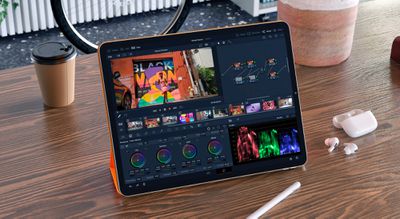
Popular video editing app DaVinci Resolve for iPad is now available on the App Store, giving iPad customers access to a popular professional-grade video editing app right on their iPad.
DaVinci Resolve for iPad was announced in October 2022 and is designed to be optimized for iPads with Apple silicon chips, like the new iPad Pro with the M2 chip and the previous generation iPad Pro and iPad Air, both powered by M1.
Designed for the new M2 iPad Pro, Blackmagic, the creators behind DaVinci Resolve, says the app will deliver 4x faster Ultra HD ProRes rendering on the new iPad Pro with M2, with other similar improvements coming to M1-based iPads.
Compared to DaVinci Resolve 18 software for the desktop, DaVinci Resolve for iPad offers similar functionality and tools, with slight changes in the user interface to better suit the iPad. DaVinci Resolve for iPad is available for free on the App Store, with an in-app purchase that unlocks the Studio version priced at $95.
iOS 26.4 was released today, and it includes a couple of new features for CarPlay: an Ambient Music widget and support for voice-based chatbot apps.
To update your iPhone 11 or newer to iOS 26.4, open the Settings app and tap on General → Software Update. CarPlay will automatically offer the new features so long as the iPhone connected to your vehicle is running iOS 26.4 or later....
Apple today announced Apple Business, a new all-in-one platform that unifies device management, productivity tools, and customer outreach features.
The service is designed to be a consolidated replacement for several of Apple's existing business-focused offerings, including Apple Business Essentials, Apple Business Manager, and Apple Business Connect. It provides organizations with a single...
Tuesday March 24, 2026 12:31 pm PDT by Juli Clover
Apple today released new firmware for the AirPods Pro 2, AirPods Pro 3, and the AirPods 4. The firmware has a version number of 8B39, up from 8B34 on the AirPods Pro 3, 8B28 on the AirPods Pro 2, and 8B21 on the AirPods 4.
There is no word on what's included in the firmware, but Apple has a support document with limited notes. Most updates are limited to bug fixes and performance...
just did my first export 4k 60mbps slog3 A7IV bt2020 4:2:2 works great honestly i can finally work on my ipad pro m1 with better color grading since display is accurate. i have recently been using my m1 mac but external monitor ; this is really helpful do most work on pc or m1 mac and color grading on ipad pro m1
Update I do not agree with BlackMagic saying edit tab would not fit on the ipad pro especially the 12.9 version. if my 13 inch macbook can do it then so can the 12.9. I hope the add it in the long run
Update found out you can bring up hidden tabs for example Fusion and Edit tab fully working on ipad
I don’t understand this whole appeal to do video editing on an iPad. You cannot possibly do complex video editing on iPad OS in an effective manner compared to on a Mac.
It’s like telling a car mechanic that the technology exists for them to now be able to change oil using oven mitts and Dixie cups because the tools are more portable! 🤪
I mean, you totally can do ‘complex editing’ on an iPad.
If you have access to external drives/media, a cut tool, and the ability to export EDLs/XMLs etc. then you totally can.
Finishing is a different story.
But you could definitely do a decent offline cut on this.
Super responsive on my mini 6! Limited to HD but that fine for what I would use it for (reviewing clips from Blackmagic camera, compiling selects, super basic grades with client).
Handles 4k braw files with no problem. You can even add custom luts in Files app. Well done Blackmagic!
since the iPad Pro 12,9 I'm in love with the form factor and especially the touch feeling when you work. It's more immersive, more creative, hard to explain but like sculpting, you can touch your work, a bit like minority report lol ;) but yes, every time I try to work only on my iPad I feel less productive and a lot of thing seem cumbersome. But I don't lose hope to work only with touch (not for long text but for everything else).
Maybe I'm not the only one and it seem pretty close to have a different way of working rather than a computer , a mouse etc . I need to test Davinci on iPad because I make short film and YouTube video and I'm pretty sure I'm not a big power user who need everything we have on a computer ;) I want a fresh way of working anywhere with touch first device !