
Test Shows How Much Battery Drain Your Wallpaper Causes on the iPhone 14 Pro's Always-On Display - MacRumors
Skip to Content

Test Shows How Much Battery Drain Your Wallpaper Causes on the iPhone 14 Pro's Always-On Display

With the introduction of an always-on display in the iPhone 14 Pro and iPhone 14 Pro Max, many users have wondered how much impact the feature has on battery life. A new video takes a careful look at just how much battery drain there is with the always-on display and whether turning off the wallpaper reduces that drain.


At launch, users were unable to customize different aspects of the always-on display, but as of the iOS 16.2 update released last month, Apple has given users options to enable or disable the wallpaper and notifications while the Lock Screen is dimmed.

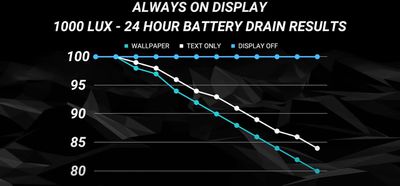
By disabling the wallpaper, the always-on display is black other than for the clock, date, any widgets you have set up on your iOS lock screen, and recent notifications, if enabled. YouTuber PhoneBuff tested whether or not enabling or disabling the wallpaper impacts overall iPhone battery life.
iphone 14 pro ios 16 battery drain2
In the test, it was found that by having the wallpaper enabled for the always-on display, an iPhone 14 Pro will drain around 0.8% per hour, compared to 0.6% an hour for the wallpaper disabled on the always-on display.

In the video, PhoneBuff also compared the iPhone 14 Pro's always-on display technology to the Samsung Galaxy S22 Ultra. One interesting point found in that comparison was that over time, the Galaxy S22 Ultra would move the clock on the always-on display around, presumably to prevent OLED burn-in from a static image being shown on display for prolonged periods.

On the iPhone, no such thing occurs, as time and all other information stay in place. The iPhone 14 Pro and Galaxy S22 Ultra drained at the same rate during the test, reaching 84% after 24 hours of the always-on display.


Related Forum: iPhone

Popular Stories

iOS 26

iOS 26.4 Adds Two New Features to CarPlay

Tuesday March 24, 2026 1:55 pm PDT by
iOS 26.4 was released today, and it includes a couple of new features for CarPlay: an Ambient Music widget and support for voice-based chatbot apps. To update your iPhone 11 or newer to iOS 26.4, open the Settings app and tap on General → Software Update. CarPlay will automatically offer the new features so long as the iPhone connected to your vehicle is running iOS 26.4 or later....
Apple Business hero

Apple Unveils 'Apple Business' All-in-One Platform

Tuesday March 24, 2026 8:53 am PDT by
Apple today announced Apple Business, a new all-in-one platform that unifies device management, productivity tools, and customer outreach features. The service is designed to be a consolidated replacement for several of Apple's existing business-focused offerings, including Apple Business Essentials, Apple Business Manager, and Apple Business Connect. It provides organizations with a single...
AirPods Pro Firmware Feature

Apple Releases New Firmware for AirPods Pro 3, AirPods Pro 2 and AirPods 4

Tuesday March 24, 2026 12:31 pm PDT by
Apple today released new firmware for the AirPods Pro 2, AirPods Pro 3, and the AirPods 4. The firmware has a version number of 8B39, up from 8B34 on the AirPods Pro 3, 8B28 on the AirPods Pro 2, and 8B21 on the AirPods 4. There is no word on what's included in the firmware, but Apple has a support document with limited notes. Most updates are limited to bug fixes and performance...

Top Rated Comments

Saladin12 Avatar
42 months ago
This really highlights how efficient Apple's original implantation (see edit), wallpaper included, really is.

That being said, ever since turning off the wallpaper for AOD, I haven't looked back. So much nicer on my eyes.

Edit: that should say implementation not implantation.. ffs
Score: 24 Votes (Like | Disagree)
philcourage Avatar
42 months ago
You know, if you really want to save battery, cut off the middle man and just shut the phone down and never use it. And don't forget to make a video of your findings, please. Preferably one with a photo of you making a silly face in the thumbnail.
Score: 23 Votes (Like | Disagree)
Macintosh Quadra 840av Avatar
42 months ago
I have stellar battery life with it on, so I'm not gonna bother turning it off at this point. Always make it through the day with plenty of charge left.
Score: 18 Votes (Like | Disagree)
TheYayAreaLiving 🎗️ Avatar
42 months ago
Regardless of the outcome iPhone 14 Pro Max has an amazing battery life.
Score: 14 Votes (Like | Disagree)
hortod1 Avatar
42 months ago
For me the AOD with wallpaper was a huge distraction. Turning off the wallpaper made a huge difference.
Score: 14 Votes (Like | Disagree)
Rychiar Avatar
42 months ago

Yeah I keep it off on the Watch for the increased battery life, it definitely makes an improvement to the battery life. I had it on for a couple of years, but noticed some burn-in due to me using the same watch face. Switching it off made a big improvement to the "ghost" effect over the course of a year though, so it can be somewhat reversed.
I can’t even fathom turning it off on the watch. AOD was a game changer on watches and my series 5 gets the same battery life as my series 2 without... which is a full day charge. I charge every night while Sleeping.
Score: 10 Votes (Like | Disagree)














