
Apple Explains iOS 16.3's New Security Keys Feature - MacRumors
Skip to Content

Apple Explains iOS 16.3's New Security Keys Feature

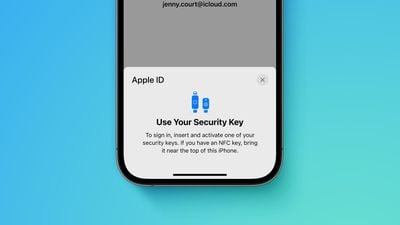
Apple this week shared a support document with details about its new Security Keys for Apple ID feature, available starting with iOS 16.3, iPadOS 16.3, and macOS 13.2. The document provides an overview of the feature and explains how to use it.
Apple advanced security Security Keys screen Feature crop
Apple says the optional security feature is designed for individuals who want "extra protection from targeted attacks, such as phishing or social engineering scams." When it is enabled, signing into an Apple ID requires entering your account's password and then using a FIDO Certified security key to complete two-factor authentication, instead of a traditional six-digit verification code from another Apple device.

Those who enable the feature must be very careful not to lose their security keys, as this could result in losing access to your Apple ID account permanently. For this reason, you must set up at least two security keys, with up to six supported in total.

Apple recommends keeping security keys in more than one place. For example, you could hide a key somewhere at home as a backup solution.

"Keep your security keys in a safe place, and consider keeping a security key in more than one place," the document says. "For example, keep one key at home and one key at work. If you're traveling, you might want to leave one of your security keys at home."

To enable Security Keys for Apple ID on an iPhone or iPad, open the Settings app, tap your name, tap "Password & Security," select "Add Security Keys" and follow the on-screen instructions. On the Mac, open the System Settings app, click on your name, click "Password & Security," click "Add" next to "Security Keys," and follow the steps.

Security keys can be removed at any time by repeating the steps outlined above and tapping or clicking on "Remove All Security Keys," at which point your Apple ID reverts to using a six-digit verification code for two-factor authentication.

Many security keys look similar to a USB thumb drive, with some options available with NFC for wireless use and others equipped with Lightning, USB-C, and/or USB-A ports for direct connectivity with iPhones, iPads, and Macs. Apple recommends a few security keys in the document, such as the YubiKey 5Ci with both Lightning and USB-C.

Apple's document provides some other important details, so it is worth reviewing before enabling the feature. For example, you can't sign in to iCloud for Windows when the feature is enabled, and some types of Apple ID accounts are not supported.


Related Forum: iOS 16

Popular Stories

iOS 26

iOS 26.4 Adds Two New Features to CarPlay

Tuesday March 24, 2026 1:55 pm PDT by
iOS 26.4 was released today, and it includes a couple of new features for CarPlay: an Ambient Music widget and support for voice-based chatbot apps. To update your iPhone 11 or newer to iOS 26.4, open the Settings app and tap on General → Software Update. CarPlay will automatically offer the new features so long as the iPhone connected to your vehicle is running iOS 26.4 or later....
Apple Business hero

Apple Unveils 'Apple Business' All-in-One Platform

Tuesday March 24, 2026 8:53 am PDT by
Apple today announced Apple Business, a new all-in-one platform that unifies device management, productivity tools, and customer outreach features. The service is designed to be a consolidated replacement for several of Apple's existing business-focused offerings, including Apple Business Essentials, Apple Business Manager, and Apple Business Connect. It provides organizations with a single...
AirPods Pro Firmware Feature

Apple Releases New Firmware for AirPods Pro 3, AirPods Pro 2 and AirPods 4

Tuesday March 24, 2026 12:31 pm PDT by
Apple today released new firmware for the AirPods Pro 2, AirPods Pro 3, and the AirPods 4. The firmware has a version number of 8B39, up from 8B34 on the AirPods Pro 3, 8B28 on the AirPods Pro 2, and 8B21 on the AirPods 4. There is no word on what's included in the firmware, but Apple has a support document with limited notes. Most updates are limited to bug fixes and performance...

Top Rated Comments

41 months ago
iPhone Forum:

I lost my security key and forgot my password. Am I screwed?
Score: 21 Votes (Like | Disagree)
krspkbl Avatar
41 months ago
I bought 2x Yubico Keys for this. Well, not just Apple but my other accounts too obviously. I've been thinking of getting a key for a while but now Apple supports it I might as well jump on it now.

I got the Yubico 5 NFC key. Won't arrive for a couple days but excited to set it up. I'll have a read over the document to familiarise myself with how to set it up. Unfortunatly most people won't care about security keys so I am one of the few who see this is as the biggest feature of 16.3!

Requiring 2x keys will put a lot of people off, I think. I spent almost £100 on the 2 keys. Other accounts allow you to set them up with just 1. I think it's good that Apple requires 2 keys to set it up. If you don't want to spend £100 on security then might as well not bother using a key at all.
Score: 13 Votes (Like | Disagree)
41 months ago
“For example, you could hide a key somewhere at home as a backup solution.”

No; please don’t do this. You’ll just forget where you put it

“ … and one key at work.”

*PLEASE* don’t do this! Whoever owns the company can trivially steal your account if you do so. Even if you’re the person who owns the company, whoever cleans your office could steal your account.

You should have a secure place at home to keep important documents. At the very least, a drawer of a filing cabinet, but a small fireproof safe is preferable. You can decide the level of security you need, all the way up to a personal bank vault — but don’t rely on obscurity to keep it secure. Keep the backup there.

And it’s a good idea to have a safe deposit box at a bank. Keep the other backup there.

If you really need more than those two backups, then add more safe deposit boxes at different banks, or a locked fireproof safe at a trusted family member’s home, or some other variation on the theme. But you almost certainly don’t need nor want that many backups.

Incidentally, these are also where you should be keeping portable hard drives with backups of whatever data you most care about.

b&
Score: 7 Votes (Like | Disagree)
riverfreak Avatar
41 months ago

Two-factor authentication is enough major PITA. I don't work for the NSA, so major pass.

Anyone else want a phone dongle?

Wonder how long it will be before a future iOS update turns it on by default.

Here's a scenario; some of the ppl using these things will be dealing with nuclear emergencies and will lose their dongle and backup dongle or have them appropriated for espionage. Doesn't anyone at Apple ever think of worst-case scenarios?

I know. Corporate culture.
2FA is a total pain? So is having your bank account drained.

I don’t use sites or services that can’t be bothered to implement 2FA, at a bare minimum via SMS which I despise as it isn’t always VOIP or travel-friendly. I’ve even moved financial institutions as they refused for years to add 2FA.

Security keys FTW. Different strokes I guess.
Score: 6 Votes (Like | Disagree)
krspkbl Avatar
41 months ago

Two-factor authentication is enough major PITA. I don't work for the NSA, so major pass.

Anyone else want a phone dongle?

Wonder how long it will be before a future iOS update turns it on by default.

Here's a scenario; some of the ppl using these things will be dealing with nuclear emergencies and will lose their dongle and backup dongle. Doesn't anyone at Apple ever think of worst-case scenarios?

I know. Corporate culture.
You already need 2FA enabled on your Apple account for things like Airtags, iCloud Keychain, Find my iPhone, Apple Card/Cash, and Sign in with Apple.

I don't think they'll force people to use physical keys but they'll keep pushing 2FA. As it is I don't mind having 2FA enabled as it makes my account secure.
Score: 5 Votes (Like | Disagree)
41 months ago
If Apple would kindly put NFC in iPads and Macs as well this would be even better, and quicker to use.
Not sure why it isn’t.

Regards keeping one at work, ‘they’ would still need to know the actual account username and password, so fairly low risk, and for most people the most obvious/easiest off site option.
Advantage of course if you work in IT and have access to a media safe 😉
Score: 5 Votes (Like | Disagree)















