Apple today released a macOS Big Sur 11.7.4 update, which is available to those who are still running the macOS Big Sur operating system. macOS Big Sur 11.7.4 comes a few weeks after the launch of macOS Big Sur 11.7.3, which was released alongside macOS Ventura 13.2.
The macOS Big Sur 11.7.4 update can be downloaded for free on all eligible Macs using the Software Update section of System Settings.
Image via Apple Support Community
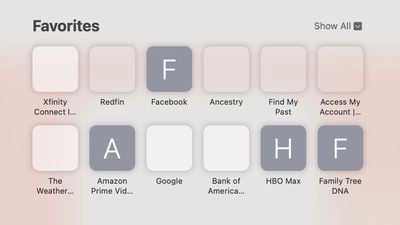
Today's update addresses an ongoing issue with Safari icons. The Big Sur 11.7.3 update introduced a bug that prevented icons from showing up in the Safari Favorites section. Spaces where icons normally appear were blank, making it difficult to see which sites are in the Favorites section at a glance.
According to Apple's security software page, the update includes important security fixes as well. Apple has also released a Safari 16.3.1 update that includes the same fix for Safari Favorite icons.
iOS 26.4 was released today, and it includes a couple of new features for CarPlay: an Ambient Music widget and support for voice-based chatbot apps.
To update your iPhone 11 or newer to iOS 26.4, open the Settings app and tap on General → Software Update. CarPlay will automatically offer the new features so long as the iPhone connected to your vehicle is running iOS 26.4 or later....
Apple today announced Apple Business, a new all-in-one platform that unifies device management, productivity tools, and customer outreach features.
The service is designed to be a consolidated replacement for several of Apple's existing business-focused offerings, including Apple Business Essentials, Apple Business Manager, and Apple Business Connect. It provides organizations with a single...
Tuesday March 24, 2026 12:31 pm PDT by Juli Clover
Apple today released new firmware for the AirPods Pro 2, AirPods Pro 3, and the AirPods 4. The firmware has a version number of 8B39, up from 8B34 on the AirPods Pro 3, 8B28 on the AirPods Pro 2, and 8B21 on the AirPods 4.
There is no word on what's included in the firmware, but Apple has a support document with limited notes. Most updates are limited to bug fixes and performance...
Great. everything seems to be working now. the 11.7.3 update brought quite a significant boost in performance. Big sur is as good and stable as the great mojave now.
Safari 16.3.1 for Big Sur has build number 16614.4.6.11.7 and you can download it here: https://swcdn.apple.com/content/downloads/62/14/032-51569-A_6C8JMC4NSY/3excb9qywqf00i87sfss53vk636jizy6ck/Safari16.3.1BigSurAuto.pkg
Doesn't seem to be one for Monterey yet though.
There was confusion before on the previous version of Safari for Big Sur with build number 16614.4.6.11.6 which came only 2 days ago. The security webpage https://support.apple.com/en-au/HT213638 previously referred to it as being version 16.3.1 whereas it was in fact version 16.3. They changed it back to version 16.3 the next day.
It is highly unusual for updates for Safari to come out in such quick succession, especially for older systems.
Then, there is the 30 min of "Preparing macOS Ventura..." on a M1 MBA 🙃
I remember the days when all of that time was staring at a blank screen. At least now most of the prep time is done ahead of time and the restart is a lot quicker.