
Vivaldi 6.0 Web Browser Introduces Tab Workspaces and Custom Icons

Vivaldi web browser this week pushed out its sixth major release, bringing a new Workspaces feature and custom icons and themes to the highly configurable Mac app.

vivaldi workspaces
Similar in functionality to virtual desktops, the new Workspaces feature is designed to further enhance the browser's powerful tab management by letting users organize tabs by category into separate workspaces and switch easily between them.

For example, users can create Workspaces for productivity, social media, news, and shopping, and then open related tabs within those Workspaces, making it possible to flip between different sets of tabs and keep workflows organized.
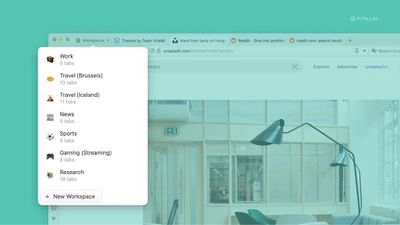
vivaldi 6
Workspaces can also be used in conjunction with Tab Stacks (similar to Safari's Tab Groups). Vivaldi offers the example of maintaining a Sports workspace and having stacks for "Football," "Cricket," "Racing," and "Tennis" to sub-organize your tabs.

In addition, Workspaces support Vivaldi's Tab Tiling feature, allowing users to view multiple tabs in a split-screen or grid within workspace groups.


Elsewhere in Vivaldi 6.0, the browser's built-in theming tools have been upgraded to include new Custom Icons, which can be found in the Themes Gallery. With different icon packs now supported, users can create anything from a Windows 95-inspired look, complete with the familiar buttons and colors, to something more artistic with the Hand Drawn style.

Users can head to Settings -> Themes -> Create more Themes to get started, or use the new filter on the Themes page to see only themes with new custom icons.

Vivaldi browser 6 is a free download for Mac available directly from the Vivaldi website. The browser includes built-in tracking protection, innumerable tab tools, a translation feature, Chrome extensions support, and much more.


Tag: Vivaldi

Popular Stories

Apple Logo Zoomed

Tim Cook Teases Plans for Apple's Upcoming 50th Anniversary

Thursday February 5, 2026 12:54 pm PST by
Apple turns 50 this year, and its CEO Tim Cook has promised to celebrate the milestone. The big day falls on April 1, 2026. "I've been unusually reflective lately about Apple because we have been working on what do we do to mark this moment," Cook told employees today, according to Bloomberg's Mark Gurman. "When you really stop and pause and think about the last 50 years, it makes your heart ...
wwdc sans text feature

Apple Rumored to Announce New Product on February 19

Thursday February 5, 2026 12:22 pm PST by
Apple plans to announce the iPhone 17e on Thursday, February 19, according to Macwelt, the German equivalent of Macworld. The report, citing industry sources, is available in English on Macworld. Apple announced the iPhone 16e on Wednesday, February 19 last year, so the iPhone 17e would be unveiled exactly one year later if this rumor is accurate. It is quite uncommon for Apple to unveil...
Finder Siri Feature

Why Apple's iOS 26.4 Siri Upgrade Will Be Bigger Than Originally Promised

Friday February 6, 2026 3:06 pm PST by
In the iOS 26.4 update that's coming this spring, Apple will introduce a new version of Siri that's going to overhaul how we interact with the personal assistant and what it's able to do. The iOS 26.4 version of Siri won't work like ChatGPT or Claude, but it will rely on large language models (LLMs) and has been updated from the ground up. Upgraded Architecture The next-generation...
iOS 26

iOS 26.3 and iOS 26.4 Will Add These New Features to Your iPhone

Tuesday February 3, 2026 7:47 am PST by
While the iOS 26.3 Release Candidate is now available ahead of a public release, the first iOS 26.4 beta is likely still at least a week away. Following beta testing, iOS 26.4 will likely be released to the general public in March or April. Below, we have recapped known or rumored iOS 26.3 and iOS 26.4 features so far. iOS 26.3 iPhone to Android Transfer Tool iOS 26.3 makes it easier...
maxresdefault

Apple Shows Off a Key Reason to Upgrade to the iPhone 17

Saturday February 7, 2026 9:26 am PST by
Apple today shared an ad that shows how the upgraded Center Stage front camera on the latest iPhones improves the process of taking a group selfie. "Watch how the new front facing camera on iPhone 17 Pro takes group selfies that automatically expand and rotate as more people come into frame," says Apple. While the ad is focused on the iPhone 17 Pro and iPhone 17 Pro Max, the regular iPhone...

Top Rated Comments

florida man Avatar
37 months ago
It’s already a great chrome replacement on Mac, but can’t quit chrome completely until it finally comes out for iOS. Wonder if they’re waiting for the WebKit requirement to go away.
Score: 2 Votes (Like | Disagree)
shapesinaframe Avatar
37 months ago
Been using Vivaldi as my work browser for a couple of years now. The tab stacking and tiling is perfect for working across many web pages at once (I need to have easy access to about 30-50 tabs split out into stacks according to projects and functions).

The degree to which you can customise the UI and it’s functionality is incredible. Nothing else comes close.

I don’t use it for my personal browser, but if it ever gets an iOS app release I’d definitely try it out to see if it could replace Safari.
Score: 2 Votes (Like | Disagree)
Take Flight Avatar
37 months ago

Too janky for me.

I want to open browser, go to website, maybe 4 tabs at a time, close tabs when I am done, don’t want to waste CPU cycles.

I like clean UI but even more I like to use my systems cleanly.

That’s why my systems don’t slow down and I report annoying CleanmyMac ads as spam.
Congrats on your computing discipline.
Score: 1 Votes (Like | Disagree)
Paradoxally Avatar
37 months ago
I prefer Arc's implementation of spaces and profiles, but this is a good alternative.


I report annoying CleanmyMac ads as spam.
Now all you need is a good adblocker!
Score: 1 Votes (Like | Disagree)
Verified Whiskey Avatar
37 months ago
Hmm. Maybe I need to try this out. My work requires me to have about 20+ tabs open at once, it would be nice to try out different tab management.
Score: 1 Votes (Like | Disagree)















