
Some Apple Watch Users Complain of Odd Green Screen Tint Following watchOS 9.5 Update - MacRumors
Skip to Content

Some Apple Watch Users Complain of Odd Green Screen Tint Following watchOS 9.5 Update

Since updating to watchOS 9.5, some Apple Watch owners have been noticing an unusual green tint to their watch display when accessing certain UI elements, based on complaints shared on Reddit and the MacRumors Forums.
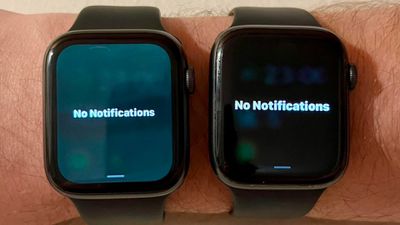
watchos 9 5 tint

Image of green tint appearing on the left, from Redditor whosyourdaddy

Almost all of the models affected are Apple Watch Series 8 and older devices, with earlier models seemingly faring worse. Users afflicted with the issue say that the green tint is visible on the passcode input screen, when accessing the Control Center, and when pulling down notifications. Based on the majority of reports, fewer Apple Watch SE and Apple Watch Ultra models are affected by the issue.

Some have suggested that Apple may have intentionally added the tint, but this seems unlikely given that most users agree that it is uncharacteristically ugly and looks out of place. One user described it as looking like a "washed out LCD" screen rather than the pure OLED blacks they are used to seeing on their watch.

It's not entirely clear what's going on, but according to user reports, the weird tint has been popping up since last week's watchOS 9.5 update, suggesting it's a software issue rather than anything hardware related. Some people have been able to get the tint to go away after restarting, but others have not had the same success.

Apple has fixed similar color tint issues on iPhones in the past that were caused by a software bug. If this is indeed a software problem, Apple should be able to address the issue in a future watchOS update. watchOS 9.6 is in testing right now, but it's not yet clear if that removes the tint.

(Thanks, Alex!)

Popular Stories

iOS 26

iOS 26.4 Adds Two New Features to CarPlay

Tuesday March 24, 2026 1:55 pm PDT by
iOS 26.4 was released today, and it includes a couple of new features for CarPlay: an Ambient Music widget and support for voice-based chatbot apps. To update your iPhone 11 or newer to iOS 26.4, open the Settings app and tap on General → Software Update. CarPlay will automatically offer the new features so long as the iPhone connected to your vehicle is running iOS 26.4 or later....
Apple Business hero

Apple Unveils 'Apple Business' All-in-One Platform

Tuesday March 24, 2026 8:53 am PDT by
Apple today announced Apple Business, a new all-in-one platform that unifies device management, productivity tools, and customer outreach features. The service is designed to be a consolidated replacement for several of Apple's existing business-focused offerings, including Apple Business Essentials, Apple Business Manager, and Apple Business Connect. It provides organizations with a single...
AirPods Pro Firmware Feature

Apple Releases New Firmware for AirPods Pro 3, AirPods Pro 2 and AirPods 4

Tuesday March 24, 2026 12:31 pm PDT by
Apple today released new firmware for the AirPods Pro 2, AirPods Pro 3, and the AirPods 4. The firmware has a version number of 8B39, up from 8B34 on the AirPods Pro 3, 8B28 on the AirPods Pro 2, and 8B21 on the AirPods 4. There is no word on what's included in the firmware, but Apple has a support document with limited notes. Most updates are limited to bug fixes and performance...

Top Rated Comments

orbital~debris Avatar
37 months ago

Almost all of the models affected are Apple Watch Series 8 and older devices
Isn't that just a waffly way of saying "all models"?
Score: 30 Votes (Like | Disagree)
jclardy Avatar
37 months ago
Ah, the accelerate screen burn-in update, just in time for Series 9.
Score: 11 Votes (Like | Disagree)
ghostface147 Avatar
37 months ago
I guess I’m one of the non-affected one fortunately.
Score: 11 Votes (Like | Disagree)
orbital~debris Avatar
37 months ago

It's clear. I am using Apple Watch Series 5 with watchOS 9.6 and unfortunately the tint is not removed.


"Unfortunately, no one can be notified what the Matrix is. You have to see it for yourself."
Score: 7 Votes (Like | Disagree)
TheYayAreaLiving 🎗️ Avatar
37 months ago
Can confirm my Apple Watch Ultra is fine but I will double-check.
Score: 6 Votes (Like | Disagree)
surfzen21 Avatar
37 months ago
Well that's not good.

Thankfully, my AWU is unaffected.
Score: 6 Votes (Like | Disagree)
















