iOS 17 Locks Your Safari Private Browsing Behind Face ID
Apple is enhancing the security of Safari in iOS 17, and private browsing now requires Face ID authentication or a passcode to access. If you open up a private browsing window in Safari, you will need to authenticate with Face ID.
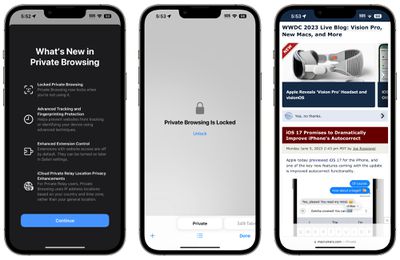
That means someone who has access to your unlocked phone and opens your Safari browser won't be able to get to your private browsing history without secondary authentication. Face ID or a passcode can be used to access the Safari private tabs.
Private browsing also completely blocks known trackers from loading on pages and removes tracking added to URLs as you browse, improving privacy. Websites are prevented from tracking or identifying your device with these new additions, plus Apple also offers improved extension control.
In private mode, extensions with website access are turned off, and you will need to manually re-enable them. iCloud Private Relay also uses IP address locations based on country and time zone rather than a general location.
Safari in iOS 17 is also gaining a Profiles feature so you can keep your personal browsing and work browsing separate, with different histories, Tab Groups, cookies, and favorites.
Popular Stories
iOS 26.4 was released today, and it includes a couple of new features for CarPlay: an Ambient Music widget and support for voice-based chatbot apps.
To update your iPhone 11 or newer to iOS 26.4, open the Settings app and tap on General → Software Update. CarPlay will automatically offer the new features so long as the iPhone connected to your vehicle is running iOS 26.4 or later....
Apple today announced Apple Business, a new all-in-one platform that unifies device management, productivity tools, and customer outreach features.
The service is designed to be a consolidated replacement for several of Apple's existing business-focused offerings, including Apple Business Essentials, Apple Business Manager, and Apple Business Connect. It provides organizations with a single...
Apple today released new firmware for the AirPods Pro 2, AirPods Pro 3, and the AirPods 4. The firmware has a version number of 8B39, up from 8B34 on the AirPods Pro 3, 8B28 on the AirPods Pro 2, and 8B21 on the AirPods 4.
There is no word on what's included in the firmware, but Apple has a support document with limited notes. Most updates are limited to bug fixes and performance...
























