
Apple Releases First Public Betas of iOS 17 and iPadOS 17 - MacRumors
Skip to Content

Apple Releases First Public Betas of iOS 17 and iPadOS 17

Apple today seeded the first betas of iOS 17 and iPadOS 17 to public beta testers, opening up the new software to the general public for the first time since the Worldwide Developers Conference in June. Developers have had three betas so far, and the first public beta offers the same content as the third developer beta.


Public beta testers who have signed up for Apple's beta testing program can download the iOS 17 and iPadOS 17 updates by opening up the Settings app, going to General, tapping on the Software Update section and toggling on the iOS 17 Public Beta option.

iOS 17 adds a new StandBy option for the iPhone, allowing it to serve as an information hub when it is in a horizontal position and connected to a charger. StandBy mode displays the time, Live Activities, incoming notifications, and tons of widgets.

StandBy iOS 17
Speaking of widgets, widgets you use on the Lock Screen and Home Screen are interactive, so you can do things like control a smart light or check off a Reminder without opening an app. Autocorrect is smarter than before, and it's easier to correct mistakes with a quick tap.

AirDrop has a new NameDrop feature for quickly sharing contact information with a person nearby, and the Phone app has customizable Contact Posters that let you choose what people see when you call them.
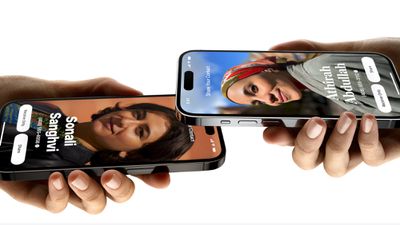
ios 17 namedrop
Live Voicemail shows the voicemail that someone is leaving right on your Lock Screen so you can pick up if it's important, and the Messages app has a refined look and a Check-In feature that's meant to help you get to your destination safely.
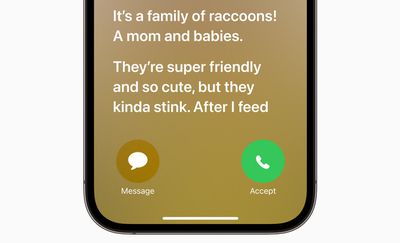
Live Voicemail iOS 17
FaceTime supports video messages so you can leave a video voicemail if someone misses a call, plus you can use it on the Apple TV. Safari has a locked private browsing window and a password sharing feature, and better tracking prevention. The Maps app now works offline, the Photos app can recognize your pets, and Visual Look Up works with food, symbols, videos, and more.

facetime video messages ios 17
There's a new mood tracking feature available in the Health app, and later this year, Apple also plans to add a journaling app.
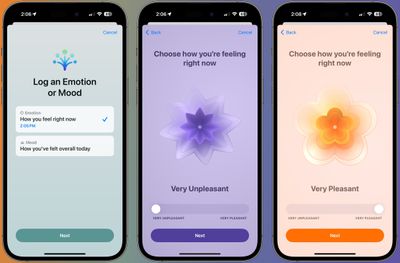
ios 17 mood updates
For a complete overview of all of the new features in iOS 17, we have a dedicated iOS 17 roundup. iPadOS 17 also has some iPad-only features like a revamped Lock Screen, with details available in our separate iPadOS 17 roundup.


Related Forums: iOS 17, iPadOS 17

Popular Stories

iOS 26

iOS 26.4 Adds Two New Features to CarPlay

Tuesday March 24, 2026 1:55 pm PDT by
iOS 26.4 was released today, and it includes a couple of new features for CarPlay: an Ambient Music widget and support for voice-based chatbot apps. To update your iPhone 11 or newer to iOS 26.4, open the Settings app and tap on General → Software Update. CarPlay will automatically offer the new features so long as the iPhone connected to your vehicle is running iOS 26.4 or later....
Apple Business hero

Apple Unveils 'Apple Business' All-in-One Platform

Tuesday March 24, 2026 8:53 am PDT by
Apple today announced Apple Business, a new all-in-one platform that unifies device management, productivity tools, and customer outreach features. The service is designed to be a consolidated replacement for several of Apple's existing business-focused offerings, including Apple Business Essentials, Apple Business Manager, and Apple Business Connect. It provides organizations with a single...
AirPods Pro Firmware Feature

Apple Releases New Firmware for AirPods Pro 3, AirPods Pro 2 and AirPods 4

Tuesday March 24, 2026 12:31 pm PDT by
Apple today released new firmware for the AirPods Pro 2, AirPods Pro 3, and the AirPods 4. The firmware has a version number of 8B39, up from 8B34 on the AirPods Pro 3, 8B28 on the AirPods Pro 2, and 8B21 on the AirPods 4. There is no word on what's included in the firmware, but Apple has a support document with limited notes. Most updates are limited to bug fixes and performance...

Top Rated Comments

Originalblez Avatar
35 months ago
And thus starts my annual countdown to giving in to the impulse to put beta versions on all my devices despite logic saying wait. I wonder if can make it a whole week.
Score: 49 Votes (Like | Disagree)
35 months ago

And thus starts my annual countdown to giving in to the impulse to put beta versions on all my devices despite logic saying wait. I wonder if can make it a whole week.
Man I really want to, but I’m going to Japan for two weeks next week. I simply cannot afford to have my phone or my watch go mess up over there
Score: 14 Votes (Like | Disagree)
fenderbass146 Avatar
35 months ago
Been using Developer beta on all my main devices (macbook m1 pro, ipad pro m1, and iphone 14 pro) and there are no show stopping issues I have noticed in my use. Biggest issue is Safari web apps have been flakey and I went back to using Web Catalog and Edge apps in the meantime.

Pretty impressed with this update so far and the extended monitor support on the ipad is pretty impressive with Stage manager.
Score: 13 Votes (Like | Disagree)
TheYayAreaLiving 🎗️ Avatar
35 months ago
For those that are in doubt… this is a very helpful video.

Score: 8 Votes (Like | Disagree)
hovscorpion12 Avatar
35 months ago
imagine the impulse of waiting the whole summer and waiting for official release
Score: 8 Votes (Like | Disagree)
Realityck Avatar
35 months ago

Im on dev beta 3 the one one released yesterday. how do i download the public beta?
You don't usually it's the same build.
Score: 7 Votes (Like | Disagree)















