Latest iOS 17 Beta Includes 'Save to Photos' Option in Full-Page Screenshot Interface, Better Dual-SIM Support
Apple in the latest iOS 17 public and developer betas has added support for saving full-page screenshots as image files in apps where the system supports the feature.
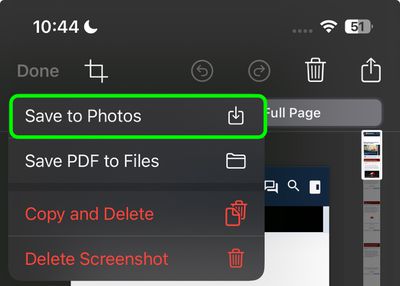
In iOS 16, users can already opt to take a screenshot in apps like Safari, Notes, and Maps, and save the full-page content, or scrolling content, as a PDF document. But in the updated iOS 17 developer beta 3 and the new public beta, Apple has now added a "Save to Photos" option to the Full Page screenshot interface for added flexibility.
The new option also appears in the latest beta versions of iPadOS 17 and macOS Sonoma. The ability to save "scrolling screenshots" as images has been available on Android devices for a while now, but iPhone users have had to use third-party apps like Tailor to achieve the same thing.
In another notable addition spotted by TechCrunch, users are also getting better dual-SIM support, with the ability to sort messages based on SIM, separate ringtones for each SIM, and the ability to choose a SIM when calling back an unknown number.
Public beta testers who have signed up for Apple's beta testing program can download the iOS 17, iPadOS 17, and macOS Sonoma updates now. Apple is expected to release final stable versions of iOS 17, iPadOS 17, and macOS Sonoma later in the fall.
Popular Stories
iOS 26.4 was released today, and it includes a couple of new features for CarPlay: an Ambient Music widget and support for voice-based chatbot apps.
To update your iPhone 11 or newer to iOS 26.4, open the Settings app and tap on General → Software Update. CarPlay will automatically offer the new features so long as the iPhone connected to your vehicle is running iOS 26.4 or later....
Apple today announced Apple Business, a new all-in-one platform that unifies device management, productivity tools, and customer outreach features.
The service is designed to be a consolidated replacement for several of Apple's existing business-focused offerings, including Apple Business Essentials, Apple Business Manager, and Apple Business Connect. It provides organizations with a single...
Apple today released new firmware for the AirPods Pro 2, AirPods Pro 3, and the AirPods 4. The firmware has a version number of 8B39, up from 8B34 on the AirPods Pro 3, 8B28 on the AirPods Pro 2, and 8B21 on the AirPods 4.
There is no word on what's included in the firmware, but Apple has a support document with limited notes. Most updates are limited to bug fixes and performance...
























