Everything New in iOS 17 Beta 4

Apple has released the fourth beta of the upcoming iOS 17 software release to developers for testing purposes, and like almost all new betas, the operating system brings a number of small tweaks and changes as Apple refines the software ahead of launch.
General iOS 17 Feature Blue Green
Here's everything new that we've found so far in the fourth beta of iOS 17.

NameDrop Toggle

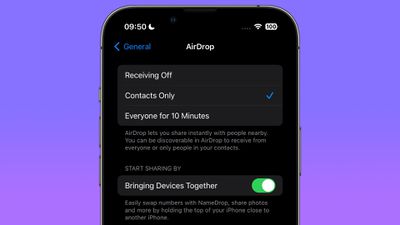
In the AirDrop menu in Settings, Apple has added a "Start Sharing By" section that includes a toggle called "Bringing Devices Together," which allows users to manually switch NameDrop on and off.
namedrop settings toggle
NameDrop is the new iOS 17 feature that lets you hold your iPhone near someone else's ‌iPhone‌ or Apple Watch to exchange contact information. Previously, there was no way to disable it.

iMessage App Menu

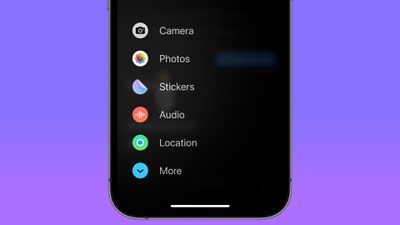
In iOS 17, all Messages apps and tools like the camera and photo options can be accessed by tapping on the "+" button, which brings up a menu column. In fourth beta, Apple has tweaked the design of the icons.
messages apps menu
The Camera icon has changed from a shutter button to a traditional camera glyph. The Photos icon no longer shows the most recent picture taken, and is now just the standard ‌Photos‌ app icon. Cash, where it appears, now has a black circular background. The Audio icon has become a white waveform on a red background instead of a red waveform on a black background, and the Location icon is now encircled in green to look similar to Find My. The More icon is also circular instead of an oblong shape.

Standby Notification Preview Toggle

In the Standby menu in Settings, Apple has added a toggle called "Show Preview on Tap Only," which when enabled causes Standby to hide the preview of a notification until you tap on it.
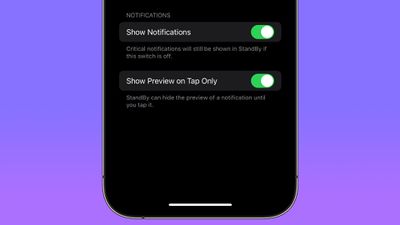
standby preview toggle
When you're not using your ‌iPhone‌, you can put it horizontally on a charger to activate iOS 17's new StandBy mode, a full-screen display with information you can see at a glance.

Mental Wellbeing

Apple has made minor design refinements to the Mental Wellbeing section of the Health app, with updated animations when logging your mood.
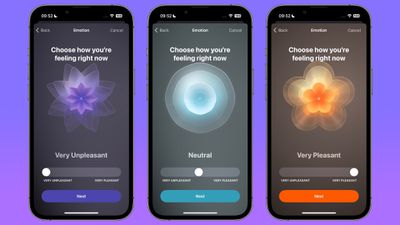
log mood animations
The animations have been made a little less angular, and are now softer, smoother, and slightly more florid.

New Home Screen & App Library Icon

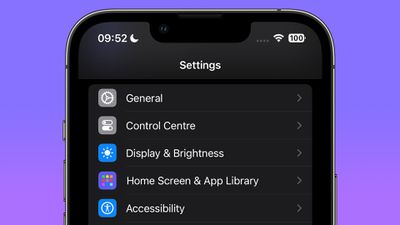
Apple has changed the Settings menu icon for Home Screen & App Library, which was previously a white outline of an ‌iPhone‌ showing a ‌Home Screen‌ on a blue background.

home screen settings
In the fourth beta, it is now represented by three rows of multicolored app-style icons on a purple background.

Tweaked Apple TV Remote Icon

In Control Center, Apple has made a minor tweak to the Apple TV Remote button, which now has a black circle representing the click wheel, while the Standby button in the top-right corner has been removed.
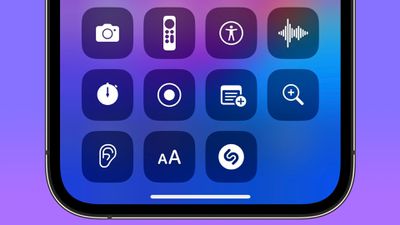
apple remote button

Other New Features and Changes

Find something that we didn't mention here? Let us know in the comments below.

Related Forums: iOS 17, iPadOS 17

Popular Stories

Apple Logo Zoomed

Tim Cook Teases Plans for Apple's Upcoming 50th Anniversary

Thursday February 5, 2026 12:54 pm PST by
Apple turns 50 this year, and its CEO Tim Cook has promised to celebrate the milestone. The big day falls on April 1, 2026. "I've been unusually reflective lately about Apple because we have been working on what do we do to mark this moment," Cook told employees today, according to Bloomberg's Mark Gurman. "When you really stop and pause and think about the last 50 years, it makes your heart ...
wwdc sans text feature

Apple Rumored to Announce New Product on February 19

Thursday February 5, 2026 12:22 pm PST by
Apple plans to announce the iPhone 17e on Thursday, February 19, according to Macwelt, the German equivalent of Macworld. The report, citing industry sources, is available in English on Macworld. Apple announced the iPhone 16e on Wednesday, February 19 last year, so the iPhone 17e would be unveiled exactly one year later if this rumor is accurate. It is quite uncommon for Apple to unveil...
Finder Siri Feature

Why Apple's iOS 26.4 Siri Upgrade Will Be Bigger Than Originally Promised

Friday February 6, 2026 3:06 pm PST by
In the iOS 26.4 update that's coming this spring, Apple will introduce a new version of Siri that's going to overhaul how we interact with the personal assistant and what it's able to do. The iOS 26.4 version of Siri won't work like ChatGPT or Claude, but it will rely on large language models (LLMs) and has been updated from the ground up. Upgraded Architecture The next-generation...
iOS 26

iOS 26.3 and iOS 26.4 Will Add These New Features to Your iPhone

Tuesday February 3, 2026 7:47 am PST by
While the iOS 26.3 Release Candidate is now available ahead of a public release, the first iOS 26.4 beta is likely still at least a week away. Following beta testing, iOS 26.4 will likely be released to the general public in March or April. Below, we have recapped known or rumored iOS 26.3 and iOS 26.4 features so far. iOS 26.3 iPhone to Android Transfer Tool iOS 26.3 makes it easier...
iphone 17 pro dark blue 1

iPhone 18 Pro Max Rumored to Deliver Next-Level Battery Life

Friday February 6, 2026 5:14 am PST by
The iPhone 18 Pro Max will feature a bigger battery for continued best-in-class battery life, according to a known Weibo leaker. Citing supply chain information, the Weibo user known as "Digital Chat Station" said that the iPhone 18 Pro Max will have a battery capacity of 5,100 to 5,200 mAh. Combined with the efficiency improvements of the A20 Pro chip, made with TSMC's 2nm process, the...

Top Rated Comments

dreamerstree Avatar
33 months ago
I found in the beta that you can reorder or change the defaults in the messages + screen.

If you tap the +, you can touch and hold, and then drag the options to reorder them. If you go to more, you can touch and hold and then drag to the top of the screen to add the item to the defaults list. Likewise, you can remove defaults by dragging them to the bottom of the screen
Score: 15 Votes (Like | Disagree)
hagar Avatar
33 months ago

A lot of nothing ?
What did you expect? iOS 18?
Score: 10 Votes (Like | Disagree)
SkimPappa Avatar
33 months ago

I found in the beta that you can reorder or change the defaults in the messages + screen.

If you tap the +, you can touch and hold, and then drag the options to reorder them. If you go to more, you can touch and hold and then drag to the top of the screen to add the item to the defaults list. Likewise, you can remove defaults by dragging them to the bottom of the screen
Thank you so much! It was driving me bananas that they were hiding one that I use all the time! This was so wonderful to learn!
Score: 8 Votes (Like | Disagree)
il_teo77 Avatar
33 months ago
I don't know if it is new or not. But when you ask Siri to perform a task and it cannot do it immediately there is now a sound when the app is "thinking". I know I didn't explain myself very well, but I hope you get the idea.
Score: 8 Votes (Like | Disagree)
thiscatisfat Avatar
33 months ago
Can't wait to make my 12 mini even slower with iOS 17.
Score: 7 Votes (Like | Disagree)
secDJ Avatar
33 months ago
Horrible that they removed the thin font option from the Lock Screen. It looked so clean. Why not giving people options? tThey have the slider anyways.
Score: 6 Votes (Like | Disagree)