Apple Watch Series 9 and Ultra 2 Gaining New 'Double Tap' Gesture Control Feature - MacRumors
Skip to Content

Apple Watch Series 9 and Ultra 2 Gaining New 'Double Tap' Gesture Control Feature

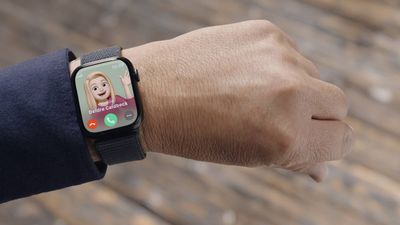
Following the announcement of the Apple Watch Series 9, Apple today detailed a new feature coming to the smartwatch next month. Called "Double Tap," the new gesture feature lets you control the Series 9 by tapping your thumb and index finger together twice.
f d193cf242e634347eaeea2044e050dd811cef19c
Users will be able to answer calls, stop alarms, open Smart Stack, play and pause Music, and more by using Double Tap. Apple said the new feature should make it easier to navigate the Apple Watch when you're one-handed, like walking your dog or holding a cup of coffee.

Double Tap will also be available on the new Apple Watch Ultra 2. The feature will be available in a software update next month for the Series 9 and Ultra 2.

Related Forum: Apple Watch

Popular Stories

iOS 26

iOS 26.4 Adds Two New Features to CarPlay

Tuesday March 24, 2026 1:55 pm PDT by
iOS 26.4 was released today, and it includes a couple of new features for CarPlay: an Ambient Music widget and support for voice-based chatbot apps. To update your iPhone 11 or newer to iOS 26.4, open the Settings app and tap on General → Software Update. CarPlay will automatically offer the new features so long as the iPhone connected to your vehicle is running iOS 26.4 or later....
Apple Business hero

Apple Unveils 'Apple Business' All-in-One Platform

Tuesday March 24, 2026 8:53 am PDT by
Apple today announced Apple Business, a new all-in-one platform that unifies device management, productivity tools, and customer outreach features. The service is designed to be a consolidated replacement for several of Apple's existing business-focused offerings, including Apple Business Essentials, Apple Business Manager, and Apple Business Connect. It provides organizations with a single...
AirPods Pro Firmware Feature

Apple Releases New Firmware for AirPods Pro 3, AirPods Pro 2 and AirPods 4

Tuesday March 24, 2026 12:31 pm PDT by
Apple today released new firmware for the AirPods Pro 2, AirPods Pro 3, and the AirPods 4. The firmware has a version number of 8B39, up from 8B34 on the AirPods Pro 3, 8B28 on the AirPods Pro 2, and 8B21 on the AirPods 4. There is no word on what's included in the firmware, but Apple has a support document with limited notes. Most updates are limited to bug fixes and performance...


Top Rated Comments

33 months ago
The finger tap thing isn't new. Perhaps the trigger of some specific functions are new, but in the current WatchOS you can use Assistive Touch to customize many different gestures using a finger tap(s) or even a fist clench.
Score: 16 Votes (Like | Disagree)
JPack Avatar
33 months ago
It almost seemed like Apple was about to make an entire event out of this one feature. 😄
Score: 9 Votes (Like | Disagree)
ApplesAreSweet&Sour Avatar
33 months ago
This "new" feature has been available since watchOS 8.3. Apple even did a video on it themselves, explaining what it does and how to set it up.

So Apple will be removing gesture controls for Series 8 and older if you upgrade to watchOS 10?


Attachment Image
Score: 8 Votes (Like | Disagree)
vertsix Avatar
33 months ago
Don't be fooled - this is already on your watch under Accessibility.
Score: 7 Votes (Like | Disagree)
33 months ago
The thing is most apple watches can already do this as an accessibility feature. It was almost comical this got such a long segment in the keynote.
Score: 6 Votes (Like | Disagree)
Johnny907 Avatar
33 months ago
It didn't gain Jack. This has been available under Accessibility since WatchOS 8.
Accessibility -> Assistive Touch -> Hand Gestures and then scroll down to Customize Gestures. Set Double Pinch to Tap and you can do everything shown in that promo right now. Or you can really get fancy and customize all the options like clenching your fist to go forward and back in menus.
I've been using these settings to control my watch during workouts for a couple years now, which is evidently how long it took Apple to figure out it had a useful feature it should promote, especially if it helps them sell a yawn of a new product that 100% isn't required to use it.
Score: 5 Votes (Like | Disagree)

















