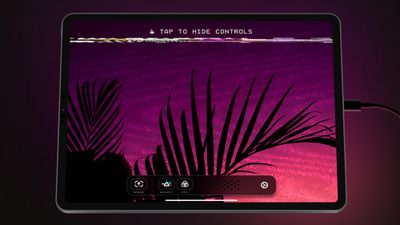
Lux, the developers behind popular camera app Halide, today announced the launch of Orion Video System, an app that is designed to turn the iPad into an external HDMI monitor that can be used with computers, gaming consoles, cameras, and other devices.
Using the Orion app requires iOS 17, an iPad that has a USB-C port, and a USB-C Video Capture Card. USB-C Capture Cards can be purchased from websites like Amazon for around $15 to $20.
The app is able to work with any device that supports HDMI, including Macs, PCs, game consoles like the Nintendo Switch, retro consoles, and cameras. According to the developers, Orion Video System will upscale Nintendo Switch gameplay to 4K in realtime. When used with a camera, Orion allows an iPad to be used for checking framing, focus, and color for video capture and stills.
Orion is free to download, and there is a demo mode that allows users to test the app without a Capture Card. There is an optional one-time $5 upgrade purchase to unlock AI-powered 4K upscaling, CRT Emulation, and Picture Adjustment.
iOS 26.4 was released today, and it includes a couple of new features for CarPlay: an Ambient Music widget and support for voice-based chatbot apps.
To update your iPhone 11 or newer to iOS 26.4, open the Settings app and tap on General → Software Update. CarPlay will automatically offer the new features so long as the iPhone connected to your vehicle is running iOS 26.4 or later....
Apple today announced Apple Business, a new all-in-one platform that unifies device management, productivity tools, and customer outreach features.
The service is designed to be a consolidated replacement for several of Apple's existing business-focused offerings, including Apple Business Essentials, Apple Business Manager, and Apple Business Connect. It provides organizations with a single...
Tuesday March 24, 2026 12:31 pm PDT by Juli Clover
Apple today released new firmware for the AirPods Pro 2, AirPods Pro 3, and the AirPods 4. The firmware has a version number of 8B39, up from 8B34 on the AirPods Pro 3, 8B28 on the AirPods Pro 2, and 8B21 on the AirPods 4.
There is no word on what's included in the firmware, but Apple has a support document with limited notes. Most updates are limited to bug fixes and performance...
I guess it's cool but, you can get better portable monitors than an ipad for a display.
True (and I have one -- only 1080p and not the most accurate colors, but it works) but that's one more thing to bring with you. If you already own an iPad and a small adapter (or buy one -- they are inexpensive), that's easier and less expensive than bringing yet one more "device" with you.
Am I the only one on the planet that thinks that 4:3 still has plenty of merit, particularly for photos and monitors. Given that most websites, and I've noticed American ones particularly, run down the middle of a 16:9 monitor leaving most of it as blank real estate. 4:3 is beneficial in those situations, and the miles of extra width 16:9 gives is often chasing an elusive use.
This is what I've been waiting for. This is the first step towards plugging your Xbox, Playstation, or anything else into your VisionPro USB-C port so that you have a personal large screen for any video input you might have.