
iPhone's Roadside Assistance via Satellite Feature Tested in New Video - MacRumors
Skip to Content

iPhone's Roadside Assistance via Satellite Feature Tested in New Video

Starting with iOS 17, all iPhone 14 and iPhone 15 models offer a roadside assistance via satellite feature that allows users in the U.S. to contact roadside assistance company AAA for vehicle service when outside of cellular and Wi-Fi coverage. In a video shared today, tech reviewer Brian Tong provided a look at the feature in action.
apple roadside assistance
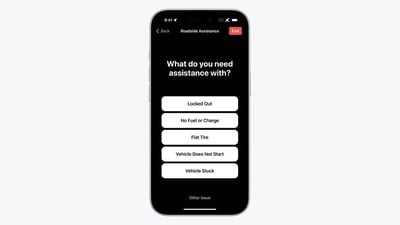
To use the feature, open the Messages app and start a new message. Next, type "roadside" into the address field. When there is no cellular and Wi-Fi coverage available, a "Roadside Assistance" option will appear. Tap on "Roadside Assistance" and follow the on-screen instructions to connect your iPhone to a Globalstar satellite and request help from AAA. You'll need to be outside with a clear view of the sky and horizon, according to Apple.

Tong demoed the feature by having AAA come to jump-start his car's battery. The feature can also be used if you are locked out of your vehicle, have a flat tire, run out of fuel, and for other services offered by AAA.


The feature is included free for two years starting at the time of activation of any new iPhone 14 or iPhone 15 model, with service covered per your AAA membership plan. If you aren't a AAA member, you can still use the service on a pay-per-use basis.

Apple said roadside assistance via satellite is available "beginning" in the U.S., suggesting that it will expand the feature to additional countries over time, but it has not provided any specific details. In Canada, there is a AAA-like organization called CAA, so it would make sense for the service to expand to that country eventually.

Roadside assistance via satellite is an extension of the Emergency SOS via satellite feature. Apple recently extended free usage of the satellite features for an additional year.


Related Forums: iOS 17, iPadOS 17

Popular Stories

iOS 26

iOS 26.4 Adds Two New Features to CarPlay

Tuesday March 24, 2026 1:55 pm PDT by
iOS 26.4 was released today, and it includes a couple of new features for CarPlay: an Ambient Music widget and support for voice-based chatbot apps. To update your iPhone 11 or newer to iOS 26.4, open the Settings app and tap on General → Software Update. CarPlay will automatically offer the new features so long as the iPhone connected to your vehicle is running iOS 26.4 or later....
Apple Business hero

Apple Unveils 'Apple Business' All-in-One Platform

Tuesday March 24, 2026 8:53 am PDT by
Apple today announced Apple Business, a new all-in-one platform that unifies device management, productivity tools, and customer outreach features. The service is designed to be a consolidated replacement for several of Apple's existing business-focused offerings, including Apple Business Essentials, Apple Business Manager, and Apple Business Connect. It provides organizations with a single...
AirPods Pro Firmware Feature

Apple Releases New Firmware for AirPods Pro 3, AirPods Pro 2 and AirPods 4

Tuesday March 24, 2026 12:31 pm PDT by
Apple today released new firmware for the AirPods Pro 2, AirPods Pro 3, and the AirPods 4. The firmware has a version number of 8B39, up from 8B34 on the AirPods Pro 3, 8B28 on the AirPods Pro 2, and 8B21 on the AirPods 4. There is no word on what's included in the firmware, but Apple has a support document with limited notes. Most updates are limited to bug fixes and performance...

Top Rated Comments

xxFoxtail Avatar
31 months ago
I would have never known to type roadside into a new message.
Score: 11 Votes (Like | Disagree)
31 months ago
As a AAA member this is great news.
Score: 9 Votes (Like | Disagree)
31 months ago

I get their point. Apple could add a button to access the feature in Settings > Emergency SOS.
Even having it be clicking on the satellite symbol in the row of status icons that would bring up a menu of the options would be a massive improvement.

They could present a button in the messages app now that you’re in SOS Satellite mode to on board you to your options if you need them.

So many things they could do to improve this flow to increase discoverability and usefulness.

It feels like they hid this like a gesture. Except there isn’t anything “natural” about accessing it this way.

My guess is they are still improving on the feature and are trying to limit its use until they’ve completed. Only way I can explain such a complex usability flow for a company that focuses more on user experience than anyone else in the technology industry.
Score: 9 Votes (Like | Disagree)
31 months ago

Seems like a very awkward way to access a critical emergency feature
Seems like exactly how you access it
Score: 9 Votes (Like | Disagree)
Joe Rossignol Avatar
31 months ago

It's perfectly fine and easy. If you fear it, then I'd suggest you NEVER drive anywhere without cellular coverage. Just out of curiosity, how would you suggest Apple should do it?
I get their point. Apple could add a button to access the feature in Settings > Emergency SOS.
Score: 8 Votes (Like | Disagree)
31 months ago
Whoa... What a killer feature! And unexpected - thanx Apple.

I can see using this on roadtrips where cellular service is non-existent, spotty, or unreliable. Such as Joshua Tree National Park or the Mojave Desert, as just two examples.
Score: 7 Votes (Like | Disagree)















