iOS 17.4 Beta Adds CarPlay Option to Show Upcoming Maneuvers in Instrument Cluster - MacRumors
Skip to Content

iOS 17.4 Beta Adds CarPlay Option to Show Upcoming Maneuvers in Instrument Cluster

The fourth beta of iOS 17.4 that Apple released today adds a new CarPlay feature, according to the notes that Apple provided to developers.
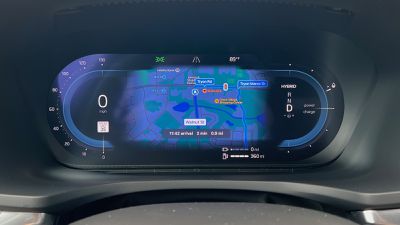
volvo s60 drivers apple maps
In supported ‌CarPlay‌ vehicles, there's now an Apple Maps option to show information about upcoming maneuvers in the instrument cluster. ‌CarPlay‌ users will be able to swap the display type between the main and instrument cluster by tapping on the map configuration button located in the upper right of the main Maps screen.

Apple this year introduced a new next-generation ‌CarPlay‌ experience that will show up in high-end vehicles starting in 2024, but this feature addition is separate from that.

It appears this new experience will be available in vehicles that support a dual-screen Apple Maps CarPlay experience, with a supplementary ‌Apple Maps‌ view that's located in the driver display or head-up display. ‌CarPlay‌ began supporting this functionality several years ago, but manufacturers have been slow to adopt it with BMW, Volvo, and Polestar being among the first on select vehicles.

While those vehicles have supported an ‌Apple Maps‌ view in the driver display, they have not shown text prompts such as upcoming turns or lane guidance, so it appears today's addition will give users some control about what information appears where.

With the iOS 17.4 update, the driver display will optionally display turn-by-turn directions so that ‌CarPlay‌ users can navigate without having to look away from the display directly in front of them.

iOS 17.4 is limited to developers and public beta testers at this time, but it will see a public release in March.


Related Roundup: CarPlay

Popular Stories

iOS 26

iOS 26.4 Adds Two New Features to CarPlay

Tuesday March 24, 2026 1:55 pm PDT by
iOS 26.4 was released today, and it includes a couple of new features for CarPlay: an Ambient Music widget and support for voice-based chatbot apps. To update your iPhone 11 or newer to iOS 26.4, open the Settings app and tap on General → Software Update. CarPlay will automatically offer the new features so long as the iPhone connected to your vehicle is running iOS 26.4 or later....
Apple Business hero

Apple Unveils 'Apple Business' All-in-One Platform

Tuesday March 24, 2026 8:53 am PDT by
Apple today announced Apple Business, a new all-in-one platform that unifies device management, productivity tools, and customer outreach features. The service is designed to be a consolidated replacement for several of Apple's existing business-focused offerings, including Apple Business Essentials, Apple Business Manager, and Apple Business Connect. It provides organizations with a single...
AirPods Pro Firmware Feature

Apple Releases New Firmware for AirPods Pro 3, AirPods Pro 2 and AirPods 4

Tuesday March 24, 2026 12:31 pm PDT by
Apple today released new firmware for the AirPods Pro 2, AirPods Pro 3, and the AirPods 4. The firmware has a version number of 8B39, up from 8B34 on the AirPods Pro 3, 8B28 on the AirPods Pro 2, and 8B21 on the AirPods 4. There is no word on what's included in the firmware, but Apple has a support document with limited notes. Most updates are limited to bug fixes and performance...

Top Rated Comments

27 months ago
Unless I’m misinterpreting this, my Mercedes will already show the Apple Maps turn by turn directions in my HUD.
Score: 5 Votes (Like | Disagree)
MinimeJer05 Avatar
27 months ago

My BMW X5 has it anyway unless it will look different. Both HUD and control display below


That's how my Ram shows it when running CarPlay on the big infotainment screen. This new update is eventually supposed to allow the entire digital cluster to be CarPlay's aka, controlled by Apple. Right now, its just passing through some map data.
Score: 3 Votes (Like | Disagree)
dontwalkhand Avatar
27 months ago

Nice way to force use of Apple Maps app to get the latest ‘feature’. No thanks
The superior prettier and better map option.
Score: 3 Votes (Like | Disagree)
27 months ago
NICE! When they finally added Apple Maps to the instrument cluster in my Polestar 2, I never used it because it didn't indicate the distance to next turn (or the street name!) like it does on the phone itself or in the infotainment system. Not sure how/why this was even left out in the first place.
Score: 3 Votes (Like | Disagree)
Flight Plan Avatar
27 months ago

I’d love to have this but I have an older 2020 Mercedes and I doubt Mercedes is going to implement this.
I have a 2020 Nissan. I'm curious though, will it actually require the car manufacturer to provide an update for it? I guess it all comes down to whether or not screen-swapping was built into the firmware running in the car.

Nice way to force use of Apple Maps app to get the latest ‘feature’. No thanks
Apple Maps recently started showing "Waze-esque" information, which I like a lot. I would rather use Apple Maps, only because I don't have to do anything special to get it when I press the "maps" button on my center console.
Score: 3 Votes (Like | Disagree)
deuxani Avatar
27 months ago

So I have installed 17.4 beta into my 2022 X5 40d (uk model) as I was tempted to test if there are any extra features added. It's looks exactly the same as before the update. Pictures from today. You can see map on the central display and turn directions on the control display and HUD. Was hoping for more being honest especially after the car software update (11/2023.50)
Yeah I also couldn't wait to update to 17.4 only to find out nothing changed. It seems that only iDrive 8 gets the full map in the instrument cluster and iDrive 7 only keeps turn by turn directions in the IC and HUD.

Especially if you have a HUD the directions in the IC don't make much sense because it shows the exact same information twice. That's why I was hoping to get more data in the IC.... ah well, maybe in a future iDrive update, but I don't expect it.
Score: 2 Votes (Like | Disagree)