
Astropad Launches Updated Rock Paper Pencil Kit for Realistic Writing Experience on iPad - MacRumors
Skip to Content

Astropad Launches Updated Rock Paper Pencil Kit for Realistic Writing Experience on iPad

Astropad is launching a new version of the Rock Paper Pencil kit that it came out with last summer, bringing some notable improvements that will allow for a better paper-like writing experience on the iPad.
rock paper pencil
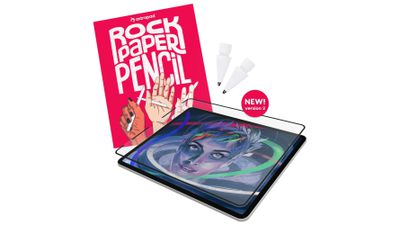
Rock Paper Pencil combines a screen protector and a unique Apple Pencil tip so that writing on the ‌iPad‌ feels like writing on a piece of paper. The new version of Rock Paper Pencil has a NanoCling Screen Protector that attaches to an ‌iPad‌ using static cling rather than a magnetic edge like the prior version.

Astropad says that NanoCling is stronger than magnets, and it provides a thinner bezel and a flatter surface on the ‌iPad‌. The NanoCling Screen Protector is 40 percent thinner than the magnetic version, so there are no gaps or ridges to contend with. The screen protector continues to be easily removable and reusable so you can take it off when you're not writing, and it is not adhesive so it leaves no residue.

The Pencil tip has also been redesigned to withstand heavy daily use. It has a wear-resistant copper alloy core and palladium coating, and it is able to hold up to more pressure. The Pencil tip has been slimmed down too, so it's equivalent to a standard 0.7mm ballpoint pen. The Rock Paper Pencil ships with two of the pencil tips and a protective storage sleeve for the screen protector.

Rock Paper Pencil can be purchased from the Astropad website for $40. It is compatible with the 11-inch iPad Pro and iPad Air, the third-generation 12.9-inch ‌iPad Pro‌ and later, the seventh-generation 10.2-inch ‌iPad‌ and later, the 10.9-inch ‌iPad‌, and the sixth-generation iPad mini.

Popular Stories

iOS 26

iOS 26.4 Adds Two New Features to CarPlay

Tuesday March 24, 2026 1:55 pm PDT by
iOS 26.4 was released today, and it includes a couple of new features for CarPlay: an Ambient Music widget and support for voice-based chatbot apps. To update your iPhone 11 or newer to iOS 26.4, open the Settings app and tap on General → Software Update. CarPlay will automatically offer the new features so long as the iPhone connected to your vehicle is running iOS 26.4 or later....
Apple Business hero

Apple Unveils 'Apple Business' All-in-One Platform

Tuesday March 24, 2026 8:53 am PDT by
Apple today announced Apple Business, a new all-in-one platform that unifies device management, productivity tools, and customer outreach features. The service is designed to be a consolidated replacement for several of Apple's existing business-focused offerings, including Apple Business Essentials, Apple Business Manager, and Apple Business Connect. It provides organizations with a single...
AirPods Pro Firmware Feature

Apple Releases New Firmware for AirPods Pro 3, AirPods Pro 2 and AirPods 4

Tuesday March 24, 2026 12:31 pm PDT by
Apple today released new firmware for the AirPods Pro 2, AirPods Pro 3, and the AirPods 4. The firmware has a version number of 8B39, up from 8B34 on the AirPods Pro 3, 8B28 on the AirPods Pro 2, and 8B21 on the AirPods 4. There is no word on what's included in the firmware, but Apple has a support document with limited notes. Most updates are limited to bug fixes and performance...

Top Rated Comments

27 months ago

Maybe it's just me, but I have found the best experience is the Apple Pencil and no screen cover at all. Every cover I have used that claims better writing experience doesn't seem to be as good as just going naked.
Nah, it’s wayyyy too slippery.
Score: 8 Votes (Like | Disagree)
27 months ago

Man uses pencil and paper. Man gets rid of pencil and paper in favor of digital screen and digital pencil, then spends eternity trying to make them feel like original pencil and paper.

Sigh.
If you don't use the pencil heavily, you don't understand. The apple pencil tip slipping around on glass takes away some of the line control and after awhile, you feel the strain in your hand, in your wrists. You need that friction that a paper like surface provides. Just as I think that something the Apple Pencil and iPad needs that I see in other tablets is the ability to adjust the pressure curve. You only see it locally in apps like Procreate, but I think it's needed, because that's another thing that creates strain. I'm an artist who uses tablets to draw for hours at a time and things like tennis elbow and wrist and hand pain are a real issue
Score: 5 Votes (Like | Disagree)
27 months ago
Man uses pencil and paper. Man gets rid of pencil and paper in favor of digital screen and digital pencil, then spends eternity trying to make them feel like original pencil and paper.

Sigh.
Score: 4 Votes (Like | Disagree)
27 months ago

Astropad is trying to emulate writing on a piece of paper with a pen(cil)? Why not just use the real thing? Or learn to type. Doesn't everyone type with their thumbs at least?
A lot of artists want the pencil on paper feel as it allows for more control of the line and ultimately less strain on the wrists. It's why I love the etched glass surface of Wacon tablets, especially coupled with their felt nibs. THAT's what I'd love to see on the next iPads. I don't care about OLED displays, I want displays that have a bit of texture to them, and pencil tips that creates some friction to the tip
Score: 4 Votes (Like | Disagree)
sw1tcher Avatar
27 months ago

Bomb still wins though

🪨🗞️✂️✏️💣
🪨
🗞️
✂️
🦎
🖖
Score: 3 Votes (Like | Disagree)
27 months ago

Astropad is launching a new version of the Rock Paper Pencil kit ('https://astropad.com/product/rock-paper-pencil/?sca_ref=5507981.N2my3G8kPZ') that it came out with last summer, bringing some notable improvements that will allow for a better paper-like writing experience on the iPad.


Rock Paper Pencil combines a screen protector and a unique Apple Pencil tip so that writing on the iPad feels like writing on a piece of paper. The new version of Rock Paper Pencil has a NanoCling Screen Protector that attaches to an iPad using static cling rather than a magnetic edge like the prior version.

Astropad says that NanoCling is stronger than magnets, and it provides a thinner bezel and a flatter surface on the iPad. The NanoCling Screen Protector is 40 percent thinner than the magnetic version, so there are no gaps or ridges to contend with. The screen protector continues to be easily removable and reusable so you can take it off when you're not writing, and it is not adhesive so it leaves no residue.

The Pencil tip has also been redesigned to withstand heavy daily use. It has a wear-resistant copper alloy core and palladium coating, and it is able to hold up to more pressure. The Pencil tip has been slimmed down too, so it's equivalent to a standard 0.7mm ballpoint pen. The Rock Paper Pencil ships with two of the pencil tips and a protective storage sleeve for the screen protector.

Rock Paper Pencil can be purchased from the Astropad website ('https://shop.astropad.com/collections/shop-astropad/products/rock-paper-pencil?sca_ref=5507981.N2my3G8kPZ') for $40. It is compatible with the 11-inch iPad Pro and iPad Air, the third-generation 12.9-inch iPad Pro and later, the seventh-generation 10.2-inch iPad and later, the 10.9-inch iPad, and the sixth-generation iPad mini.


Article Link: Astropad Launches Updated Rock Paper Pencil Kit for Realistic Writing Experience on iPad ('https://www.geekwebguides.com/2024/02/21/astropad-rock-paper-pencil-2/')
I have this product V1 and really like it. I am using the pencil again!
Score: 2 Votes (Like | Disagree)















