Philips Hue App Gains Support for Widgets
The Philips Hue app was today updated to version 5.14, adding support for widgets. Hue widgets can be added to the Home Screen, Lock Screen, or Today View, and can be used for controlling lights and other accessories.
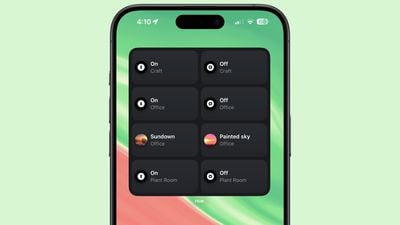
Widgets come in small, medium, and large sizes with the largest widget supporting eight actions or scenes. Widgets can be tailored to the entire Hue bridge or to lights that are located in specific rooms, so you can set up a widget for each of your rooms if desired.
Each of the actions can be customized, and you can choose a scene from the Hue app or opt to turn lights in certain rooms on or off. Dimming lights is not an option, nor is activating automations, but some of that can be done through scenes. Adding a widget is a useful way to control frequently accessed lights or scenes.
Along with widgets, the update also improves Friends of Hue switches like the Lutron Aurora Smart Bulb Dimmer Switch. Switches now support time-based light, the scene cycle mode, the natural light scene, and more.
The Philips Hue app can be downloaded from the App Store for free. It is designed to work with Philips Hue lights and accessories.
Popular Stories
iOS 26.4 was released today, and it includes a couple of new features for CarPlay: an Ambient Music widget and support for voice-based chatbot apps.
To update your iPhone 11 or newer to iOS 26.4, open the Settings app and tap on General → Software Update. CarPlay will automatically offer the new features so long as the iPhone connected to your vehicle is running iOS 26.4 or later....
Apple today announced Apple Business, a new all-in-one platform that unifies device management, productivity tools, and customer outreach features.
The service is designed to be a consolidated replacement for several of Apple's existing business-focused offerings, including Apple Business Essentials, Apple Business Manager, and Apple Business Connect. It provides organizations with a single...
Apple today released new firmware for the AirPods Pro 2, AirPods Pro 3, and the AirPods 4. The firmware has a version number of 8B39, up from 8B34 on the AirPods Pro 3, 8B28 on the AirPods Pro 2, and 8B21 on the AirPods 4.
There is no word on what's included in the firmware, but Apple has a support document with limited notes. Most updates are limited to bug fixes and performance...























