
Check Out This Apple Watch iPad Demo Unit From 2014 - MacRumors
Skip to Content

Check Out This Apple Watch iPad Demo Unit From 2014

With the 10th anniversary of the Apple Watch approaching, we thought it would be fun to take a look back at an interesting bit of Apple Watch history.
apple watch ipad demo 1
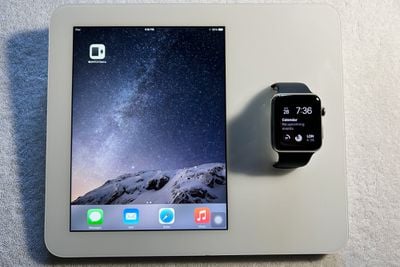
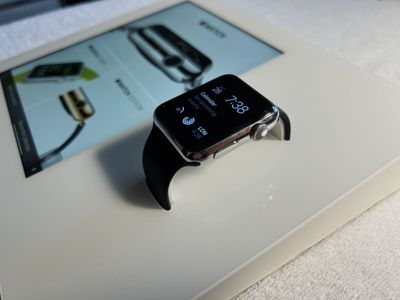
After the Apple Watch was announced in 2014, and before it became available in 2015, Apple sent out custom Apple Watch iPad demo kiosks to retail stores. The Apple Watch and ‌iPad‌ units used for these devices were specially designed, had custom software, and represent the first and only time that an Apple Watch was able to pair with an ‌iPad‌.

AppleDemoYT, known for sourcing rare prototypes, shared images and detailed information about the demo units with MacRumors, offering up detailed insight on the lengths Apple went to for this custom experience. AppleDemoYT was able to acquire one of these now-rare demo units.
apple watch ipad demo 2
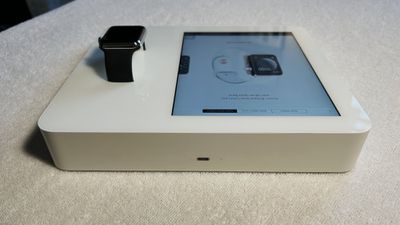
Jony Ive and his design team came up with the Apple Watch ‌iPad‌ Kiosks as a way for customers to try out an Apple Watch without needing help from an employee. Apple used a modified iPad mini 2 running iOS 8.2 paired with an original Apple Watch running watchOS 1.0, with the two devices fused in a custom housing.

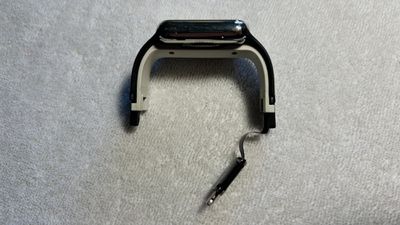
The ‌iPad‌ Apple used had multiple components removed, including the camera, microphone, and speakers, and the housing of the setup served as the body of the ‌iPad‌. The Apple Watch was heavily modified as well, featuring a groove along the diagnostic port for cable routing, holes to affix it to the demo unit, and a special Sport Band that was shorter than normal.
apple watch ipad demo 3
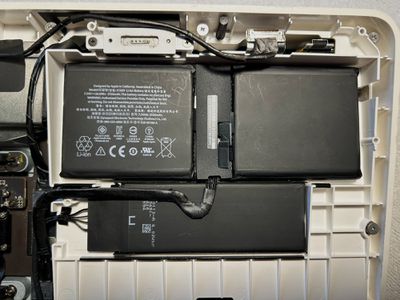
The Apple Watch was paired to the ‌iPad‌ using a wired connection. A lightning cable attached to the Apple Watch diagnostic port connected to a converter board inside the ‌iPad‌, allowing the ‌iPad‌ to communicate with and charge the Apple Watch. A special app called Apple Watch Demo was used to allow the Apple Watch to interface with the ‌iPad‌, and a connection to Apple's server was required.
apple watch ipad demo 4
The server that Apple used for the Apple Watch Demo app has long since gone offline, so the only way to see how the setup worked is through a demo unit that was paired in 2014 and not reset since then. With a functional unit, the ‌iPad‌ is able to mirror the Apple Watch, offering up transition animations and providing tips on the actions that can be performed on the Apple Watch. This functionality is demoed in AppleDemoYT's video:


The custom ‌iPad mini‌ was not only the sole model able to connect with an Apple Watch, it was also the only ‌iPad‌ that could be charged using MagSafe 2, originally designed for the Mac. A ‌MagSafe‌ connector charged the ‌iPad‌, Apple Watch, and extra batteries inside the ‌iPad‌. A Lightning port is available as well, but Apple's documentation suggests that it is only meant to be used for data transfer.

Apple discontinued the demo unit in 2016 because it was riddled with issues. Updates to the ‌iPad‌ or Apple Watch would erase demo content, and the front glass was prone to cracking because of the design of the housing. Batteries degraded quickly due to the always-on charging, and overheating and failure were continual problems. Apple also had to deal with pairing and syncing issues, and that caused Apple to tweak the interactive part of the demo functionality in 2015. After that change, the ‌iPad‌ provided Apple Watch info, but no longer mirrored the content on the Apple Watch.
apple watch ipad demo 5
Demo units that were decommissioned were supposed to be destroyed, and so finding one that is still available, functional, and in good working condition is unusual. The Apple Watch ‌iPad‌ kiosk represents one of the most advanced custom devices that Apple had designed at the time, and it offers a neat look back at the Apple Watch's debut.

Rumors suggest that Apple has plans for the 10th anniversary of the Apple Watch, and as soon as this year, we may see a redesigned "Apple Watch X" with an updated magnetic band attachment system, new health features, and more.


Popular Stories

iOS 26

iOS 26.4 Adds Two New Features to CarPlay

Tuesday March 24, 2026 1:55 pm PDT by
iOS 26.4 was released today, and it includes a couple of new features for CarPlay: an Ambient Music widget and support for voice-based chatbot apps. To update your iPhone 11 or newer to iOS 26.4, open the Settings app and tap on General → Software Update. CarPlay will automatically offer the new features so long as the iPhone connected to your vehicle is running iOS 26.4 or later....
Apple Business hero

Apple Unveils 'Apple Business' All-in-One Platform

Tuesday March 24, 2026 8:53 am PDT by
Apple today announced Apple Business, a new all-in-one platform that unifies device management, productivity tools, and customer outreach features. The service is designed to be a consolidated replacement for several of Apple's existing business-focused offerings, including Apple Business Essentials, Apple Business Manager, and Apple Business Connect. It provides organizations with a single...
AirPods Pro Firmware Feature

Apple Releases New Firmware for AirPods Pro 3, AirPods Pro 2 and AirPods 4

Tuesday March 24, 2026 12:31 pm PDT by
Apple today released new firmware for the AirPods Pro 2, AirPods Pro 3, and the AirPods 4. The firmware has a version number of 8B39, up from 8B34 on the AirPods Pro 3, 8B28 on the AirPods Pro 2, and 8B21 on the AirPods 4. There is no word on what's included in the firmware, but Apple has a support document with limited notes. Most updates are limited to bug fixes and performance...

Top Rated Comments

magicschoolbus Avatar
25 months ago
Alright Apple- we know you don't want the iPad to pair with the watch. You have made that clear. But can I at least get my activity data on the iPad so I can see it all on a larger display? So much data you could see in one shot from workouts, heart rates, ETC. Especially with Apple Fitness; you would think you could put a fitness workout on the iPad, then take a look at your activity on the iPad.. Sometimes your stubbornness is a real turn off, apple.
Score: 17 Votes (Like | Disagree)
erikkfi Avatar
25 months ago
And why can't you pair an Apple Watch to an iPad? Because that'd be one less thing keeping you stuck to having an iPhone! You can't get rid of an iPhone without also losing your Watch. These things are always for lock-in reasons.
Score: 11 Votes (Like | Disagree)
25 months ago
I wish I could get my grandmother an Apple Watch to use with her iPad. She’d definitely benefit from it. The iPhone is a little too small still.
Score: 10 Votes (Like | Disagree)
25 months ago
I wish my series 0 ran that fast
Score: 10 Votes (Like | Disagree)
dannyyankou Avatar
25 months ago

Amazing that Apple watch is coming up to 10th birthday!

Ive only had two of them… a first gen, and a series 4 (still going strong considering)

They have been amongst the best watches, and the best smart watches I've owned. And not bad price at all considering the run I've had with only two models.

I think the only thing id ask for at this point is an ultra low energy mode that can be switched into if you're going to be away from power, or for an emergency. That lasts a week at least

😀
If you want to feel really old, AirPods are coming up on 8 years. It doesn't feel like it at all.
Score: 8 Votes (Like | Disagree)
25 months ago
Amazing that Apple watch is coming up to 10th birthday!

Ive only had two of them… a first gen, and a series 4 (still going strong considering)

They have been amongst the best watches, and the best smart watches I've owned. And not bad price at all considering the run I've had with only two models.

I think the only thing id ask for at this point is an ultra low energy mode that can be switched into if you're going to be away from power, or for an emergency. That lasts a week at least

😀
Score: 5 Votes (Like | Disagree)















