Satechi Launches Thunderbolt 4 Multi-Display Docking Station - MacRumors
Skip to Content

Satechi Launches Thunderbolt 4 Multi-Display Docking Station

Satechi today announced the launch of its latest Mac accessory, the Thunderbolt 4 Multi-Display Docking Station. The Docking Station uses DisplayLink software technology to allow a Mac to connect to up to four external monitors, plus it offers 96W power delivery and Thunderbolt 4 transfer speeds.
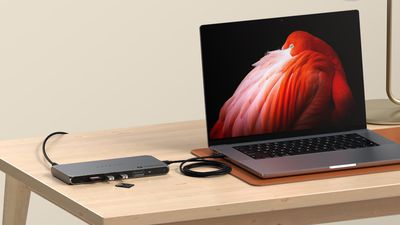
satechi thunderbolt dock
Made from a space gray aluminum that is meant to match Apple devices, the hub supports up to four extended monitors at 4K/60Hz resolution, or one display at 8K/60Hz. With four displays, two can be connected through Thunderbolt 4 and two through HDMI. Satechi says that this feature is designed to address the single display limit of M1, M2, and M3 chips. ‌M1‌, ‌M2‌, and M3 MacBook Pro models support up to three displays with Satechi's dock, while the M3 MacBook Air supports four when in clamshell mode. Machines with Pro and Max chips support up to four displays through the hub.

The hub provides 96W power delivery to the host machine, which is enough to charge even the 16-inch ‌MacBook Pro‌. Each of the three Thunderbolt 4 downstream ports also offer 15W for charging iPhones, Apple Watches, and other accessories, with two ports able to be used at one time for charging purposes. The Thunderbolt 4 ports facilitate data transfers at speeds up to 40Gb/s, and there are two USB-A ports that support transfer speeds up to 10Gb/s. a UHS-II SD card reader is available as well, and it is capable of transferring up to 312MB/s.

Satechi says the dock supports daisy-chaining up to six devices, providing 32Gb/s native PCIe support for external GPUs and Thunderbolt-based storage devices.

The Thunderbolt 4 Multi-Display Docking Station can be purchased from the Satechi website for $300.


Tag: Satechi

Popular Stories

iOS 26

iOS 26.4 Adds Two New Features to CarPlay

Tuesday March 24, 2026 1:55 pm PDT by
iOS 26.4 was released today, and it includes a couple of new features for CarPlay: an Ambient Music widget and support for voice-based chatbot apps. To update your iPhone 11 or newer to iOS 26.4, open the Settings app and tap on General → Software Update. CarPlay will automatically offer the new features so long as the iPhone connected to your vehicle is running iOS 26.4 or later....
Apple Business hero

Apple Unveils 'Apple Business' All-in-One Platform

Tuesday March 24, 2026 8:53 am PDT by
Apple today announced Apple Business, a new all-in-one platform that unifies device management, productivity tools, and customer outreach features. The service is designed to be a consolidated replacement for several of Apple's existing business-focused offerings, including Apple Business Essentials, Apple Business Manager, and Apple Business Connect. It provides organizations with a single...
AirPods Pro Firmware Feature

Apple Releases New Firmware for AirPods Pro 3, AirPods Pro 2 and AirPods 4

Tuesday March 24, 2026 12:31 pm PDT by
Apple today released new firmware for the AirPods Pro 2, AirPods Pro 3, and the AirPods 4. The firmware has a version number of 8B39, up from 8B34 on the AirPods Pro 3, 8B28 on the AirPods Pro 2, and 8B21 on the AirPods 4. There is no word on what's included in the firmware, but Apple has a support document with limited notes. Most updates are limited to bug fixes and performance...

Top Rated Comments

bradman83 Avatar
24 months ago

Doubtful. Sounds like this dock is using DisplayLink (a software graphics solution) to get around the limitations of Apple's fairly weak GPUs.
It's less an issue of the GPUs being weak as it's an issue that the base M-series SoCs have a limited number of display controllers. The M1 MacBook Air/Pro and iMac all have two display controllers but one is hard-wired to the internal display, hence the one external display limitation (the Mac Mini has one controller hardwired to HDMI and the other to Thunderbolt). The display controllers themselves are apparently physically quite large and are built into the SoC; they take up the same silicon space as two performance cores, so Apple is limited in how many they can put into their chips. M3 SoCs allow the display controller to switch between the internal display or USB-C/Thunderbolt, hence the second display with the lid closed. Even the base M1 GPU would handle 3-4 external displays just fine if it had the controller support to do it.
Score: 12 Votes (Like | Disagree)
24 months ago
Sigh... yet another TB4 dock without 10GbE (or even 2.5GbE.)
Score: 7 Votes (Like | Disagree)
24 months ago
I've been liking the Dell Thunderbolt 4 docks, they're universal and work with everything - for less money than the Apple specific ones like this.
Score: 7 Votes (Like | Disagree)
24 months ago

It's less an issue of the GPUs being weak as it's an issue that the base M-series SoCs have a limited number of display controllers. The M1 MacBook Air/Pro and iMac all have two display controllers but one is hard-wired to the internal display, hence the one external display limitation (the Mac Mini has one controller hardwired to HDMI and the other to Thunderbolt). The display controllers themselves are apparently physically quite large and are built into the SoC; they take up the same silicon space as two performance cores, so Apple is limited in how many they can put into their chips. M3 SoCs allow the display controller to switch between the internal display or USB-C/Thunderbolt, hence the second display with the lid closed. Even the base M1 GPU would handle 3-4 external displays just fine if it had the controller support to do it.
Semantics - supports less external displays than the old Intel machines, and a $300 Chromebook without nasty software based solutions like DisplayLink - it's a problem.
Score: 3 Votes (Like | Disagree)
24 months ago
"providing 32Gb/s native PCIe support for external GPUs"

Not on a Mac with Apple Silicon.
Score: 3 Votes (Like | Disagree)
24 months ago

Pity there's no support for 4k120hz
It's using Displaylink , so 4K 60hz with a lot of latency is the best you can get
Score: 3 Votes (Like | Disagree)