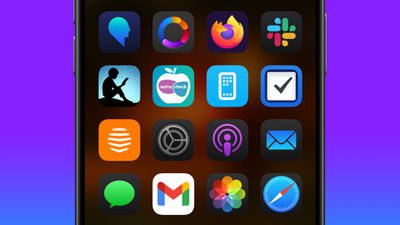
As part of its Home Screen customization overhaul, iOS 18 lets iPhone users hide the labels on app icons for a cleaner look.
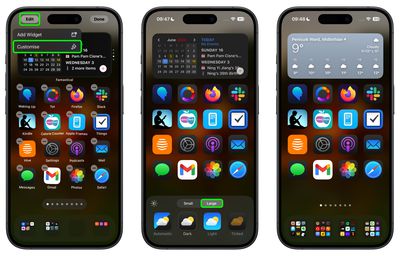
Turning off the labels causes the icons to expand and take up the space where the text usually appears underneath. Here's how it currently works in the iOS 18 Developer Beta.
On the Home Screen, press and hold on an empty area.
Tap Edit in the top-left corner.
Tap Customize.
In the customization menu that appears, tap the Large button.
Tap anywhere on the Home Screen to save your preference.
As things stand, it's not possible to hide labels and keep app icons small, but this could change in succeeding beta versions.
iOS 26.4 was released today, and it includes a couple of new features for CarPlay: an Ambient Music widget and support for voice-based chatbot apps.
To update your iPhone 11 or newer to iOS 26.4, open the Settings app and tap on General → Software Update. CarPlay will automatically offer the new features so long as the iPhone connected to your vehicle is running iOS 26.4 or later....
Apple today announced Apple Business, a new all-in-one platform that unifies device management, productivity tools, and customer outreach features.
The service is designed to be a consolidated replacement for several of Apple's existing business-focused offerings, including Apple Business Essentials, Apple Business Manager, and Apple Business Connect. It provides organizations with a single...
Tuesday March 24, 2026 12:31 pm PDT by Juli Clover
Apple today released new firmware for the AirPods Pro 2, AirPods Pro 3, and the AirPods 4. The firmware has a version number of 8B39, up from 8B34 on the AirPods Pro 3, 8B28 on the AirPods Pro 2, and 8B21 on the AirPods 4.
There is no word on what's included in the firmware, but Apple has a support document with limited notes. Most updates are limited to bug fixes and performance...
I wish I could edit app names. I have a folder with a bunch of smart home apps and the icons are pretty much all a house within a rounded square and some variation of "home", "smart" in it. I wish I could call them "temperature sensors", "lights", "security cam", "solar", "vacuum", etc.