
iOS 18 Photos App Adds New Utilities Categories for Finding QR Codes, Receipts, Illustrations and More - MacRumors
Skip to Content

iOS 18 Photos App Adds New Utilities Categories for Finding QR Codes, Receipts, Illustrations and More

Apple introduced a new design for the iOS 18 Photos app that replaces the Library and For You sections with a more integrated all-in-one view, and part of that redesign includes an overhauled Utilities section that makes it easier to find different types of images.
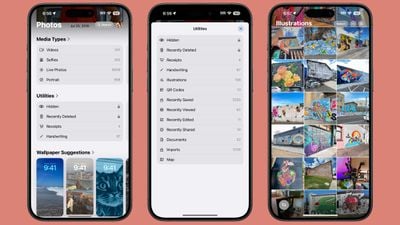
ios 18 photos utilities
Rather than being limited to Imports, Duplicates, Hidden, and Recently Deleted as in iOS 17, the Utilities section of the app has all of the following categories:

  • Hidden
  • Recently Deleted
  • Duplicates
  • Receipts
  • Handwriting
  • Illustrations
  • QR Codes
  • Recently Saved
  • Recently Viewed
  • Recently Edited
  • Documents
  • Imports
  • Maps

You've been able to search for things like receipts in prior versions of iOS, and still can, but having them in a dedicated Utilities section makes them quicker to locate.

Along with Utilities, the ‌Photos‌ app also features Media Types, and while this section is largely the same, there is a new Animated category. The Animated category and the Illustrations utility section may be aimed at the image generation tools that are coming to iOS 18 as part of the Apple Intelligence feature set.

Apple also added a "Pinned Collections" section to ‌Photos‌, which houses things that you might want quick access to like Videos, Favorites, Screenshots, and Selfies. Collections are a repeat of content that can be found elsewhere in ‌Photos‌, but you can customize it to your liking so you see your preferred content at the top of the app. These changes to ‌Photos‌ are in iPadOS 18 and macOS Sequoia as well as iOS 18.

Related Forums: iOS 18, iPadOS 18

Popular Stories

iOS 26

iOS 26.4 Adds Two New Features to CarPlay

Tuesday March 24, 2026 1:55 pm PDT by
iOS 26.4 was released today, and it includes a couple of new features for CarPlay: an Ambient Music widget and support for voice-based chatbot apps. To update your iPhone 11 or newer to iOS 26.4, open the Settings app and tap on General → Software Update. CarPlay will automatically offer the new features so long as the iPhone connected to your vehicle is running iOS 26.4 or later....
Apple Business hero

Apple Unveils 'Apple Business' All-in-One Platform

Tuesday March 24, 2026 8:53 am PDT by
Apple today announced Apple Business, a new all-in-one platform that unifies device management, productivity tools, and customer outreach features. The service is designed to be a consolidated replacement for several of Apple's existing business-focused offerings, including Apple Business Essentials, Apple Business Manager, and Apple Business Connect. It provides organizations with a single...
AirPods Pro Firmware Feature

Apple Releases New Firmware for AirPods Pro 3, AirPods Pro 2 and AirPods 4

Tuesday March 24, 2026 12:31 pm PDT by
Apple today released new firmware for the AirPods Pro 2, AirPods Pro 3, and the AirPods 4. The firmware has a version number of 8B39, up from 8B34 on the AirPods Pro 3, 8B28 on the AirPods Pro 2, and 8B21 on the AirPods 4. There is no word on what's included in the firmware, but Apple has a support document with limited notes. Most updates are limited to bug fixes and performance...

Top Rated Comments

stiligFox Avatar
23 months ago
I mostly just want the option to filter out the photos I’ve taken with the device from everything and keep them from getting synced to my larger photo library. Apple always shows off the Photos with libraries full of beautiful photos and never shows off the screenshots, memes, saved videos, discord snippets and quick clips form websites that fill up the majority of my library, making it a pain to scroll through my library and look back at the memories of JUST the photos I TOOK with the device - what the “camera roll” should really have been. Everything else should go into a hard secondary folder, in my opinion. It’s kept me from using iCloud Photos because I know the second I do, my 160GB of 15 years of photos is going to get mixed in with thousands of memes and saved furry art…
Score: 23 Votes (Like | Disagree)
sw1tcher Avatar
23 months ago

Rather than being limited to Imports, Duplicates, Hidden, and Recently Deleted as in iOS 17, the Utilities section of the app has all of the following categories:

* Hidden
* Recently Deleted
* . . . .

No Deleted Years Ago ('https://www.geekwebguides.com/2024/05/21/update-to-ios-17-5-1-fix-deleted-photos-bug/') section? :confused:
Score: 21 Votes (Like | Disagree)
Apple Mac Daz Avatar
23 months ago

There should definitely be a 'screenshots' category so if you take a snap of train times, etc, you can easily get to them all and delete them. Or does that exist?
There is 🤷‍♂️


Attachment Image
Score: 8 Votes (Like | Disagree)
23 months ago
The image to text detection in Photos is already very handy for searching for random stuff from years ago.
Score: 8 Votes (Like | Disagree)
23 months ago
Can we just get folders? I want folders…and yes I know we have albums and one hidden. I just need a place to store my memes and stuff.
Score: 7 Votes (Like | Disagree)
bruno7 Avatar
23 months ago
Please tell me that there is a screen within this app where I can just quickly swipe all the way to the bottom to see my recent photos - like the present Albums behave.
Score: 7 Votes (Like | Disagree)
















