iOS 18 Adds Control Center Options to Action Button on iPhone 15 Pro

iPhone 15 Pro and iPhone 15 Pro Max models have an Action button in place of the Ring/Silent switch on older iPhones, and iOS 18 makes it even more useful.

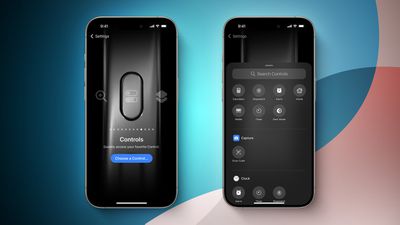
iOS 18 Control Center Toggles for Action Button FeatureScreenshot Credit: Aaron Perris

iOS 18 allows the Action button to be assigned to one of the dozens of controls available in the new Control Center gallery, allowing the Action button to invoke Dark Mode, Airplane Mode, Personal Hotspot, and more. Options like Low Power Mode and Orientation Lock do not appear to be available as of iOS 18 beta 1, but the Shortcut action already allows the Action button to be assigned to those options if desired.

These new options are in addition to the actions that were already available for the Action button on iOS 17, including Ring/Silent, Do Not Disturb, Camera, Flashlight, Voice Memo, Magnifier, Translate, Shortcut, and Accessibility. Some of the new Control Center options were already possible with the Shortcut or Accessibility options.

It has been rumored that the Action button will be expanded to all four iPhone 16 models later this year, so these new controls will come to even more devices.

iOS 18 is currently in beta and should be released in September.

Related Forums: iOS 18, iPadOS 18

Popular Stories

Apple Logo Zoomed

Tim Cook Teases Plans for Apple's Upcoming 50th Anniversary

Thursday February 5, 2026 12:54 pm PST by
Apple turns 50 this year, and its CEO Tim Cook has promised to celebrate the milestone. The big day falls on April 1, 2026. "I've been unusually reflective lately about Apple because we have been working on what do we do to mark this moment," Cook told employees today, according to Bloomberg's Mark Gurman. "When you really stop and pause and think about the last 50 years, it makes your heart ...
wwdc sans text feature

Apple Rumored to Announce New Product on February 19

Thursday February 5, 2026 12:22 pm PST by
Apple plans to announce the iPhone 17e on Thursday, February 19, according to Macwelt, the German equivalent of Macworld. The report, citing industry sources, is available in English on Macworld. Apple announced the iPhone 16e on Wednesday, February 19 last year, so the iPhone 17e would be unveiled exactly one year later if this rumor is accurate. It is quite uncommon for Apple to unveil...
Finder Siri Feature

Why Apple's iOS 26.4 Siri Upgrade Will Be Bigger Than Originally Promised

Friday February 6, 2026 3:06 pm PST by
In the iOS 26.4 update that's coming this spring, Apple will introduce a new version of Siri that's going to overhaul how we interact with the personal assistant and what it's able to do. The iOS 26.4 version of Siri won't work like ChatGPT or Claude, but it will rely on large language models (LLMs) and has been updated from the ground up. Upgraded Architecture The next-generation...
iOS 26

iOS 26.3 and iOS 26.4 Will Add These New Features to Your iPhone

Tuesday February 3, 2026 7:47 am PST by
While the iOS 26.3 Release Candidate is now available ahead of a public release, the first iOS 26.4 beta is likely still at least a week away. Following beta testing, iOS 26.4 will likely be released to the general public in March or April. Below, we have recapped known or rumored iOS 26.3 and iOS 26.4 features so far. iOS 26.3 iPhone to Android Transfer Tool iOS 26.3 makes it easier...
iphone 17 pro dark blue 1

iPhone 18 Pro Max Rumored to Deliver Next-Level Battery Life

Friday February 6, 2026 5:14 am PST by
The iPhone 18 Pro Max will feature a bigger battery for continued best-in-class battery life, according to a known Weibo leaker. Citing supply chain information, the Weibo user known as "Digital Chat Station" said that the iPhone 18 Pro Max will have a battery capacity of 5,100 to 5,200 mAh. Combined with the efficiency improvements of the A20 Pro chip, made with TSMC's 2nm process, the...

Top Rated Comments

kalafalas Avatar
22 months ago
ORIENTATION LOCK YYYYAAAAAASSSS

dang I might have to ruin my life and install the beta on my main

edit: seems the writer was wrong :/ oh well. I use shortcuts right now, but I was hoping for something a bit more native with synced haptics and stuff
Score: 9 Votes (Like | Disagree)
kirky29 Avatar
22 months ago
This is pretty cool, I now wish you could change the volume up and down buttons to whatever, I'd be happy to control my volume manually from control centre and have, say, my volume up button as orientation lock, and volume down as quick access to the home app. Or something like that!
Score: 8 Votes (Like | Disagree)
Joe Rossignol Avatar
22 months ago

ORIENTATION LOCK YYYYAAAAAASSSS

dang I might have to ruin my life and install the beta on my main
I wrote the MacRumors story, and unfortunately I made an error. I thought the Action button could be assigned to ANY control in the Control Center gallery, but it turns out that options like Orientation Lock and Low Power Mode are not available, at least as of iOS 18 beta 1.

Truly sorry to get your hopes up! I messed up that one.

EDIT: But as the comment below me pointed out, you can already map the Action button to Orientation Lock via Shortcuts on iOS 17, so the end result is still completely possible.
Score: 8 Votes (Like | Disagree)
FishyFish Avatar
22 months ago
But no way to use the button to actually just bring up Control Center which would be the most useful shortcut of all.
Score: 7 Votes (Like | Disagree)
mrat93 Avatar
22 months ago

This is pretty cool, I now wish you could change the volume up and down buttons to whatever, I'd be happy to control my volume manually from control centre and have, say, my volume up button as orientation lock, and volume down as quick access to the home app. Or something like that!
Anytime there’s an article about the Action Button, I’m reminded of the Jailbreak app Activator from over 10 years ago. You could assign literally over 100 actions systemwide similarly. It is so sad that Apple is restricting this to one action for one button.
Score: 6 Votes (Like | Disagree)
AppleInLVX Avatar
22 months ago
I feel like between adding things to control center, colorizing app icons, and making the Action button more robust, I'll finally be able to reach minimal iPhone using only native functionality, and that will be lovely.
Score: 5 Votes (Like | Disagree)