
macOS Sequoia: How Window Tiling and Snapping Currently Works

With macOS Sequoia, Apple has introduced a new window tiling management feature that aims to make it easy to arrange open windows into a layout that works best for you.

macos 15 tiling
PC users have had tiling since at least Windows 7 and Aero Snap, and if you've ever used those, the new window tiling feature in macOS Sequoia will be familiar. In the absence of the feature, Mac users have relied on several third-party tools like Magnet, Moom, and Rectangle to achieve similar results, but as things stand, in beta 1, window management in macOS still needs some work before it can approach the utility of those apps.
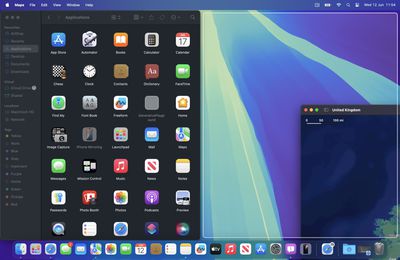
tiling macos two apps
When you drag a window to the edge of the screen, macOS Sequoia suggests a tiled position by displaying a frame, and you release the window to drop it right into place. This way, you can quickly arrange two app windows side by side, or place four windows in corners to keep several apps in view at once. When a window has been dragged to tile on one side or the other, dragging it back immediately resizes it to its original width and height, which is a nice touch.
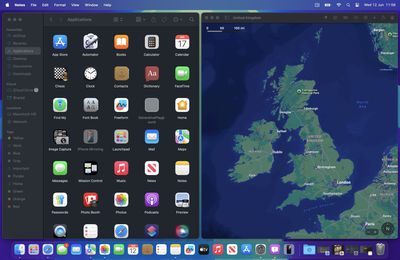
macos tiled two apps
The dragging system is far from infallible though. If you drag a window to the side of the screen and hold it for more than a couple of seconds, you can sometimes unintentionally switch to an adjacent desktop space if one is active. It can also be quite tricky to place certain app windows so that they snap to corners.
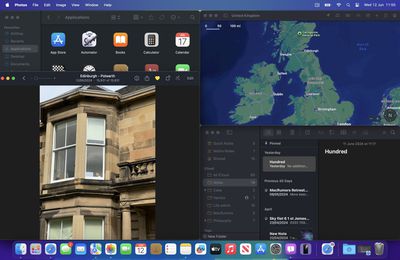
macos tiling overlapping
Also, some apps by design will not reduce down beyond a certain size, so you can end up with tiled windows overlapping each other or falling off the screen. If you have a group of apps that play nice together when tiled, the tiling system can leave unsightly gaps between the windows where the desktop wallpaper is exposed, but there's a setting that can rectify this.
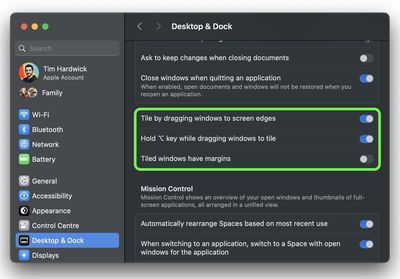
system settings tiling
In System Settings, you'll find tiling options in a new section in the Desktop & Dock menu. For example, tiling can be activated by holding the Option key while dragging windows. You can also toggle off "Tiled windows have margins," which reduces gaps between windows.
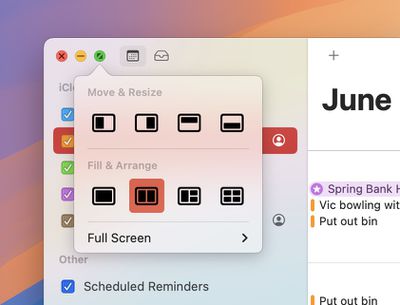
tiling options green traffic light

Image credit: MacRumors forum member Danbalsh

macOS 15 also adds new tiling options to the green traffic light in the top corner of windows. Hover your pointer over the green button, and a menu appears with options to move and resize or fill and arrange all open windows. These options generally seem to work better than the drag-to-snap tiling system in its current state.

Overall, tiling windows in macOS Sequoia does not feel properly implemented yet, but this is developer beta 1, and Apple will surely refine its functionality before we get to the public release of macOS 15 in September.


Related Forum: macOS Sequoia

Popular Stories

Apple Logo Zoomed

Tim Cook Teases Plans for Apple's Upcoming 50th Anniversary

Thursday February 5, 2026 12:54 pm PST by
Apple turns 50 this year, and its CEO Tim Cook has promised to celebrate the milestone. The big day falls on April 1, 2026. "I've been unusually reflective lately about Apple because we have been working on what do we do to mark this moment," Cook told employees today, according to Bloomberg's Mark Gurman. "When you really stop and pause and think about the last 50 years, it makes your heart ...
wwdc sans text feature

Apple Rumored to Announce New Product on February 19

Thursday February 5, 2026 12:22 pm PST by
Apple plans to announce the iPhone 17e on Thursday, February 19, according to Macwelt, the German equivalent of Macworld. The report, citing industry sources, is available in English on Macworld. Apple announced the iPhone 16e on Wednesday, February 19 last year, so the iPhone 17e would be unveiled exactly one year later if this rumor is accurate. It is quite uncommon for Apple to unveil...
Finder Siri Feature

Why Apple's iOS 26.4 Siri Upgrade Will Be Bigger Than Originally Promised

Friday February 6, 2026 3:06 pm PST by
In the iOS 26.4 update that's coming this spring, Apple will introduce a new version of Siri that's going to overhaul how we interact with the personal assistant and what it's able to do. The iOS 26.4 version of Siri won't work like ChatGPT or Claude, but it will rely on large language models (LLMs) and has been updated from the ground up. Upgraded Architecture The next-generation...
iOS 26

iOS 26.3 and iOS 26.4 Will Add These New Features to Your iPhone

Tuesday February 3, 2026 7:47 am PST by
While the iOS 26.3 Release Candidate is now available ahead of a public release, the first iOS 26.4 beta is likely still at least a week away. Following beta testing, iOS 26.4 will likely be released to the general public in March or April. Below, we have recapped known or rumored iOS 26.3 and iOS 26.4 features so far. iOS 26.3 iPhone to Android Transfer Tool iOS 26.3 makes it easier...
iphone 17 pro dark blue 1

iPhone 18 Pro Max Rumored to Deliver Next-Level Battery Life

Friday February 6, 2026 5:14 am PST by
The iPhone 18 Pro Max will feature a bigger battery for continued best-in-class battery life, according to a known Weibo leaker. Citing supply chain information, the Weibo user known as "Digital Chat Station" said that the iPhone 18 Pro Max will have a battery capacity of 5,100 to 5,200 mAh. Combined with the efficiency improvements of the A20 Pro chip, made with TSMC's 2nm process, the...

Top Rated Comments

PsykX Avatar
22 months ago
Finally we can have this feature built-in.

Perhaps the only major thing where I have always preferred Windows over macOS is that in macOS I often find myself having a mess of windows all over the place. Windows Aero has been really useful for the last like 15 years...
Score: 23 Votes (Like | Disagree)
Fuzzball84 Avatar
22 months ago
This type of windows management should have been built in 15 plus years ago. It’s so fundamental to the OS to be able to manage windows without resorting to third party apps.

As a user of windows and Mac I was just shocked year after year Mac OS not having a decent windows management built in. It’s a no brainer.
Score: 18 Votes (Like | Disagree)
Cookie285 Avatar
22 months ago
For those wondering, fn + control + arrow keys seem to work as global shortcuts to move windows. fn + control + R returns to the previous state. Oddly enough it doesn't seem to work in every app yet?
Score: 16 Votes (Like | Disagree)
B4U Avatar
22 months ago
Would be real nice to have a bigger screen than 24" on the current iMac to make great use of this.
Score: 11 Votes (Like | Disagree)
jonnysods Avatar
22 months ago
This is a huge step in the right direction. I tell you what would be nice as well - when in Finder using the columns view that column width is the same width as the file name. The amount of fiddling around so I can navigate every single time is a pain!
Score: 11 Votes (Like | Disagree)
DEMinSoCAL Avatar
22 months ago

Meh. I’ve lived without it and I have zero interest in my Mac looking anything like Windows which I cannot stand. At least it can be turned off.
Being able to position windows on your screen isn't making your Mac look like Windows...it's functionality, sort of like a mouse cursor, dragging windows, menus, etc., don't make your Mac look like Windows despite they both have the same functions.
Score: 10 Votes (Like | Disagree)














