
Safari 18 Features: Highlights, New Reader Mode, and Video Viewer - MacRumors
Skip to Content

Safari 18 Features: Highlights, New Reader Mode, and Video Viewer

In macOS Sequoia, Apple has some additional features in Safari 18 that are likely to be welcomed by Mac users. Here's a quick rundown of what's new.
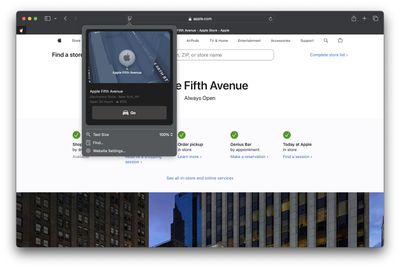
safari highlights
Safari's headline feature in macOS 15 is something called Highlights, which aims to make it easier to discover information on the web.

Highlights can be accessed via a new site menu icon that appears in the address bar, from which you can quickly pull up relevant information about a site, such as directions, summaries, or quick links to learn more about people, music, movies, and TV shows.

As of writing this, Highlights does not appear to work outside of the United States, so it is likely to be region-specific at this early state. However, there are other changes to Safari that are live wherever you are located.
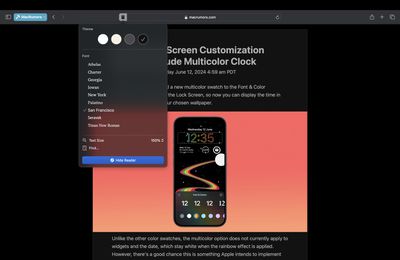
safari 18 reader
The Reader mode in Safari has received an overhaul, and now offers more customization options once you have enabled it on a site using the Reader button in the address bar.

If you click the button again, a dropdown menu lets you change the theme (white, off-white, gray, black) and choose your preferred font (Athelas, Charter, Georgia, Iowan, New York, Palatino, San Fransisco, Seravek, and Times New Roman).

In this menu, you can also find text size options by percentage (from 50% to 300%), as well as a "Find..." option to find a word or phrase on a page, and a button to Hide Reader mode.

Apple says that Reader can also provide a summary of an article, along with a table of contents in a sidebar, but we could not get this to work, likely because it is an aspect of Apple Intelligence, which will not be introduced until later in the year.
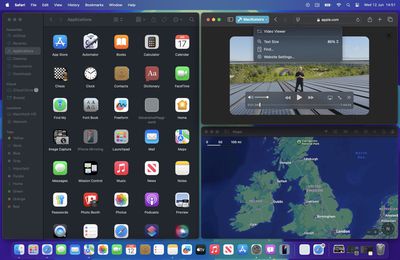
safari video viewer
Meanwhile, when Safari detects a video on the page, a new Video Viewer mode puts the media front and center, which allows you to adjust the window without obscuring the video. It also helpfully presents system playback controls within an overlay, including Picture in Picture.

In other Safari-related changes, macOS Sequoia beta adds support for opening links directly in web apps. Now, when you click a link, that link should open in the web app instead of your default web browser. You can also now personalize web apps on Mac with Safari Web Extensions and Content Blockers.

Lastly, Safari 18 beta for iOS, iPadOS, visionOS, macOS Sequoia and macOS Sonoma brings inline predictive text to the web, and you can now set which Safari profile should be used to open particular websites.


Tag: Safari
Related Forum: macOS Sequoia

Popular Stories

iOS 26

iOS 26.4 Adds Two New Features to CarPlay

Tuesday March 24, 2026 1:55 pm PDT by
iOS 26.4 was released today, and it includes a couple of new features for CarPlay: an Ambient Music widget and support for voice-based chatbot apps. To update your iPhone 11 or newer to iOS 26.4, open the Settings app and tap on General → Software Update. CarPlay will automatically offer the new features so long as the iPhone connected to your vehicle is running iOS 26.4 or later....
Apple Business hero

Apple Unveils 'Apple Business' All-in-One Platform

Tuesday March 24, 2026 8:53 am PDT by
Apple today announced Apple Business, a new all-in-one platform that unifies device management, productivity tools, and customer outreach features. The service is designed to be a consolidated replacement for several of Apple's existing business-focused offerings, including Apple Business Essentials, Apple Business Manager, and Apple Business Connect. It provides organizations with a single...
AirPods Pro Firmware Feature

Apple Releases New Firmware for AirPods Pro 3, AirPods Pro 2 and AirPods 4

Tuesday March 24, 2026 12:31 pm PDT by
Apple today released new firmware for the AirPods Pro 2, AirPods Pro 3, and the AirPods 4. The firmware has a version number of 8B39, up from 8B34 on the AirPods Pro 3, 8B28 on the AirPods Pro 2, and 8B21 on the AirPods 4. There is no word on what's included in the firmware, but Apple has a support document with limited notes. Most updates are limited to bug fixes and performance...

Top Rated Comments

Moriakum Avatar
23 months ago

People still use Safari? I tried it when i first had my Mac, but I could nto get on with it, then I tried it again a few weeks ago, but had problems with some sites not working, so I have gone back to Firefox.
I do. I use the handoff between macOS and iOS a lot, which works perfectly, and I love the feature of automatically filling in 2fa codes for SMS and emails. And it's worked very well, I think Safari has improved a lot in the last few years.
Score: 8 Votes (Like | Disagree)
dredlew Avatar
23 months ago

People still use Safari? I tried it when i first had my Mac, but I could nto get on with it, then I tried it again a few weeks ago, but had problems with some sites not working, so I have gone back to Firefox.
Safari is still the second-most used browser. Far behind Chrome but also far ahead of Firefox.


Of course, most of that is iOS/iPadOS. But even on the desktop, Safari is ahead of Firefox and Safari is not even available on Windows & Linux, unlike Firefox. So yeah... People still use FireFox? :D


Attachment Image

Attachment Image
Score: 6 Votes (Like | Disagree)
23 months ago

People still use Safari? I tried it when i first had my Mac, but I could nto get on with it, then I tried it again a few weeks ago, but had problems with some sites not working, so I have gone back to Firefox.
I do. I was quite happy with it, until I got this weird issue where composing emails in hotmail was so slow that the typing experience was unbearable. Other than that, works all right for me.
Score: 6 Votes (Like | Disagree)
Moriakum Avatar
23 months ago

Safari is still the second-most used browser. Far behind Chrome but also far ahead of Firefox.


Of course, most of that is iOS/iPadOS. But even on the desktop, Safari is ahead of Firefox and Safari is not even available on Windows & Linux, unlike Firefox. So yeah... People still use FireFox? :D


People love Chrome... Never understood why.
Score: 5 Votes (Like | Disagree)
23 months ago

No fixes to the messy interface? I have no idea where to find stuff anymore. Scattered around the share sheet, under the A button, the refresh button, the extensions menu, third party buttons, …

And there are iCloud tabs, tab groups, profiles, tab group favorites, ….
Don't forget the sidebar!
Score: 2 Votes (Like | Disagree)
23 months ago
No fixes to the messy interface? I have no idea where to find stuff anymore. Scattered around the share sheet, under the A button, the refresh button, the extensions menu, third party buttons, …

And there are iCloud tabs, tab groups, profiles, tab group favorites, ….
Score: 2 Votes (Like | Disagree)















