
iOS 18: Podcasts App Now Shows Chapter Segments When Scrubbing - MacRumors
Skip to Content

iOS 18: Podcasts App Now Shows Chapter Segments When Scrubbing

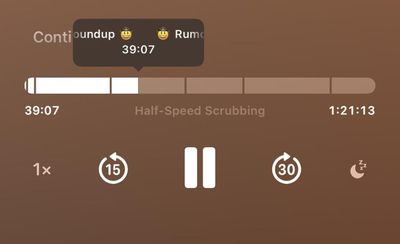
In iOS 18, Apple's Podcasts app now shows chapter segments of a podcast when you scrub through a currently playing episode, making it easier to browse through the audio content.
podcasts scrubbing chapters ios 18

Image credit: Reddit user Wristnut

As spotted by Redditor "Wristnut," navigating the timeline across the chapter segments shows the chapter name above the line. Note that this behavior appears in the Podcasts app proper, and it is not currently reproducible on the Lock Screen media controls in iOS 18 beta 2.

While the ability to scrub through chapter segments is new, chapters themselves are not. Some podcast listeners may not be familiar with them because creators have to manually add chapters, and many shows have not adopted them. Creators must specify chapters in the header of an MP4 file or by modifying the ID3 tags of MP3 or AAC files using third-party tools.

When creators do support chapters, listeners can find them by swiping up on the Now Playing screen on iOS and iPadOS or by clicking the Chapters button located in the top-right corner of the Podcasts app for macOS. Creators can also provide chapter-specific artwork that is displayed on the Now Playing screen and on the Lock Screen on iOS and iPadOS, providing a timely visual supplement to the podcast.

Apple Podcasts supports chapters for MP4, MP3, and AAC files, whether they are available from the directory or manually added to the Library via an RSS feed. Some of the tools used to add chapters include Ferrite on iOS and iPadOS, Forecast by Overcast, Podcasts Chapters on macOS, and Vizzy on the web.

iOS 18 is currently in its second developer beta, with a public beta expected in July, followed by a general release in the fall.


Related Forums: iOS 18, iPadOS 18

Popular Stories

iOS 26

iOS 26.4 Adds Two New Features to CarPlay

Tuesday March 24, 2026 1:55 pm PDT by
iOS 26.4 was released today, and it includes a couple of new features for CarPlay: an Ambient Music widget and support for voice-based chatbot apps. To update your iPhone 11 or newer to iOS 26.4, open the Settings app and tap on General → Software Update. CarPlay will automatically offer the new features so long as the iPhone connected to your vehicle is running iOS 26.4 or later....
Apple Business hero

Apple Unveils 'Apple Business' All-in-One Platform

Tuesday March 24, 2026 8:53 am PDT by
Apple today announced Apple Business, a new all-in-one platform that unifies device management, productivity tools, and customer outreach features. The service is designed to be a consolidated replacement for several of Apple's existing business-focused offerings, including Apple Business Essentials, Apple Business Manager, and Apple Business Connect. It provides organizations with a single...
AirPods Pro Firmware Feature

Apple Releases New Firmware for AirPods Pro 3, AirPods Pro 2 and AirPods 4

Tuesday March 24, 2026 12:31 pm PDT by
Apple today released new firmware for the AirPods Pro 2, AirPods Pro 3, and the AirPods 4. The firmware has a version number of 8B39, up from 8B34 on the AirPods Pro 3, 8B28 on the AirPods Pro 2, and 8B21 on the AirPods 4. There is no word on what's included in the firmware, but Apple has a support document with limited notes. Most updates are limited to bug fixes and performance...

Top Rated Comments

23 months ago
That’s a nice little addition. Wish the chapter markers were visible before you started to scrub though.
Score: 4 Votes (Like | Disagree)
tonywalker23 Avatar
23 months ago
Ever so often I try to use Apple Podcasts like I did back when I synced my iPod with iTunes… when everything worked fine. Now, trillions of dollars later, instead of my devices staying in sync with a FireWire cable,

They all wirelessly act as if they are supposed to be as out of sync as possible to torture me. iPhone, 8 unplayed episodes… Mac, 30 unplayed episodes… make all of them played and start from scratch… and BOOM! old news broadcast of an hourly update from 2022.

Difference OSes, different iPads, different phones, different Macs… not a single thing has made a difference in the last few years now. It completely baffles me how an app can be so bad for me. There has to be something going on with some server somewhere with my account being not quite right. I don’t know enough about computers to know what's going on, but I wish that the same syncing in Apple Music was used in Apple Podcasts...

Apple Music: we can tell the immediate split second you hit play on your MacBook Air and we will stop your MacBook Pro from playing another half-second of your song.

Apple Podcasts: we don’t even know what year it is, here's an old episode of a podcast you have hit "mark all as played" dozens of times on, even deleting everything in your library and resubscribing won’t fix. listen to this old show from years ago while we can somehow keep mail, and finder, and reminders, and notes, and voice memos, and photos, and basically everything else synced up.

It makes Marco's 9.99 a year for Overcast such a great deal. he saves me frustration and according to the settings has saved me 470 hours of my life using smart speed.
Score: 3 Votes (Like | Disagree)
TheMacDaddy1 Avatar
23 months ago
Worst podcast app ever.
Score: 2 Votes (Like | Disagree)
Chungry Avatar
23 months ago

Ever so often I try to use Apple Podcasts like I did back when I synced my iPod with iTunes… when everything worked fine. Now, trillions of dollars later, instead of my devices staying in sync with a FireWire cable,

They all wirelessly act as if they are supposed to be as out of sync as possible to torture me. iPhone, 8 unplayed episodes… Mac, 30 unplayed episodes… make all of them played and start from scratch… and BOOM! old news broadcast of an hourly update from 2022.

Difference OSes, different iPads, different phones, different Macs… not a single thing has made a difference in the last few years now. It completely baffles me how an app can be so bad for me. There has to be something going on with some server somewhere with my account being not quite right. I don’t know enough about computers to know what's going on, but I wish that the same syncing in Apple Music was used in Apple Podcasts...

Apple Music: we can tell the immediate split second you hit play on your MacBook Air and we will stop your MacBook Pro from playing another half-second of your song.

Apple Podcasts: we don’t even know what year it is, here's an old episode of a podcast you have hit "mark all as played" dozens of times on, even deleting everything in your library and resubscribing won’t fix. listen to this old show from years ago while we can somehow keep mail, and finder, and reminders, and notes, and voice memos, and photos, and basically everything else synced up.

It makes Marco's 9.99 a year for Overcast such a great deal. he saves me frustration and according to the settings has saved me 470 hours of my life using smart speed.
Apple has no business making a podcast app if all they are gonna do is half-ass it and offer a drip feed of enhancements every so often. They approach levels of not groking what a podcast player should be and what people want that is close but not quite eclipsing their institutional wonkiness with games as a medium. The fact that Marco out-Apples Apple in terms of programming prowess should concern them. If they arent gonna throw the same attention into this get out of the way and let some folks better-suited to catering to those needs step up and make some money in the space. Apple Podcasts remains a dumpster fire of inconsistency and I don’t understand why anyone would use it when so many great alternatives exist. Another example of Apple’s terrible, institutional inability to walk and chew gum.
Score: 1 Votes (Like | Disagree)
23 months ago
Good. Should be useful.
Score: 1 Votes (Like | Disagree)
23 months ago
A welcome improvement.
Score: 1 Votes (Like | Disagree)















