
Revised iOS 18 Beta 3 Reverts Emoji Changes - MacRumors
Skip to Content

Revised iOS 18 Beta 3 Reverts Emoji Changes

The revised third beta of iOS 18 that Apple released today eliminates the emoji and sticker changes that Apple introduced with the initial third beta release.
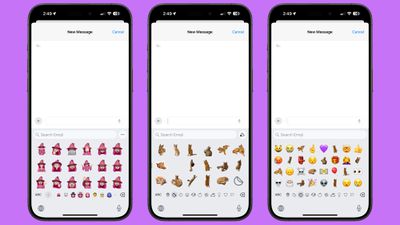
ios 18 emoji stickers memoji
In the prior beta, stickers behaved like emoji and could be added right inline with your messages, rather than only being available as large, stand alone message additions or drag and drop add-ons to texts. You could type a message and add a little sticker or Memoji to the end of it rather than an emoji, but Apple has pulled back this change, along with the interface changes that were introduced.

Emoji, Memoji, and stickers were all combined, and could be navigated using small icons at the bottom of the emoji picker, plus emoji were displayed larger than before, with fewer on a single screen. Apple added dedicated sections for stickers and Memoji rather than showing stickers only in the Recents section, and both stickers and Memoji could be created from the emoji window. It was a design that made both Memoji and stickers quicker to access and use.

With the revised version of beta 3, the emoji picker has been reverted to the beta 2 design. It's not clear why Apple made the change, but it's likely temporary. Sometimes Apple adds features in the beta and then pulls them to implement further refinements before reintroducing them at a later time, so we could see the emoji picker changes re-added in a later beta.


Related Forums: iOS 18, iPadOS 18

Popular Stories

iOS 26

iOS 26.4 Adds Two New Features to CarPlay

Tuesday March 24, 2026 1:55 pm PDT by
iOS 26.4 was released today, and it includes a couple of new features for CarPlay: an Ambient Music widget and support for voice-based chatbot apps. To update your iPhone 11 or newer to iOS 26.4, open the Settings app and tap on General → Software Update. CarPlay will automatically offer the new features so long as the iPhone connected to your vehicle is running iOS 26.4 or later....
Apple Business hero

Apple Unveils 'Apple Business' All-in-One Platform

Tuesday March 24, 2026 8:53 am PDT by
Apple today announced Apple Business, a new all-in-one platform that unifies device management, productivity tools, and customer outreach features. The service is designed to be a consolidated replacement for several of Apple's existing business-focused offerings, including Apple Business Essentials, Apple Business Manager, and Apple Business Connect. It provides organizations with a single...
AirPods Pro Firmware Feature

Apple Releases New Firmware for AirPods Pro 3, AirPods Pro 2 and AirPods 4

Tuesday March 24, 2026 12:31 pm PDT by
Apple today released new firmware for the AirPods Pro 2, AirPods Pro 3, and the AirPods 4. The firmware has a version number of 8B39, up from 8B34 on the AirPods Pro 3, 8B28 on the AirPods Pro 2, and 8B21 on the AirPods 4. There is no word on what's included in the firmware, but Apple has a support document with limited notes. Most updates are limited to bug fixes and performance...

Top Rated Comments

cocky jeremy Avatar
22 months ago
Just let us make a list of favorites. Is that really that hard to pull off? Frequent sucks because I may use one as a one time thing and it stays there forever before I finally get rid of it. Let me list my favorites, in order. C'mon, Apple!
Score: 8 Votes (Like | Disagree)
22 months ago
A re-release of the beta for emojis.... What a time to be alive lol.
Score: 7 Votes (Like | Disagree)
adrianlondon Avatar
22 months ago
I create "text replacements" (under Settings/General/Keyboard) for emojis I use regularly.

Just short two-letter aliases.
Score: 6 Votes (Like | Disagree)
22 months ago
I hated the new UI, everything was giant and you had to scroll endlessly to find anything. Also it felt slow and swiping all the way to the left didn’t bring me to recents like it should. Glad the tried and true is back on this one
Score: 4 Votes (Like | Disagree)
armandxp Avatar
22 months ago
My old eyes were loving the larger emoji’s 😕 can’t wait for that to come back.
Score: 4 Votes (Like | Disagree)
armandxp Avatar
22 months ago

I create "text replacements" (under Settings/General/Keyboard) for emojis I use regularly.

Just short two-letter aliases.
Very good tip! I do that sometimes for the special characters. 
Score: 3 Votes (Like | Disagree)















