
Apple Wallet App Now Works With PRESTO Fare Card in Toronto Area

Apple and Metrolinx today announced that the PRESTO card can now be added to the Wallet app, allowing commuters in Toronto, Canada and the surrounding area to tap an iPhone or Apple Watch to pay for a fare on buses, streetcars, trains, and the subway. Funds can be loaded onto the card directly in the Wallet app for added convenience.
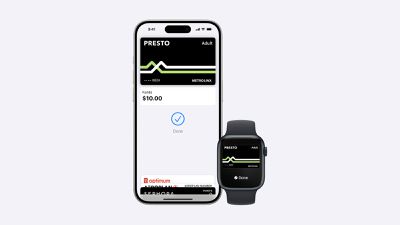
Apple Wallet PRESTO
Express Mode allows commuters to simply hold their iPhone or Apple Watch near a payment reader to pay for their ride, without needing to unlock or wake the device. This mode even works for up to five hours after your iPhone runs out of battery power.

Transit agencies that accept the PRESTO card in the Wallet app include the TTC and UP Express in Toronto, HSR in Hamilton, MiWay in Mississauga, Brampton Transit, Burlington Transit, Durham Region Transit, Oakville Transit, and York Region Transit, as well as the GO Transit network. The feature does not work with OC Transpo in Ottawa.

To add the PRESTO card to the Wallet app, tap on the plus sign in the top-right corner, select Transit Card, and select PRESTO. A physical PRESTO card can also be converted for use in the Wallet app, but the physical card will no longer work. The version in the Wallet app supports various fare types, and Ontario's new One Fare program.

Adding a PRESTO card to the Wallet app requires an iPhone 8 or later with iOS 16.4 or later, or an Apple Watch Series 4 or later with watchOS 9.4 or later.

For additional information, read the PRESTO in Apple Wallet page and FAQ.

(Thanks, Apollo Zhao!)

Popular Stories

wwdc sans text feature

Apple Rumored to Announce New Product on February 19

Thursday February 5, 2026 12:22 pm PST by
Apple plans to announce the iPhone 17e on Thursday, February 19, according to Macwelt, the German equivalent of Macworld. The report, citing industry sources, is available in English on Macworld. Apple announced the iPhone 16e on Wednesday, February 19 last year, so the iPhone 17e would be unveiled exactly one year later if this rumor is accurate. It is quite uncommon for Apple to unveil...
Apple Logo Zoomed

Tim Cook Teases Plans for Apple's Upcoming 50th Anniversary

Thursday February 5, 2026 12:54 pm PST by
Apple turns 50 this year, and its CEO Tim Cook has promised to celebrate the milestone. The big day falls on April 1, 2026. "I've been unusually reflective lately about Apple because we have been working on what do we do to mark this moment," Cook told employees today, according to Bloomberg's Mark Gurman. "When you really stop and pause and think about the last 50 years, it makes your heart ...
Finder Siri Feature

Why Apple's iOS 26.4 Siri Upgrade Will Be Bigger Than Originally Promised

Friday February 6, 2026 3:06 pm PST by
In the iOS 26.4 update that's coming this spring, Apple will introduce a new version of Siri that's going to overhaul how we interact with the personal assistant and what it's able to do. The iOS 26.4 version of Siri won't work like ChatGPT or Claude, but it will rely on large language models (LLMs) and has been updated from the ground up. Upgraded Architecture The next-generation...
maxresdefault

Apple Shows Off a Key Reason to Upgrade to the iPhone 17

Saturday February 7, 2026 9:26 am PST by
Apple today shared an ad that shows how the upgraded Center Stage front camera on the latest iPhones improves the process of taking a group selfie. "Watch how the new front facing camera on iPhone 17 Pro takes group selfies that automatically expand and rotate as more people come into frame," says Apple. While the ad is focused on the iPhone 17 Pro and iPhone 17 Pro Max, the regular iPhone...
iOS 26

iOS 26.3 and iOS 26.4 Will Add These New Features to Your iPhone

Tuesday February 3, 2026 7:47 am PST by
While the iOS 26.3 Release Candidate is now available ahead of a public release, the first iOS 26.4 beta is likely still at least a week away. Following beta testing, iOS 26.4 will likely be released to the general public in March or April. Below, we have recapped known or rumored iOS 26.3 and iOS 26.4 features so far. iOS 26.3 iPhone to Android Transfer Tool iOS 26.3 makes it easier...

Top Rated Comments

jicon Avatar
21 months ago

This hasn't been explained very well, so it's worth noting that adding a Presto card directly in the Wallet app will create a new virtual Presto card and ask you to load some money onto it. To convert an existing physical Presto card, you need to use the latest version of the Presto iPhone app. The option should appear as soon as you open the app, provided your card's already registered; otherwise, you'll need to go through the process of adding it to the Presto app first.
Thanks. What wasn't clear to me was whether only one phone or watch can use the expresspass feature. Given the setup, it looks like I only set up one device, pick your phone or watch per card.
Score: 4 Votes (Like | Disagree)
danakin Avatar
21 months ago

I tried it today and it worked perfectly on my Apple Watch on the TTC.
TTC short for Take The Car
Score: 4 Votes (Like | Disagree)
jhollington Avatar
21 months ago

Thanks. What wasn't clear to me was whether only one phone or watch can use the expresspass feature. Given the setup, it looks like I only set up one device, pick your phone or watch per card.
Yup, that's apparently how transit cards work everywhere in Apple Wallet. It's an Apple limitation rather than a Presto one.

You can move the card between the iPhone and Apple Watch as often as you like, but it can only be active on one device at a time.

You can also transfer or buy a second Presto card for the other device, but it will be handled as a separate card, just like it would if you had two physical Presto cards. That means two balances and two sets of transfer windows (e.g., you have to use the same device to get free transfers throughout your trip, just like using Apple Pay with a credit or debit card).
Score: 2 Votes (Like | Disagree)
fwmireault Avatar
21 months ago
I can't wait until the end of this century, when this feature will be available in Montreal!
Score: 2 Votes (Like | Disagree)
jhollington Avatar
21 months ago
This hasn't been explained very well, so it's worth noting that adding a Presto card directly in the Wallet app will create a new virtual Presto card and ask you to load some money onto it. To convert an existing physical Presto card, you need to use the latest version of the Presto iPhone app. The option should appear as soon as you open the app, provided your card's already registered; otherwise, you'll need to go through the process of adding it to the Presto app first.
Score: 2 Votes (Like | Disagree)
AnInanimateCarbonRod Avatar
21 months ago
One gripe I have is that if you use Wallet on the Apple Watch for your PRESTO card, the PRESTO app seems to have no awareness of this at all and shows an error-like message that "This card is active on another device", offering to remove the card server-side as if it's in some state they think you shouldn't be in.
Score: 1 Votes (Like | Disagree)
















