

Apple is beta testing iOS 18 and the first update to iOS 18 concurrently, and we got the second betas of iOS 18.1, iPadOS 18.1, and macOS Sequoia 15.1 today alongside the sixth betas of iOS 18, iPadOS 18, and macOS Sequoia 15.
Many of the changes in iOS 18.1 are focused on bringing the .1 betas in line with the standard betas, which recently received updates to Photos and Safari, while updates in iOS 18 are to finalize features and prepare it for launch.
Photos Redesign (iOS 18.1)
The redesigned Photos app in iOS 18 has proven to be not so popular with some users, so Apple streamlined it ahead of launch. The all-in-one design remains, but Apple removed the carousel to make the app less confusing and less repetitive. Apple introduced these design changes in the standard iOS 18 update last week, and has now brought them to iOS 18.1.
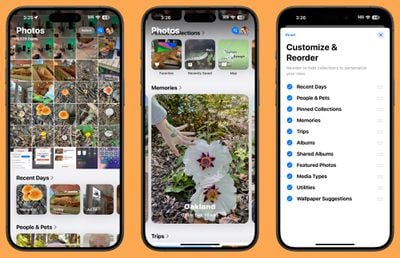
With prior versions of iOS 18, you could swipe left to right to get to various Collections, but now Collections are accessed solely by scrolling down from the main library view. Collections include your custom albums and content that was previously in the For You section, such as featured images, videos, favorites, memories, and more.
The Photo Library now displays more images at once in the photos grid, and Apple moved albums higher by default to make it easier for users to get to them. Recently Saved content has been integrated into Recent Days, so it's simpler to find too.
Distraction Control in Safari (iOS 18.1)
Distraction Control is a new Safari option that lets you hide distracting elements from webpages and articles. You can use the feature to get rid of sign-in windows, cookie preference popups, newsletter signup videos, GDPR banners, and autoplay videos, among other things.
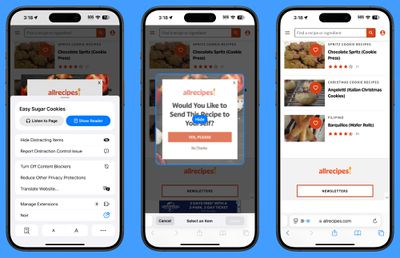
What you can't use Distraction Control for is hiding ads. Apple has been clear that Distraction Control is not an ad removing tool, and while you can temporarily hide an ad, it pops right back when the ad or webpage refreshes. Distraction Control is designed for static content, not dynamic content, so anything that refreshes can't be hidden from view.
You can get to Distraction Control by opening up Safari, selecting the page settings, and tapping on Hide Distracting Items. From there, you can tap on an element on the page that you want to hide from view. If you're not seeing the Hide Distracting Items option, tap on the three dots in the settings and then choose Edit and you'll be able to add it to your quick access options.
What you've hidden will remain blocked from view as long as it's not dynamic content, but you can restore a webpage to default by going into the same options and tapping on Show Hidden Items.
Note that if you hide a cookie banner or GDPR popup, it is the same as closing the banner without submitting your website preferences. Distraction Control settings are on-device and will not sync from one device to another, so you will need to set it up on each of your devices.
Distraction Control was added to iOS 18 and iPadOS 18 last week, and now the feature is also in the .1 betas.
Photo App Collection (iOS 18 Beta 6)
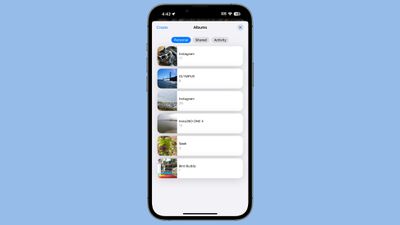
Apple has further tweaked the Photos app in iOS 18 beta 6, introducing a redesigned look for the Albums Collection. Each album has a separate card, with a main thumbnail on the left. Prior versions had the album name on the left and a collection of small thumbnails.
Control Center (All Betas)
In Control Center, there is a new toggle for turning Bluetooth on and off. It is separate from the general communication controls that are all lumped together, and it can be added to any Control Center page.
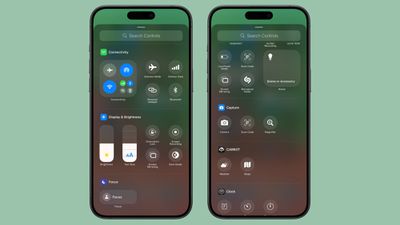
You can also add the Bluetooth toggle to the Lock Screen in place of the Camera or the Flashlight or assign it to the Action Button on the iPhone 15 Pro and Pro Max.
There have been some tweaks to the way Control Center icons are organized in the gallery. A "Capture" section, for example, has Camera, Scan QR Code, and Magnifier options, and Silent Mode has been added under Sounds.
Dark Mode Notification Icons (All Betas)
When you have Dark Mode icons turned on, notifications that you receive from apps with a Dark Mode icon will show with that icon properly rather than showing with the Light Mode icon.
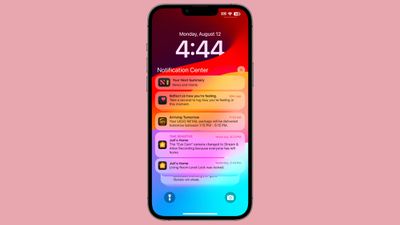
Note that in iOS 18.1 beta 2, both Dark Mode and Dark Mode icons need to be turned on for notifications to have the darker icon. In iOS 18 beta 6, dark mode icons will show up with the darker icons turned on. Dark Mode is not required.
Splash Screens (All Betas)
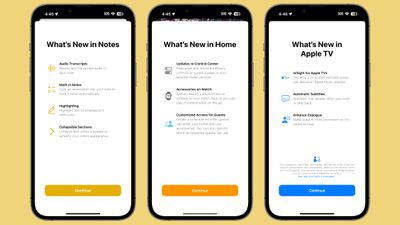
As Apple prepares for the launch of iOS 18, there are new splash screens for Photos, Translate, Podcasts, Home, Apple TV, Calculator, and Notes. The addition of splash screens suggests that we are nearing the end of planned changes for the base version of iOS 18, which will be installed on iPhone 16 models.
Apple Intelligence Localization (iOS 18.1)
Apple Intelligence includes new localized versions of English in the second 18.1 beta. Options include Canada, Ireland, New Zealand, South Africa, India, and Singapore, which are in addition to the previous U.S., UK, and Australia localization options.
No support for non-English languages has been added at this time, and Apple says that support for other languages will come later this year and in 2025.
Apple Intelligence in EU (iOS 18.1)
Multiple people located in the European Union have been able to turn on and use Apple Intelligence by setting their region to the United States and language to U.S. English.
Icon Tints (All Betas)
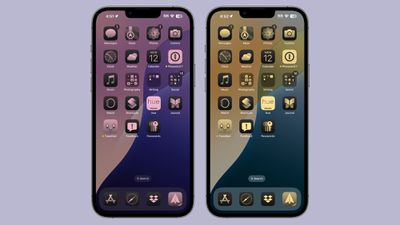
Tints that you apply to your icons to match wallpapers are now linked to that wallpaper rather than the system. When you change your wallpaper, your icons will change as well if you've tailored them to be tinted to a wallpaper color.
Apple Music (All Betas)
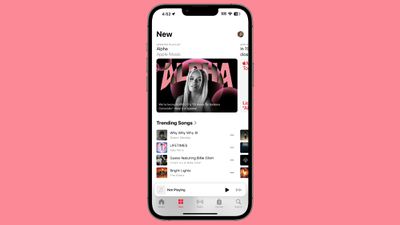
The Browse tab in Apple Music is now the "New" tab.
Lock Screen (iOS 18.1)
There is no longer an option to get to Spotlight search by swiping down from the Lock Screen in iOS 18.1 beta 2, but based on it being listed a known issue in the release notes, this is a bug.
Mail - Upgrade Warning
Apple says that developers who have iOS 18 beta 5 and who are thinking of upgrading to the iOS 18.1 beta might have all their mail redownloaded.
More Features
Know of something that we left out? Let us know in the comments below.






















