
iPhone Mirroring in macOS Sequoia and iOS 18 Now Supports Jiggle Mode for Managing Home Screen - MacRumors
Skip to Content

iPhone Mirroring in macOS Sequoia and iOS 18 Now Supports Jiggle Mode for Managing Home Screen

With the latest betas of iOS 18 and macOS Sequoia, Apple added new functionality to iPhone Mirroring, the feature that lets you control your iPhone from your Mac. When iPhone Mirroring first debuted in the betas, there was no support for managing the Home Screen, but that's now changed.
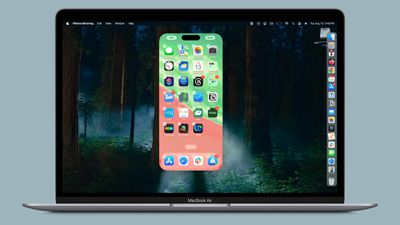
iphone mirroring jiggle mode
Apple added an option to get into jiggle mode, as noted by 9to5Mac. After activating the iPhone Mirroring app, you can click and hold on the iPhone's ‌Home Screen‌ to activate jiggle mode. In this mode, you can do everything you can in jiggle mode on the iPhone itself, from deleting and rearranging apps to managing widgets.

You can add widgets, change widget sizes, activate app long press functionality, turn on dark mode icons, or opt into icon tinting. There is no option to get to the Lock Screen or Control Center, though, and notifications can only be viewed through the Mac notification center.

Apple added the new jiggle functionality in the iOS 18, iOS 18.1, macOS 15, and macOS 15.1 betas, so if you have any of the developer or public betas, you should be able to use the new iPhone Mirroring functionality as of now.


Related Forums: iOS 18, iPadOS 18, macOS Sequoia

Popular Stories

iOS 26

iOS 26.4 Adds Two New Features to CarPlay

Tuesday March 24, 2026 1:55 pm PDT by
iOS 26.4 was released today, and it includes a couple of new features for CarPlay: an Ambient Music widget and support for voice-based chatbot apps. To update your iPhone 11 or newer to iOS 26.4, open the Settings app and tap on General → Software Update. CarPlay will automatically offer the new features so long as the iPhone connected to your vehicle is running iOS 26.4 or later....
Apple Business hero

Apple Unveils 'Apple Business' All-in-One Platform

Tuesday March 24, 2026 8:53 am PDT by
Apple today announced Apple Business, a new all-in-one platform that unifies device management, productivity tools, and customer outreach features. The service is designed to be a consolidated replacement for several of Apple's existing business-focused offerings, including Apple Business Essentials, Apple Business Manager, and Apple Business Connect. It provides organizations with a single...
AirPods Pro Firmware Feature

Apple Releases New Firmware for AirPods Pro 3, AirPods Pro 2 and AirPods 4

Tuesday March 24, 2026 12:31 pm PDT by
Apple today released new firmware for the AirPods Pro 2, AirPods Pro 3, and the AirPods 4. The firmware has a version number of 8B39, up from 8B34 on the AirPods Pro 3, 8B28 on the AirPods Pro 2, and 8B21 on the AirPods 4. There is no word on what's included in the firmware, but Apple has a support document with limited notes. Most updates are limited to bug fixes and performance...

Top Rated Comments

21 months ago

I was going to ask a similar question... Can some of the folks who plan to use the iphone mirroring, tell us how/when you plan to use this feature? I can't think of any significant use case, however Apple seems to make it sounds like a big deal.
Interesting. I use my Mac for work and to know I can just see my iPhone by clicking a notification from it and type on my Mac with a full keyboard rather than picking up my phone will definitely make life easier and will make me use my phone much less. I would not be surprised if I use my iPhone much much less
Score: 9 Votes (Like | Disagree)
21 months ago
now this..... this is news.
Score: 5 Votes (Like | Disagree)
21 months ago
OMG I just spend 3 hours reorganizing my Home Screen last week
Score: 5 Votes (Like | Disagree)
CharlesShaw Avatar
21 months ago
I used to love using iTunes to arrange iPhone icons, as it was fumble proof.
Score: 3 Votes (Like | Disagree)
FloatingBones Avatar
21 months ago
When are we going to get iPad Mirroring?
When are we going to be able to mirror an iPhone on an iPad?
When we have iPhone-on-iPad mirroring, will you be able to see the iPhone screen when you mirror that iPad on a Mac?
Score: 3 Votes (Like | Disagree)
jo-1 Avatar
21 months ago

One thing for me is that WhatsApp Audio calls and messages will show up on the Mac notifications. Currently if my phone is in another room or face down I won't see the notifications until much later (I don't want to install the WhatsApp Mac app).

Also, some banking apps won't have a Mac version, so accessing those using via mirroring could be handy (one use-case I think I will use). I know some iPhone apps can be found in the Mac App Store but that's not the case if the developer forgoes this.
and to add to that List - there are many company APPs that won't run on my MAC - but if I could access than on my AVP or my MAC that would be a no-brainer since I can use my own machine and would not be forced to use the company phone
Score: 2 Votes (Like | Disagree)















