

As part of its longstanding efforts to encourage users to repair their electronic devices and other items, iFixit is announcing FixHub, a USB-C soldering iron and portable power station designed to allow all types of users to handle soldering work wherever they may be.
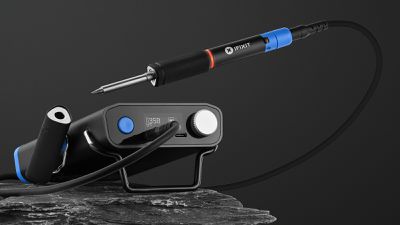
The Portable Power Station serves as the command and power center for FixHub, including a 55-watt-hour battery to support over eight hours of continuous soldering on a single charge. The power supply delivers up to 100 watts to a pair of USB-C ports, allowing it to run two soldering irons simultaneously, and the fact that it's simply a USB-C power output device means you can also use it to power or recharge an array of devices like phones.
The solidly built power station includes a handy display to show the status of your soldering iron, along with a convenient dial for adjusting the power being delivered to the iron, supporting temperatures up to 400ºC (750ºF). A flip-up bracket raises the front of the power station a bit to make the display easier to see while in use, while attachment points on the left and right side allow you to clip on the soldering iron's cap for convenient access as a stand.
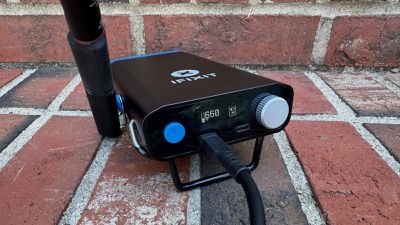
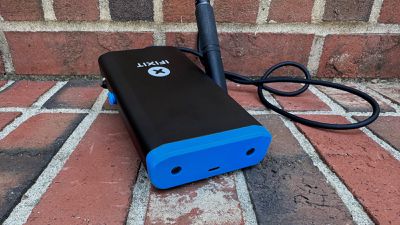
A USB-C port on the rear of the power station allows for up to 45 watts of input to recharge the station, and iFixit says it is safe to leave continuously connected to power so it's ready whenever you need it.
The soldering iron itself is designed with ergonomics in mind, with a comfort pencil-like grip with a short Bevel 1.5 tip for precise heat control. Additional tips will be sold separately, including Cone, Wedge 1.5, Point, Bevel 2.6, Knife 2.5, and Knife 1.4, with more potentially being added in the future depending on demand. Once turned on, the iron is ready to begin soldering in under five seconds.
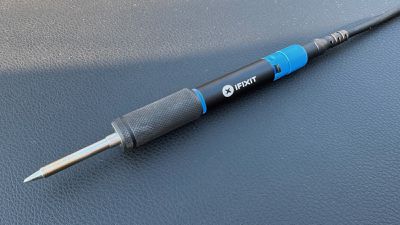
Safety features are key to the FixHub experience, with a configurable automatic sleep mode, a heat-resistant protective cap for the iron that snaps on magnetically, and gyroscope-powered fall detection that automatically turns off the iron if it is dropped or knocked off a table. An LED status light ring on the iron itself makes it obvious when the iron is hot, shining blue when below 40ºC (100ºF) and safe to touch, purple when actively heating or cooling and not safe to touch, or orange when at the set temperature and ready to solder.
While pairing the soldering iron with iFixit's power station is the preferred setup, you can use the soldering iron on its own with any sufficiently powerful USB-C power source. The set temperature for the iron can be adjusted by plugging into the USB-C port on a computer and accessing the iron's settings via a browser (Chrome, Edge, or Brave required).
iFixit is of course known for more than just hardware, and it has hundreds of free soldering guides on its website, ranging from the basics of soldering to specific repair projects.
It also wouldn't be an iFixit product without repairability being front of mind, so the FixHub system is designed to allow for easy repairs and iFixit will be releasing a number of guides to help users replace batteries, repair parts, and more.
Supplementing the FixHub is an optional Portable Soldering Toolkit, which provides an extensive set of tools and consumables to get you going on soldering projects.
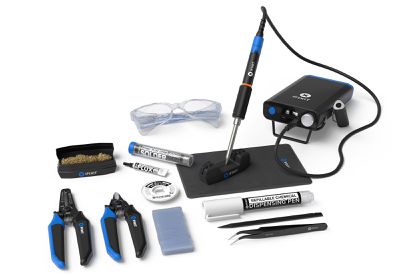
- Flush Cutter: Perfect for trimming leads and cutting electrical wires and plastic materials.
- Wire Stripper: Features multiple holes for different wire sizes and a spring-assisted mechanism for easy use.
- Fixite Spudger: An improvement on our much-loved universal pry tool, made of Fixite, an iFixit-developed material blend specially formulated with improved heat resistance for handling soldering materials.
- Precision Angled Tweezers: Fine-tip tweezers for manipulating wire and components in tight spaces.
- Silicone Work Mat: A heat-resistant mat that protects your work surface.
- Chemical Dispensing Pen: Ideal for dispensing isopropyl alcohol for cleaning flux residues.
- No-Clean Flux: Improves soldering by removing oxides and promoting better solder flow.
- Silicon Electrical Tape: Perfect for insulating wires without the need for additional tools.
- Safety Glasses: Essential eye protection while soldering.
- Lead-Free Solder: Environmentally friendly solder in a convenient tube.
- Desoldering Wick: Easily removes unwanted solder with a copper mesh.
- Soldering Splint: A magnetic, hands-free tool to hold wires and components securely in place.
- Soldering Tip Cleaner: Keeps your soldering tip in optimal condition with brass wool.
The Portable Soldering Station with the soldering iron and battery pack is priced at $249.95 / €269.95, while the full toolkit included the iron, battery pack, pliers, and other tools is $299.95 / €329.95.
The USB Smart Soldering Iron can also be purchased on its own for $79.95 / €84.95 if you need an additional one or want to use one without the iFixit power supply. Shipping begins on October 15 in the United States, Canada, Australia, and Europe.




















