Latest iOS 18.1 Beta Adds Control Center Reset and New Connectivity Options
In the fifth beta of iOS 18.1, Apple has made some changes to the new customizable Control Center, refining it ahead of when iOS 18.1 is set to come out in October.
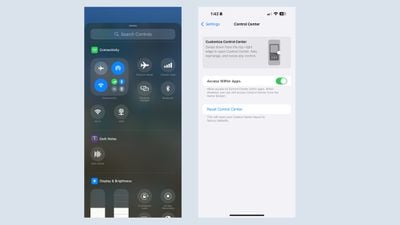
In the Control Center section of the Settings app, there is now an option to return to the default setup. If you make a bunch of confusing changes to Control Center and don't want to go through the trouble of moving everything around, you can now use the reset option to get back to the default options that Apple provides when installing iOS 18.
Apple has also added separate Control Center connectivity controls for Wi-Fi and VPN connectivity. In prior versions of iOS 18, these controls were baked into an all-in-one connectivity button, but now they can be added to the Control Center. The new Wi-Fi and VPN options cannot be added to the Lock Screen or the Action Button.
Almost all connectivity controls can now be added individually, including Airplane Mode, Cellular Data, Personal Hotspot, Bluetooth, Wi-Fi, and VPN. AirDrop and Satellite are not available as standalone controls.
Popular Stories
iOS 26.4 was released today, and it includes a couple of new features for CarPlay: an Ambient Music widget and support for voice-based chatbot apps.
To update your iPhone 11 or newer to iOS 26.4, open the Settings app and tap on General → Software Update. CarPlay will automatically offer the new features so long as the iPhone connected to your vehicle is running iOS 26.4 or later....
Apple today announced Apple Business, a new all-in-one platform that unifies device management, productivity tools, and customer outreach features.
The service is designed to be a consolidated replacement for several of Apple's existing business-focused offerings, including Apple Business Essentials, Apple Business Manager, and Apple Business Connect. It provides organizations with a single...
Apple today released new firmware for the AirPods Pro 2, AirPods Pro 3, and the AirPods 4. The firmware has a version number of 8B39, up from 8B34 on the AirPods Pro 3, 8B28 on the AirPods Pro 2, and 8B21 on the AirPods 4.
There is no word on what's included in the firmware, but Apple has a support document with limited notes. Most updates are limited to bug fixes and performance...
























