

Apple is set to release iOS 18.1 in October, bringing the first set of Apple Intelligence features to iPhone 15 Pro and iPhone 16 models. This update marks a significant step forward in Apple's AI integration, offering a new Siri contextually-aware experience and a range of additional capabilities powered by on-device machine learning and large language models. There are a couple of handy new feature controls coming, too.
While not all Apple Intelligence features will be available immediately, iOS 18.1 introduces several enhancements that aim to make your iPhone smarter and more intuitive. Below, we've listed 15 new things your iPhone will be able to do when the update rolls out next month.
Reset Your Control Center
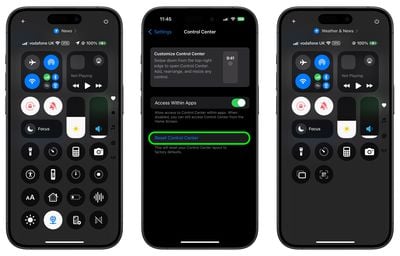
With iOS 18, Apple made the Control Center thoroughly customizable, but there's no way to roll back your changes if things get messy. Fortunately, iOS 18.1 introduces a simple way to start fresh. In Settings ➝ Control Center, you'll find a new option to reset your Control Center to its default layout. This feature is perfect if you've made too many customizations and want to return to a clean slate without manually rearranging everything.
Take Selfies With Camera Control

Camera Control gets a selfie upgrade in iOS 18.1. Now, you can switch to the front-facing camera without touching your screen. Simply open the Camera app with a press of the Camera Control button, then swipe on the button to cycle through lens options. Look for the person icon at the top to activate the selfie camera, making it easier to capture that perfect self-portrait.
Proofread Your Text
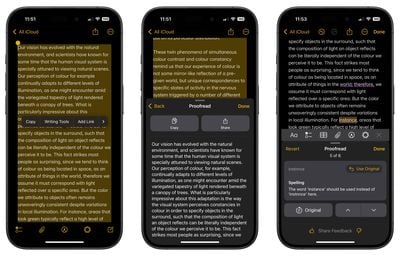
Embarrassing typos could be a thing of the past. iOS 18.1's new Writing Tools feature includes a powerful proofreading function. It not only checks for spelling and grammar errors but also suggests improvements in word choice and sentence structure. You can accept all suggestions with a single tap or review them one by one, complete with explanations.
Rewrite Your Text
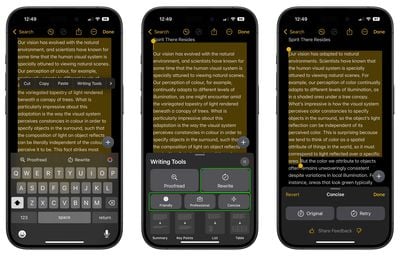
Need to change the tone of your message? The new Rewrite tool is capable of doing just that. Whether you want your text to sound more friendly, professional, or concise, this feature can adjust your writing style without altering the core content. It's like having a personal editor at your fingertips, helping you communicate more effectively in any situation.
Summarize Long Emails
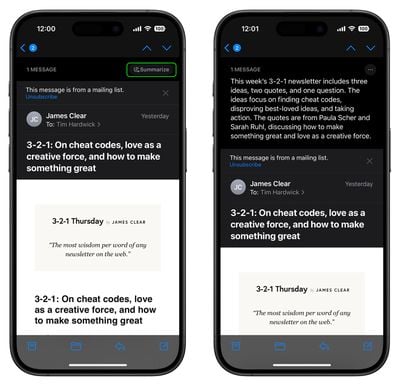
If you frequently suffer from inbox overload, this should be a welcome feature. When you receive a lengthy email, you'll now see a "Summarize" button that lets Apple Intelligence create a concise overview. Choose from options like a brief paragraph, key points, or even a bulleted list. This tool makes it easier to quickly grasp the essence of important messages without reading every word. Plus, your inbox now displays a brief AI-generated summary instead of the first few lines of each email, helping you prioritize your responses more efficiently.
Answer Apple Product Questions
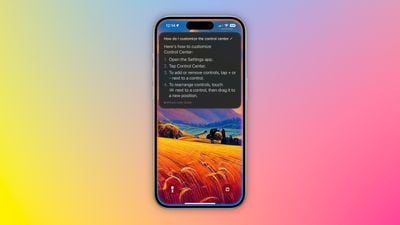
Your iPhone becomes a knowledgeable Apple expert with iOS 18.1. Siri can now tap into a vast database of product information, helping you understand device features, locate settings, and even provide tutorials on how to complete tasks. It's like having Apple Support built right into your device, available whenever you need it.
Offer Smart Replies to Emails and Messages

Communication gets a boost with Smart Reply in iOS 18.1. When you receive an email or message, your iPhone will analyze the content and suggest contextually relevant responses. These quick-tap options make it easy to reply promptly and appropriately, saving you time and effort in your daily correspondence.
Summarize Multiple Message Notifications

Catching up on group chats is set to get a lot easier. iOS 18.1 can summarize multiple message notifications on your Lock Screen, giving you a quick overview without the need to open the app. This feature helps you stay on top of conversations without getting overwhelmed by notification overload.
Create Memory Movies From a Short Description

Relive your favorite moments with ease using the new Memory Movie feature. Simply provide a description like "My cat in 2024" or "Orlando in the summer," and your iPhone will automatically select relevant photos and choose appropriate music. You can further customize the mood and add specific scenes, turning your memories into beautiful short films with minimal effort.
Remove Unwanted Objects From Photos

Perfect your photos with the new Clean Up tool. This feature allows you to easily remove unwanted objects from your images. Whether it's a photobomber or a distracting element in the background, you can now tap, circle, or brush over the object to make it disappear. The tool is smart enough to preserve important elements, ensuring your main subjects remain intact.
Summarize Your Audio Transcripts
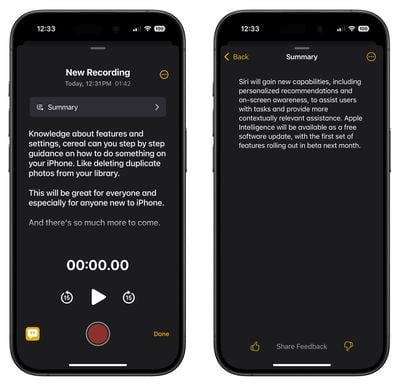
Turn long recordings into digestible content with the new transcription feature. When you record audio in apps like Notes, your iPhone can now provide a transcript along with a summary. This is particularly useful for capturing and distilling information from lectures, meetings, or interviews, making it easier to review and share key points.
Reduce Your Interruptions
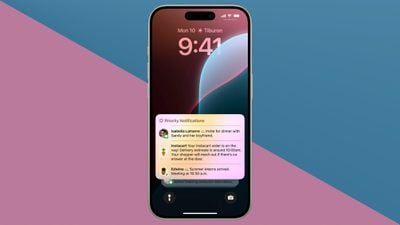
Take control of your notifications with the new Reduce Interruptions Focus Mode. This intelligent feature filters your alerts, showing you only the most important notifications that require immediate attention. It should come in handy for when you need to concentrate but don't want to miss crucial information.
Record Your Phone Calls
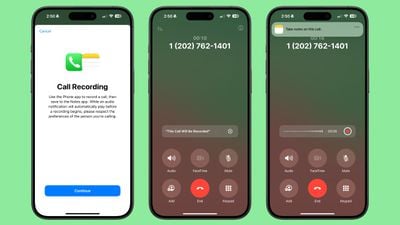
iOS 18.1 introduces Phone call recording. During a call, you'll see a record button in the upper left corner of the display. Tap it, and after notifying all participants, the call will be recorded. These recordings are stored in the Notes app, where you can access transcripts and AI-generated summaries, making it easy to review important conversations.
Summarize Web Articles
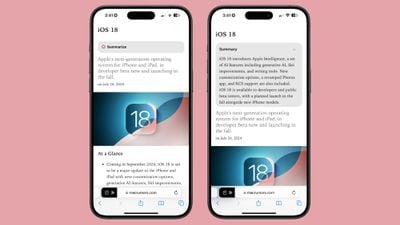
Reading long articles is about to get easier with this Safari improvement. When using Reader Mode, you can now tap a button to have Apple Intelligence summarize the article for you. This feature quickly distills the main points, allowing you to grasp the essence of the content without reading every word.
Generate Apple Intelligence Reports
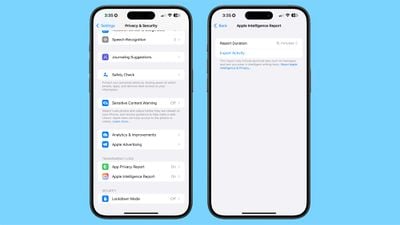
If you're curious about how Apple Intelligence is working on your device, iOS 18.1 offers transparency through the new Apple Intelligence Report. Found in the Privacy & Security section of the Settings app, this feature allows you to export your Apple Intelligence data. It requires Face ID authentication, ensuring your privacy is protected while providing insight into how AI is enhancing your iPhone experience.





















